
Contents
A tech pack is often treated as the single source of truth for a product.
And for good reason.
It brings together the measurements, sketches, construction details, materials, trims, and other information a factory needs to understand what you're trying to make.
The BOM, or Bill of Materials, is one of the most important parts of that documentation. It breaks the product down into the physical materials and components needed to make it.
But sometimes, a single product needs multiple BOMs.
What happens when the product is the same, but the sourcing or material decision isn't?
Maybe you're speaking to two suppliers and haven't decided which one to work with yet.
Maybe you have a preferred fabric, but need a backup in case it becomes unavailable.
Maybe you're developing several colorways where the construction stays the same but the materials and trims change.
Maybe the same product is being prepared for different markets.
Or perhaps you're developing several AOPs (all-over prints), where a pattern or artwork is printed across the surface of the fabric, while the underlying product stays exactly the same.
In all of these situations, you have more than one legitimate configuration of the product.
And creating a completely separate tech pack for every possibility can create more work than it solves.
This is where having multiple BOMs within the same tech pack starts to make sense.
Why duplicating the entire tech pack isn't always the answer
One obvious way to manage multiple configurations is to duplicate the tech pack.
You could create one tech pack for Supplier A and another for Supplier B.
Or one for the tan colorway and another for the black.
Or one for the US market and another for the EU.
It sounds simple.
But now you've duplicated everything, not just the part that changed.
You have two sets of:
- Measurements
- Sketches
- Construction details
- Comments
- Product information
- BOMs
- Files and references
And the moment something changes, you have another problem:
Did you update both versions?
If the sleeve length changes, do you update it in both tech packs?
If the neckline changes, do you update both?
If a construction detail changes, which version becomes the source of truth?
This is where documentation can start working against the product development process.
A tech pack should help teams keep product information organized. It shouldn't force you to duplicate information simply because one part of the product is still being evaluated or has a different configuration.
A better approach can be:
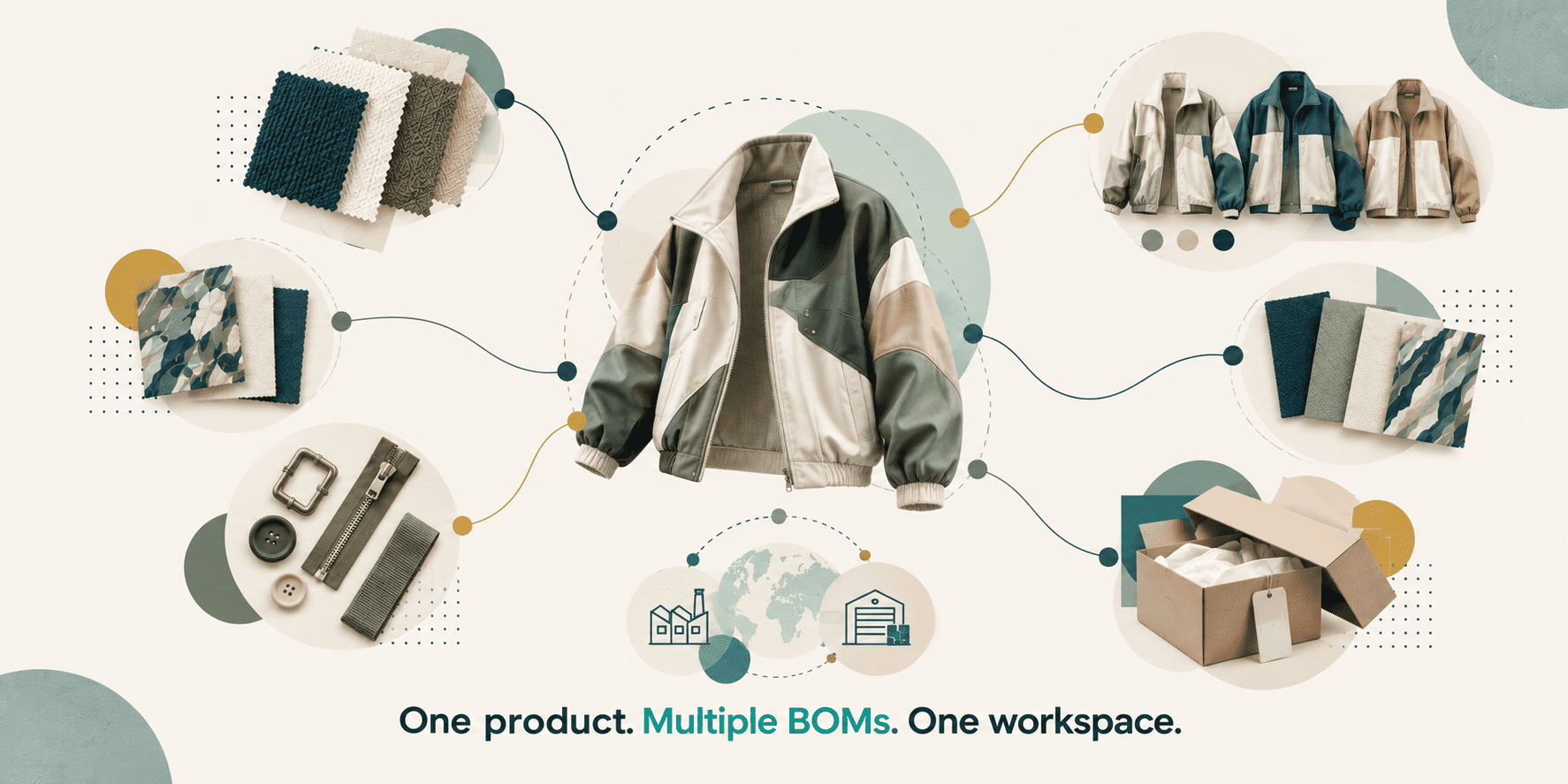
One product → shared product information → multiple BOMs for different configurations.
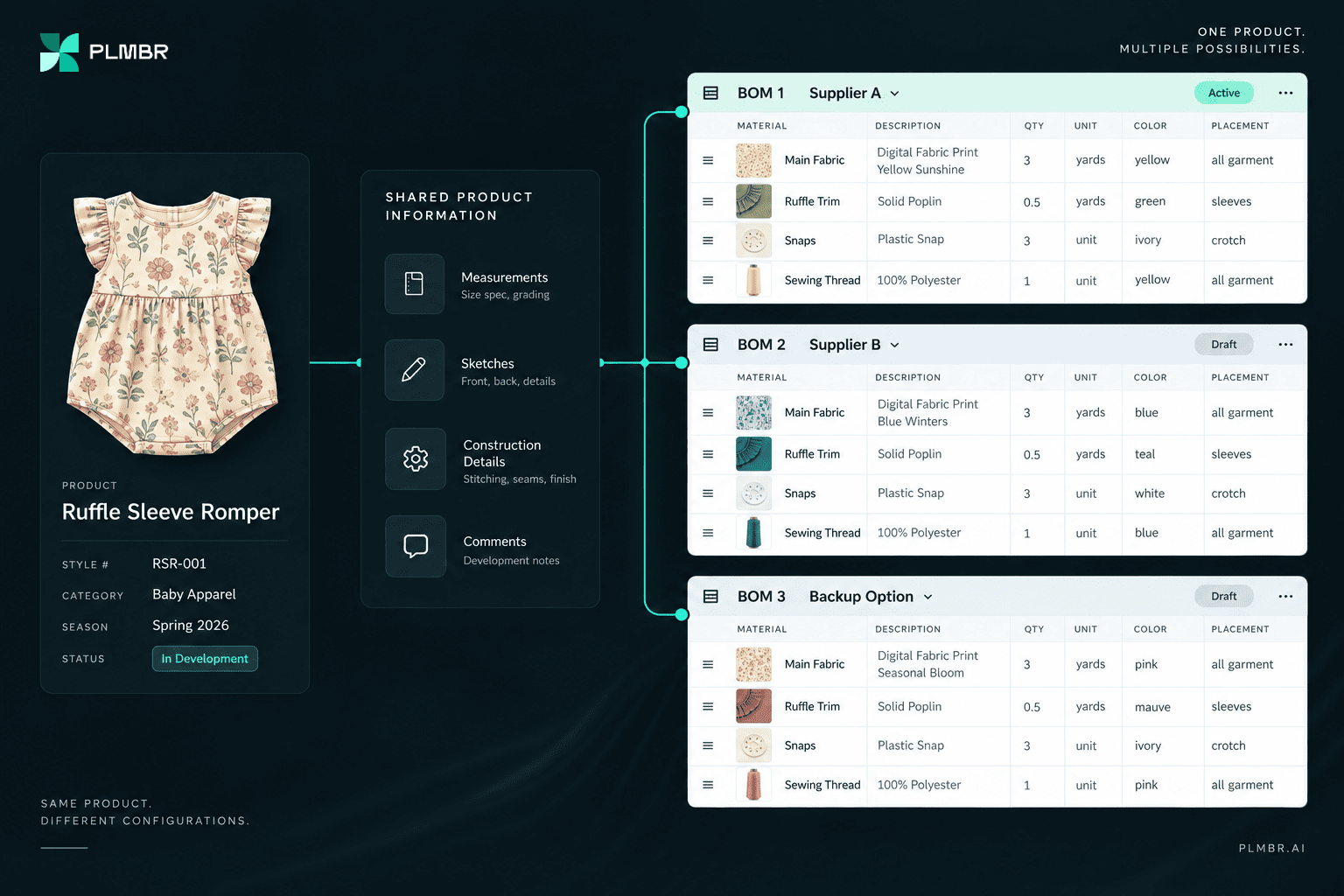
That way, the information that is genuinely shared stays shared.
And the information that is genuinely different can have its own place.
A BOM isn't always a final production decision
This is also why it's useful to think about what a BOM represents during product development.
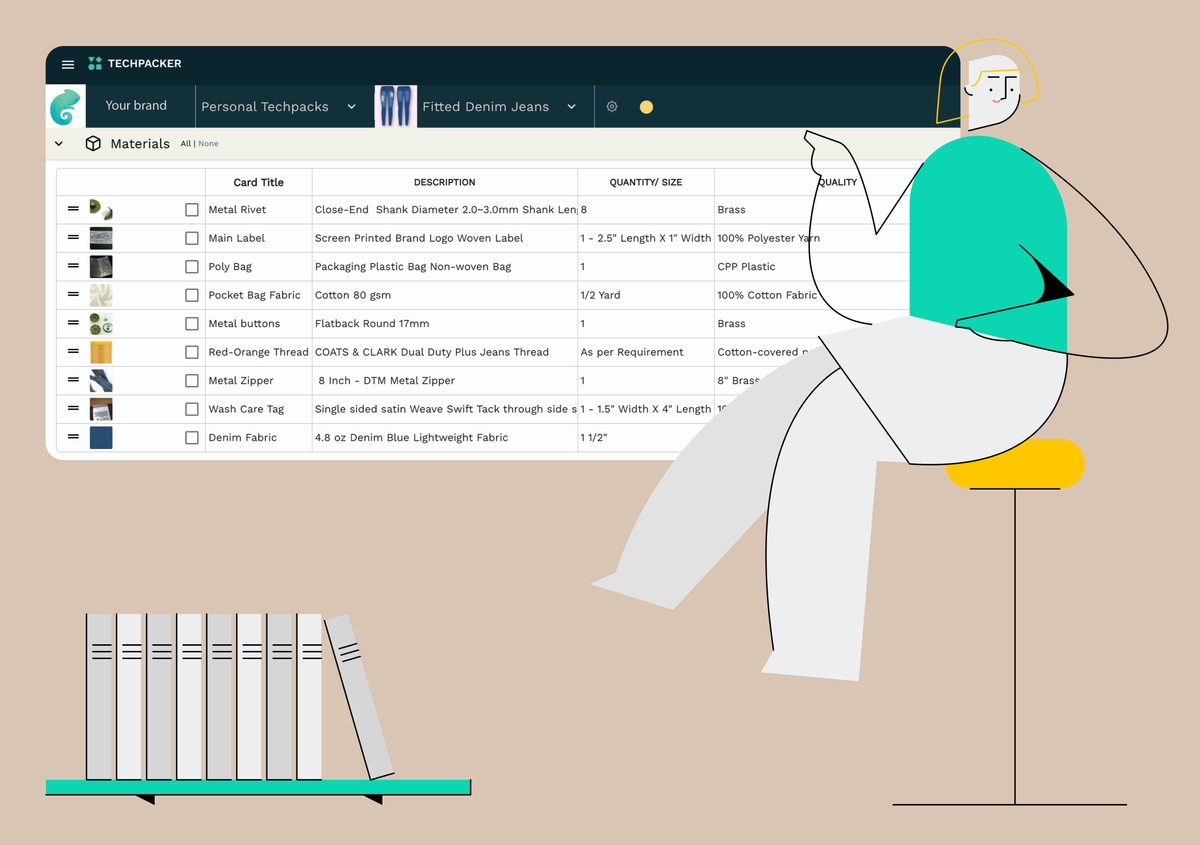
A BOM is more than a list of fabrics and trims.
It connects the product specification to the physical components that need to be sourced, costed, tested, and eventually used in production.
If you're new to BOMs, this guide covers the basics:

But product development doesn't always move in a straight line.
You might have a preferred fabric and a backup fabric.
You might be waiting for two suppliers to come back with pricing.
You might be testing different trim options.
You might be developing several versions of a print.
You might know exactly how the product should be constructed while still working through the most commercially viable material combination.
In other words, the product can be technically defined while some sourcing decisions are still open.
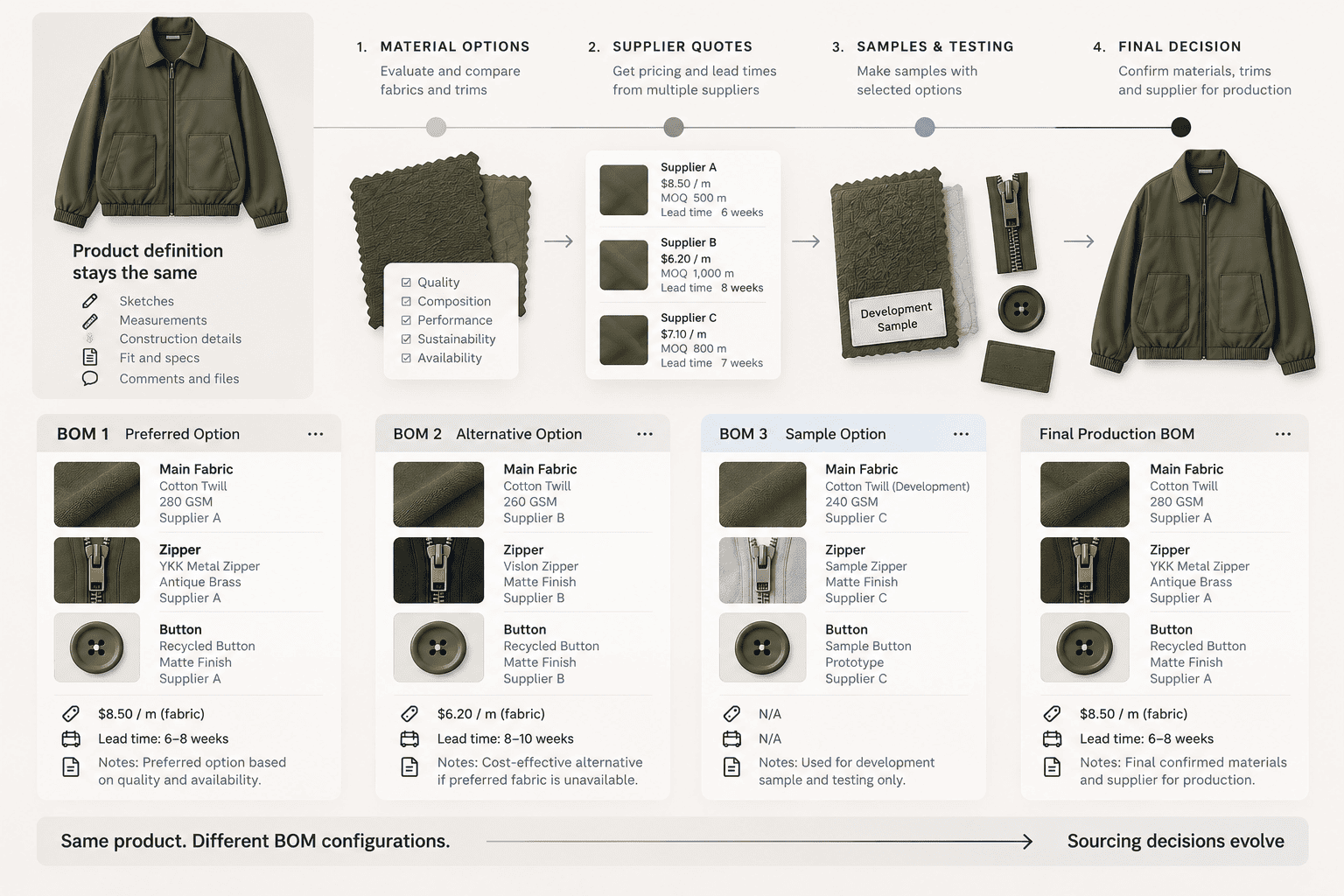
That distinction matters.
The fact that a material decision is still open doesn't necessarily mean you have two different products.
It may simply mean that the product currently has two possible BOM configurations.
Multiple BOMs give teams a way to document those alternatives without creating unnecessary copies of the product itself.
And that leads to a number of very practical use cases.
When does having multiple BOMs actually make sense?
A product can stay the same while its materials, sourcing, components, or production configuration change.
Here are some common situations where keeping those variations as separate BOMs can make sense.
1. When you're comparing suppliers
Imagine you're developing a new style.
The measurements are agreed.
The construction is defined.
The sketches are approved.
The product itself isn't changing.
But you're talking to two different suppliers.
Supplier A can source the fabric you want at one price.
Supplier B has proposed a different material option at another price.
You don't necessarily want to choose immediately.
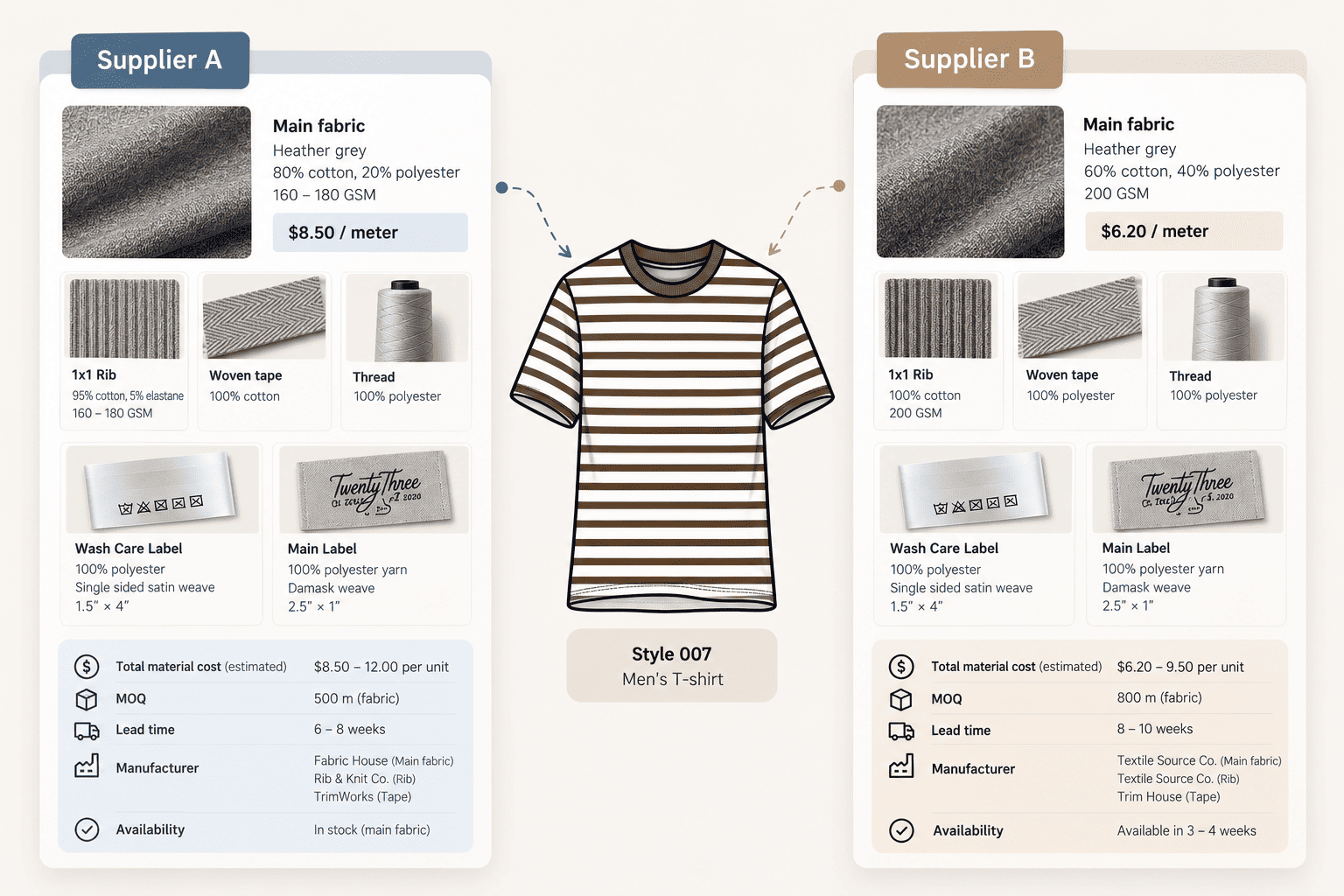
At this stage, you're comparing more than just price.
You may be looking at:
- Material availability
- Fabric quality
- Minimum order quantities
- Lead times
- Trims
- Manufacturing capabilities
- Supplier-specific sourcing
- Overall cost
So you might have:
BOM 1 — Supplier A
- Main fabric
- Rib
- Woven tape
- Thread
- Labels
- Supplier-specific information
- Costs
BOM 2 — Supplier B
- Alternative main fabric
- Alternative rib and trims
- Same labels
- Different costs
- Different sourcing information
The important thing is that the product itself hasn't become two different products.
The measurements haven't changed.
The construction hasn't changed.
The technical drawings haven't changed.
Only the sourcing configuration has.
The problem
The traditional workaround is often to create separate spreadsheets, duplicate the tech pack, or keep supplier-specific BOMs in different files.
Now the same product exists in multiple places.
One supplier sends a revised quote.
Another changes a material.
Someone updates a cost.
Someone else updates the main tech pack.
Before long, it becomes difficult to tell which information belongs to which supplier and which version is current.
The solution
Keep the supplier-specific material and sourcing information in separate BOMs within the same product workspace, while keeping the shared product information in one place.
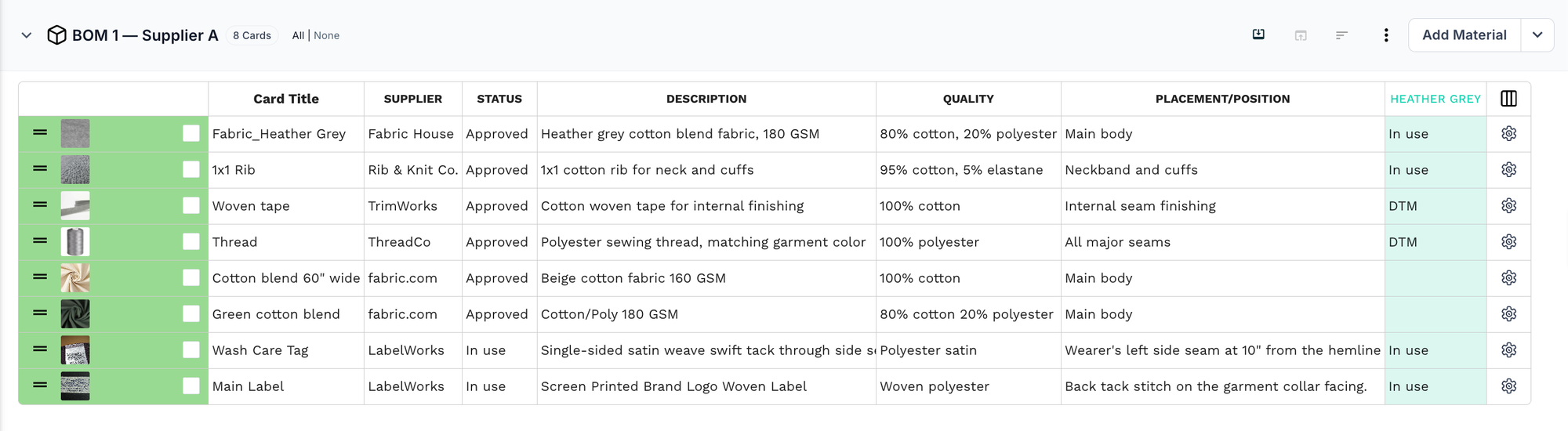
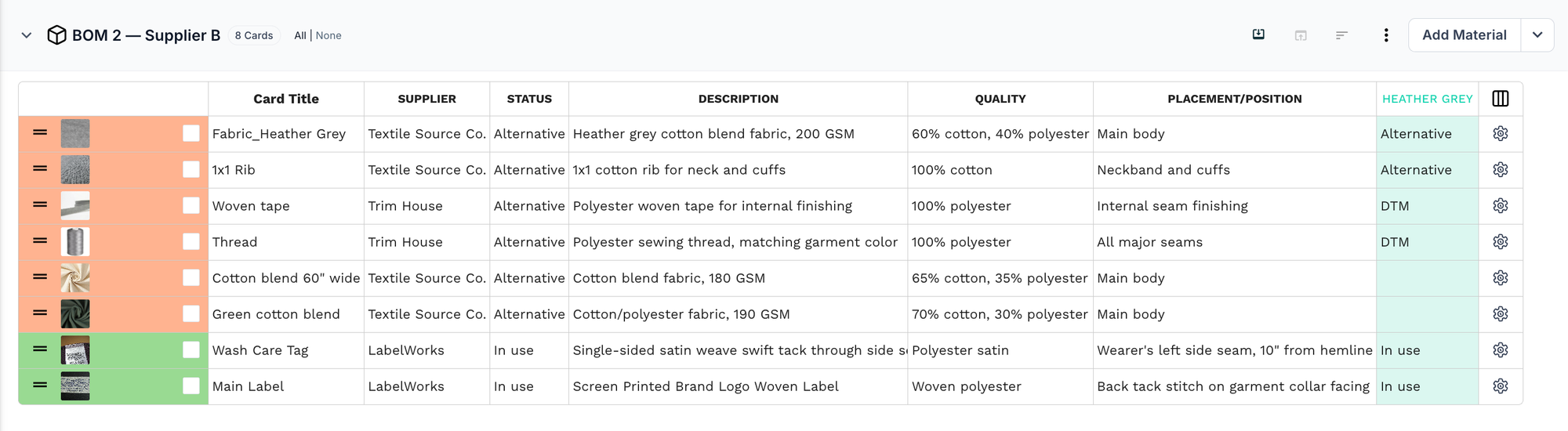
That allows the team to compare different sourcing configurations without duplicating the measurements, construction, sketches, and other information that hasn't changed.
And when the supplier is finally selected, the chosen BOM can become the production configuration without having maintained two completely separate products throughout development.
The product stays one product. The sourcing options stay separate.
2. When you have a preferred material and a backup
Supplier comparison isn't the only reason you might need more than one BOM.
Sometimes you've already decided what you want to use.
You just don't want to depend entirely on it.
Imagine you're developing a baseball jacket.
You've identified a fabric that has exactly the hand feel, weight, appearance, and performance you're looking for.
That's your preferred material.
But the fabric has a long lead time.
Or the supplier has limited capacity.
Or availability might become an issue once you move into bulk production.
So you've identified another fabric that could work if the preferred option isn't available.
That's your backup material.
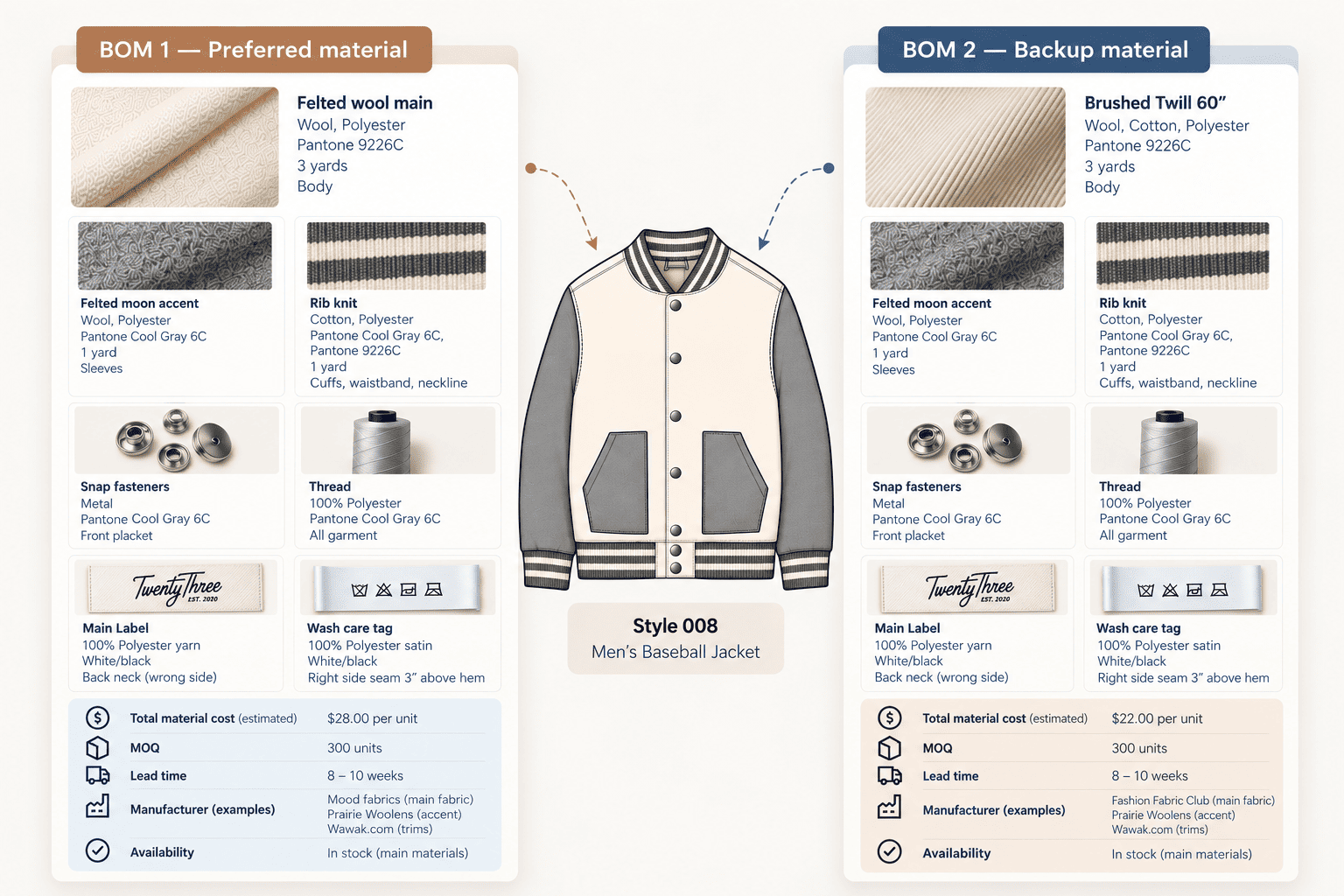
You might have:
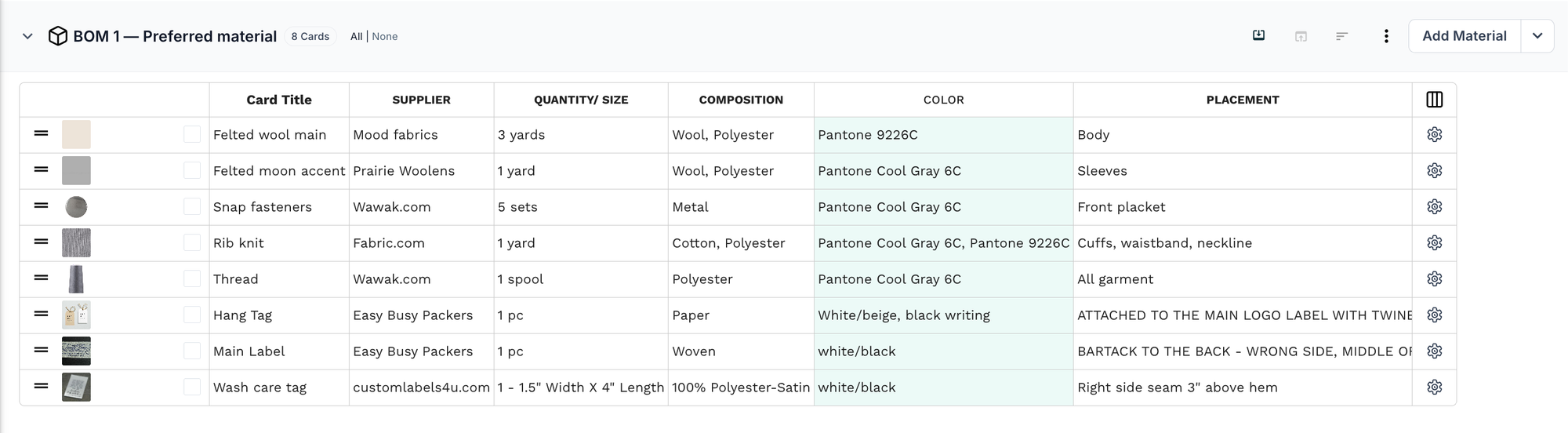
BOM 1 — Preferred material
- Felted wool main fabric
- Felted moon accent for the sleeves
- Rib knit
- Snap fasteners
- Thread
- Labels
- Target costs
BOM 2 — Backup material
- Alternative main fabric (brushed twill)
- Same accent fabric, rib knit, and snap fasteners
- Same thread and labels
- Supplier information
- Backup costs
The garment itself hasn't changed.
You're not designing a second jacket.
You're preparing for two possible material paths for the same jacket.
The problem
The backup option often ends up living somewhere else.
Maybe it's in an Excel sheet.
Maybe a supplier sent it over email.
Maybe someone has a separate fabric comparison document.
Maybe it's mentioned in a comment inside the tech pack.
The problem isn't that the backup exists.
The problem is that the backup isn't connected clearly to the product it belongs to.
And six weeks later, when the preferred fabric suddenly becomes unavailable, someone has to go looking for that alternative again.
The solution
Keep the preferred and backup configurations as separate BOMs within the same product.
The preferred BOM documents what you intend to use.
The backup BOM documents the approved alternative.
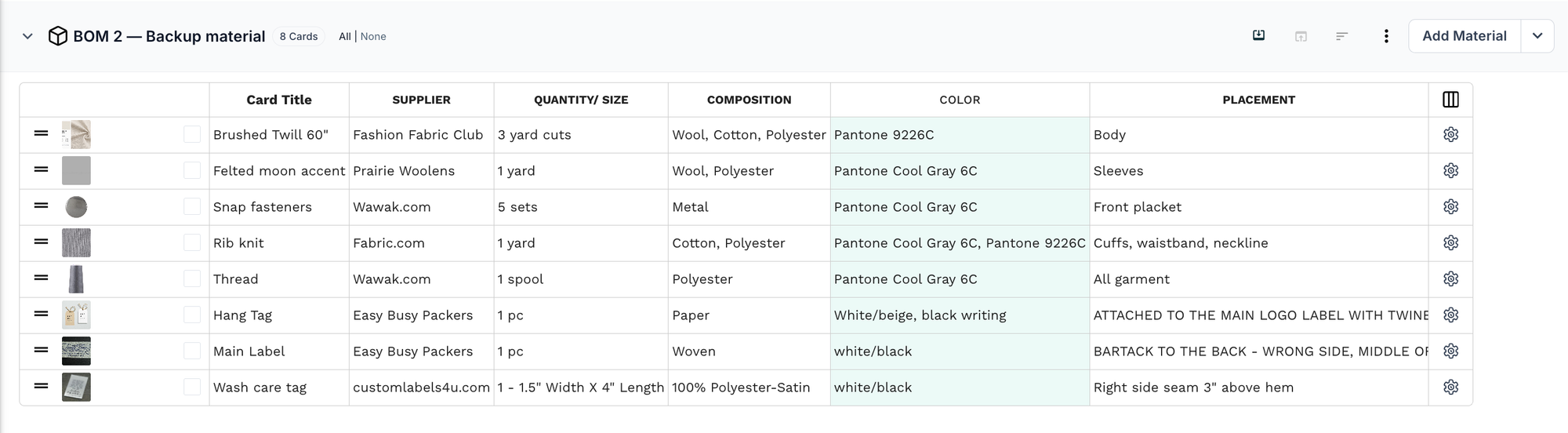
Both remain connected to the same product information.
This means a backup doesn't have to be treated as a forgotten spreadsheet or an emergency note.
It becomes a documented part of the product's sourcing options.
3. When the same product has different colorways or material variants
Colorways are another common example.
A colorway is a particular color combination or color version of a product.
Imagine you've developed a Chelsea boot.
The construction is the same.
The dimensions are the same.
The technical drawings are the same.
But you're producing the boot in tan and black.
At first glance, this might look like a simple color change.
But from a BOM perspective, the difference can go much deeper.
The upper material may change.
The side panel elastic may change.
The leather for the soles may change.
The reinforcement tape may change.
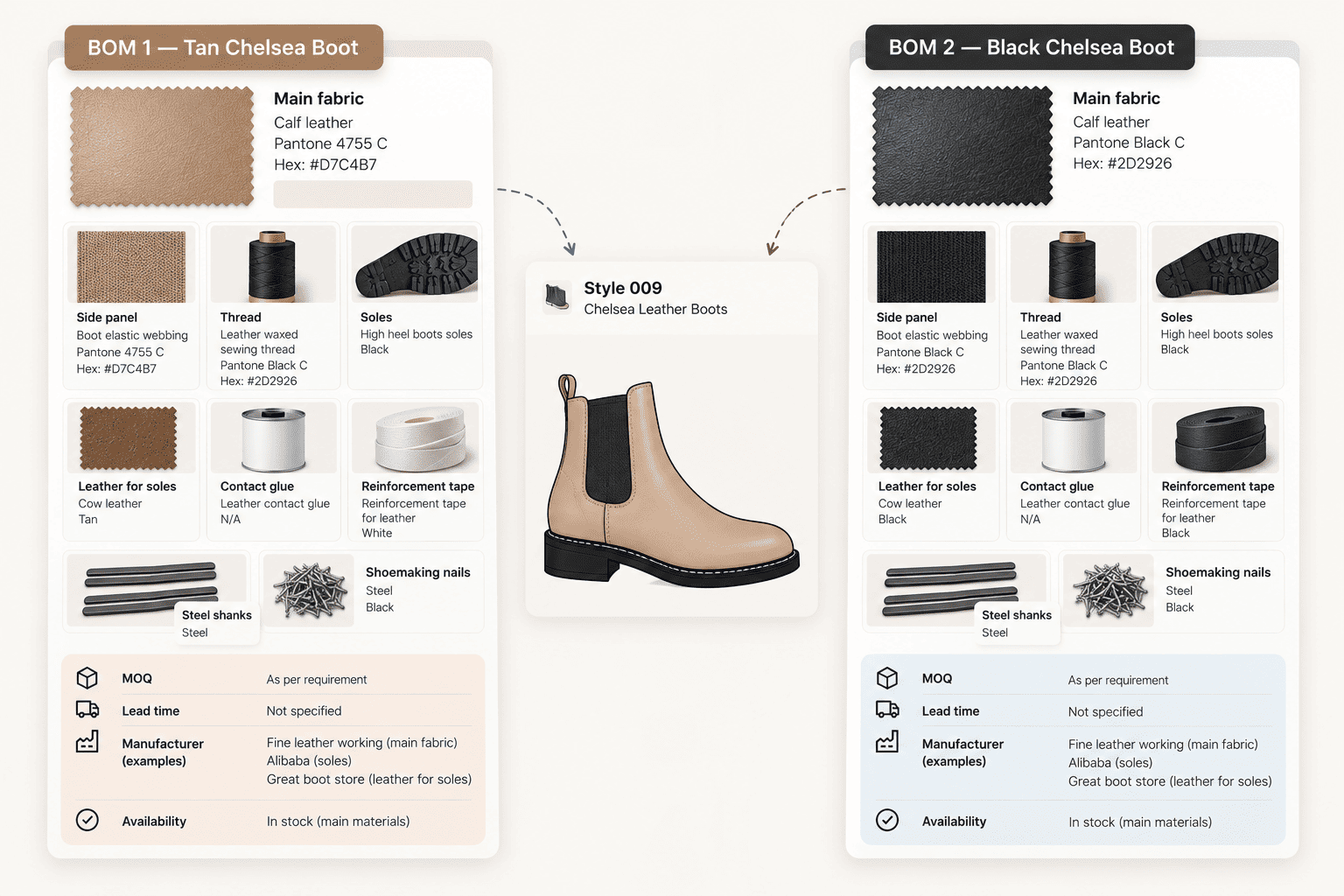
So you could have:
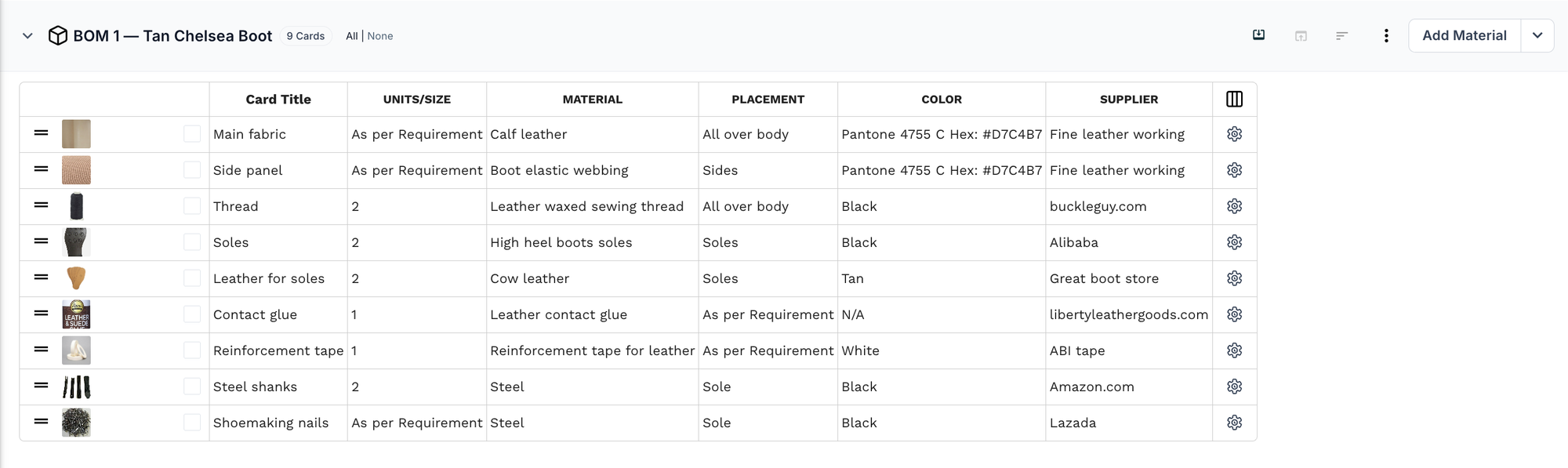
BOM 1 — Tan Chelsea Boot
- Calf leather main fabric (Pantone 4755 C / #D7C4B7)
- Tan boot elastic webbing for the side panel
- Black leather waxed sewing thread
- Black high-heel boot soles
- Tan cow leather for the soles
- Leather contact glue
- White reinforcement tape
- Black steel shanks
- Black shoemaking nails
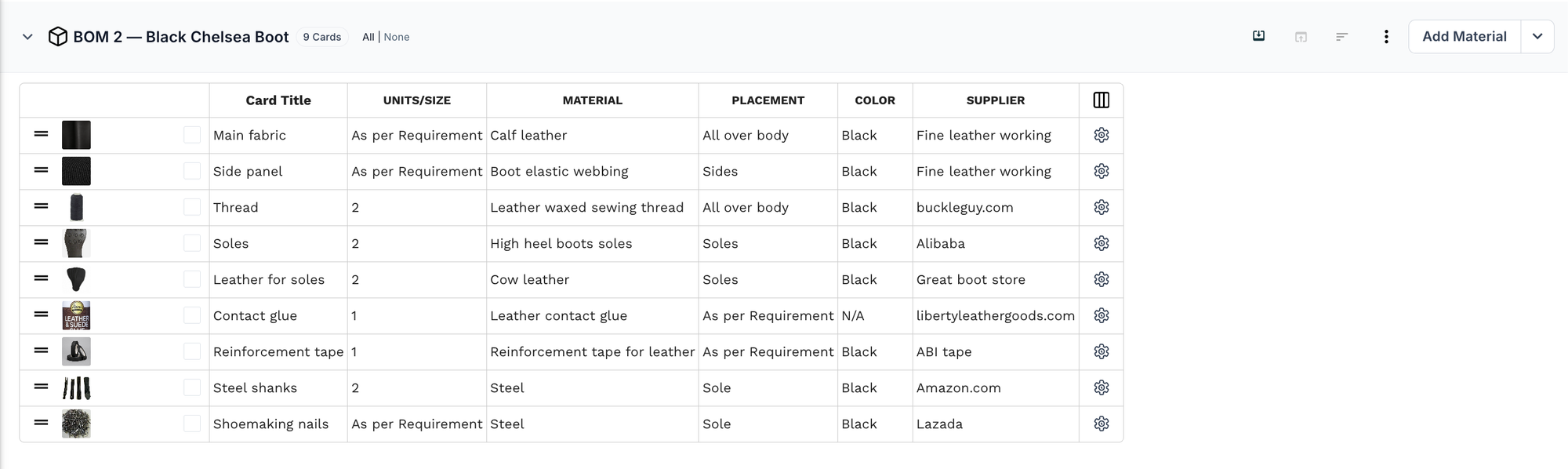
BOM 2 — Black Chelsea Boot
- Calf leather main fabric (Pantone Black C / #2D2926)
- Black boot elastic webbing for the side panel
- Black leather waxed sewing thread
- Black high-heel boot soles
- Black cow leather for the soles
- Leather contact glue
- Black reinforcement tape
- Black steel shanks
- Black shoemaking nails
Notice that not everything changes.
The thread, soles, contact glue, steel shanks, and shoemaking nails remain the same across both BOMs. What changes is the color of the main leather, the side panel elastic, the leather for the soles, and the reinforcement tape.
The product hasn't necessarily become two separate styles.
It's still the same underlying Chelsea boot, with different material and color configurations.
The problem
A common way to handle this is to create a separate tech pack for every colorway.
That works when the products are genuinely different.
But if the meaningful differences are mainly the materials and components, you're now maintaining multiple copies of the same technical information.
The measurements don't need to be recreated.
The construction doesn't need to be recreated.
The sketches don't need to be recreated.
And every shared change now has to be maintained across multiple versions.
The more colorways you add, the more duplication you create.
The solution
Use a separate BOM for each colorway when the material configuration is different enough to need its own documentation, while keeping the shared product information together.
In this Chelsea boot example, the tech pack keeps the sketches and measurements together, while BOM 1 — Tan Chelsea Boot and BOM 2 — Black Chelsea Boot document the differences between the two configurations.
The tan BOM describes what makes the tan version different.
The black BOM describes what makes the black version different.
The common technical information doesn't need to be recreated each time.
This makes the variation explicit without turning every colorway into a completely separate product.
4. When the same product has different AOPs or print variations
AOP stands for all-over print.
It refers to artwork or a repeating pattern that is printed across the surface of a material, rather than being placed in just one small area.
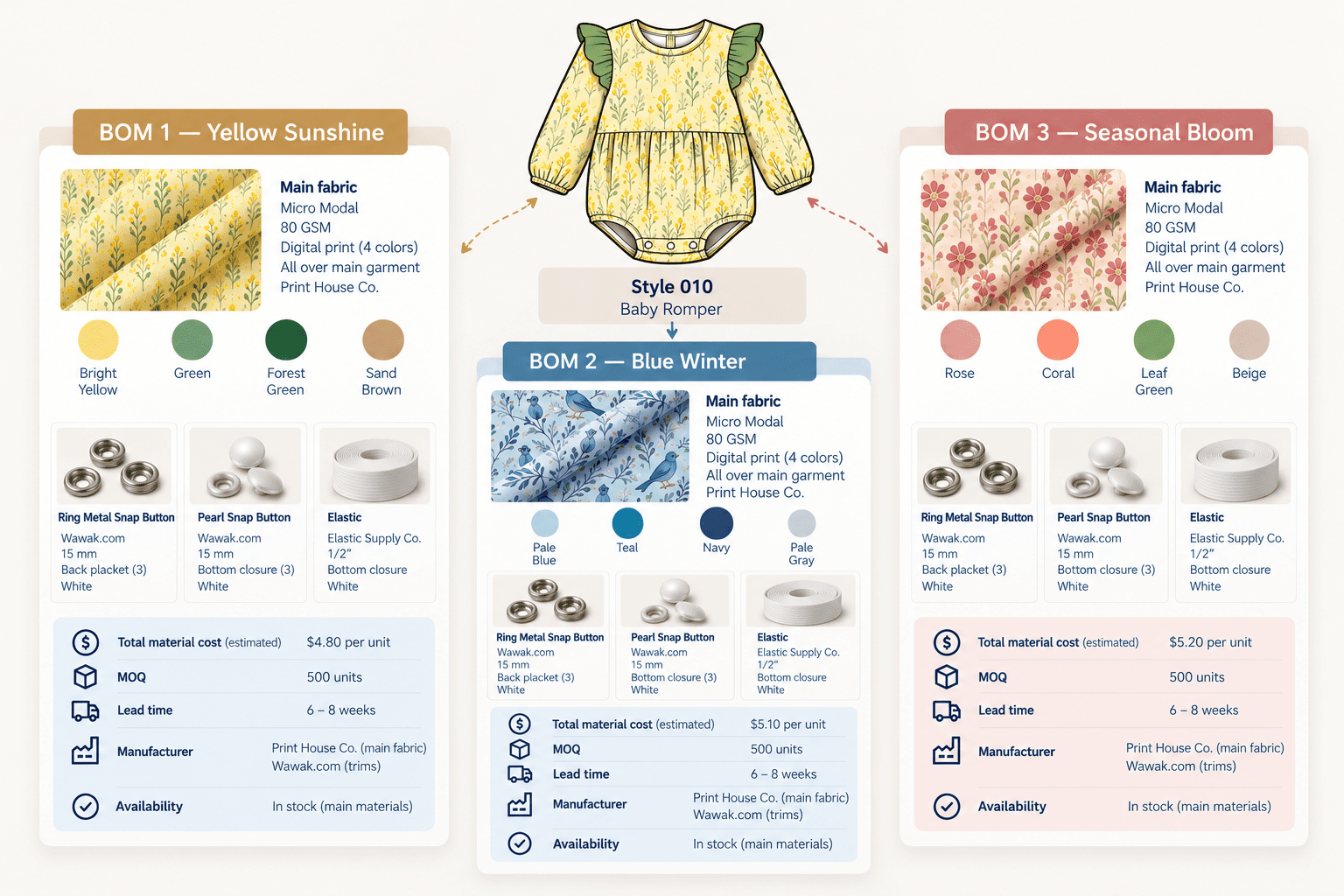
Think of a baby romper that is available with three different prints.
The silhouette is the same.
The construction is the same.
The measurements are the same.
But the artwork changes.
And because the artwork changes, the BOM changes with it.
In this case, the three prints are:
- Yellow Sunshine AOP
- Blue Winter AOP
- Seasonal Bloom AOP
You might have:
BOM 1 — Yellow Sunshine
- Micro modal base fabric, 80 GSM
- Yellow Sunshine artwork (4-color digital print)
- Ring metal snap buttons
- Pearl snap buttons
- Elastic
- Costs
BOM 2 — Blue Winter
- Micro modal base fabric, 80 GSM
- Blue Winter artwork (4-color digital print)
- Ring metal snap buttons
- Pearl snap buttons
- Elastic
- Costs
BOM 3 — Seasonal Bloom
- Micro modal base fabric, 80 GSM
- Seasonal Bloom artwork (4-color digital print)
- Ring metal snap buttons
- Pearl snap buttons
- Elastic
- Costs
The garment itself hasn't changed.
The print configuration has.
The problem
If every AOP becomes a separate tech pack, you're once again duplicating information that doesn't need to be duplicated.
The measurements are the same.
The construction is the same.
The silhouette is the same.
But now you have multiple copies of the same product just because the artwork and material configuration differ.
There is also a practical risk: artwork and material information can get separated across files, making it harder to know exactly which BOM belongs to which print.
The solution
Keep the different AOP configurations as separate BOMs within the same product.
Each BOM can contain the material and artwork information that applies to that particular print.
The shared technical information stays with the product.
So instead of creating a separate product for every print, you keep one product.
Each AOP gets its own BOM.
BOM 1 — Yellow Sunshine

BOM 2 — Blue Winter

BOM 3 — Seasonal Bloom

One product → multiple AOP configurations
This is particularly useful when the product is fundamentally unchanged and only the material or artwork configuration varies.
5. When the same product is being made for different markets
Sometimes the product is the same, the supplier is the same, and even the core materials are the same.
But the product still needs different configurations because it is being prepared for different markets.
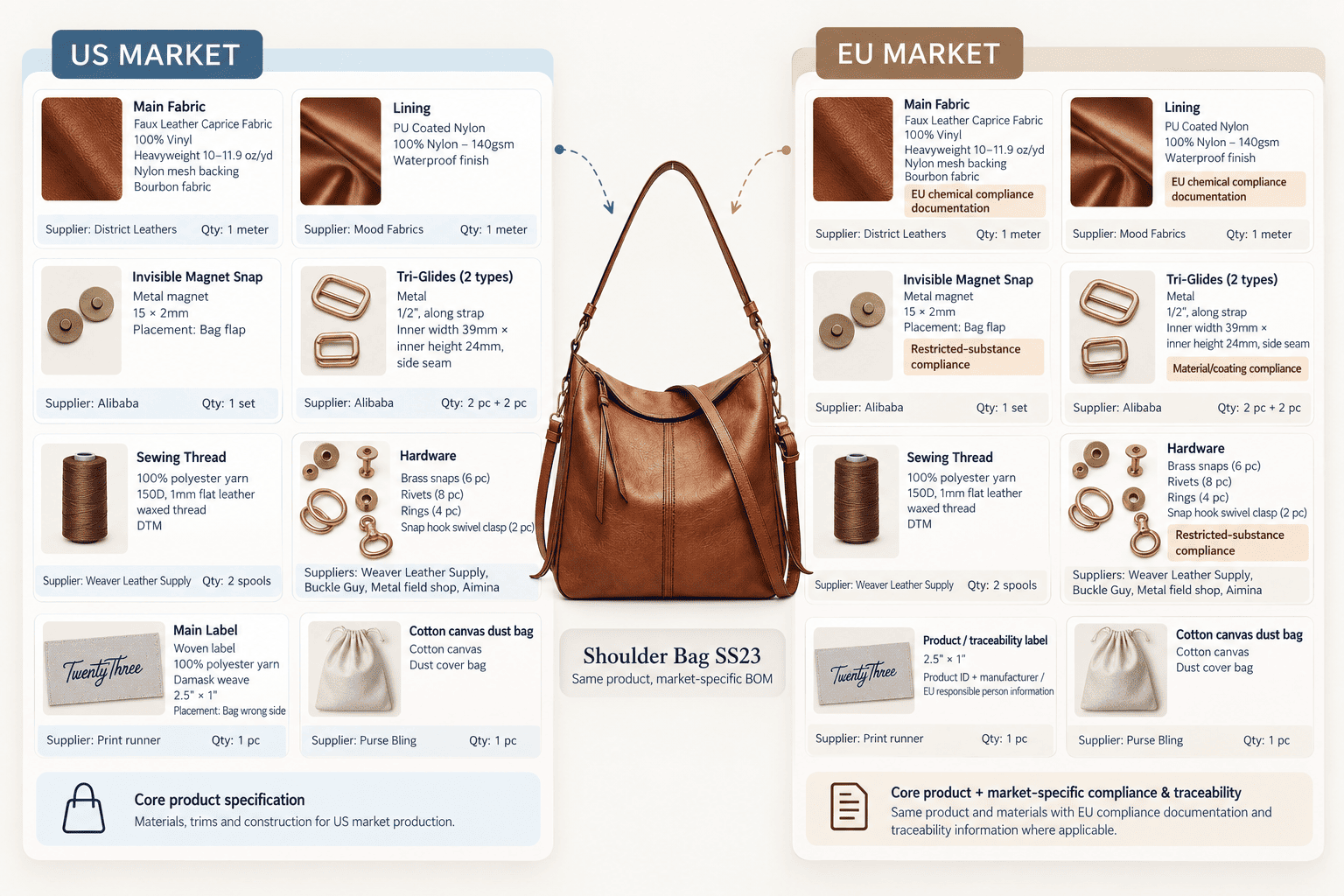
Imagine you're producing the same shoulder bag for the US and EU markets.
The bag's construction is identical.
The fabric is identical.
The hardware is identical.
The manufacturer is the same.
But the labeling and compliance requirements differ.
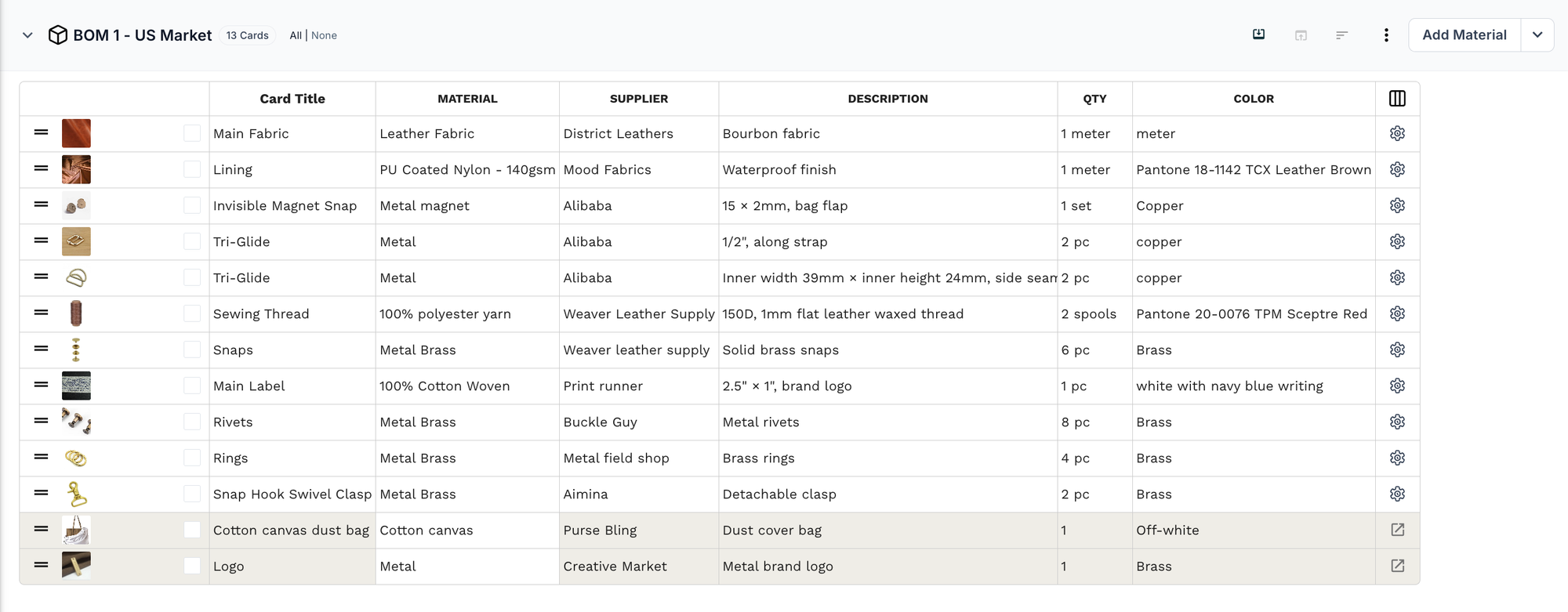
The US version uses the standard woven brand label.
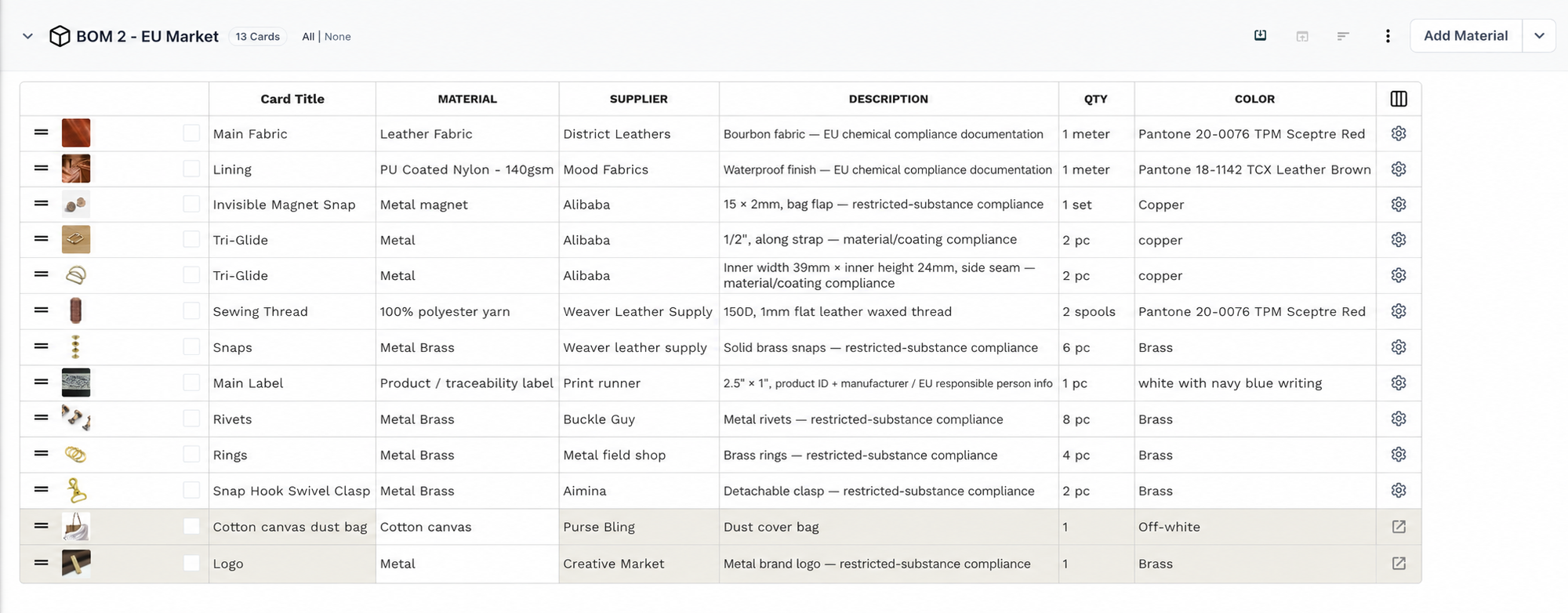
The EU version may need a traceability label with the product ID, manufacturer, and EU responsible person.
It may also need compliance documentation for the materials and hardware.
So you might have:
BOM 1 — US
- Faux leather main fabric
- PU-coated nylon lining
- Hardware: magnet snap, tri-glides, snaps, rivets, rings, and swivel clasps
- Sewing thread
- Woven brand label
- Cotton canvas dust bag
BOM 2 — EU
- Same main fabric, with EU chemical compliance documentation
- Same lining, with EU chemical compliance documentation
- Same hardware, with restricted-substance and coating compliance
- Sewing thread
- Product/traceability label
- Cotton canvas dust bag
Most of the BOM is identical.
Only part of the configuration changes.
The problem
If you create a separate tech pack for each market, you're maintaining two versions of essentially the same product.
That means the shared product information can become duplicated.
If the bag's construction changes, for example, you now have to make sure that change reaches both market versions.
At the same time, you don't want to combine everything into one giant BOM and leave people guessing which label, compliance document, or market-specific requirement applies where.
The solution
Keep the shared product information together and document the market-specific differences in separate BOM configurations.
The US BOM can contain the US-specific requirements.
The EU BOM can contain the EU-specific requirements.
This keeps the variations clear without pretending that the products are completely unrelated.
The same approach can work for other market-specific configurations where the core product remains the same but labels, packaging, sourcing, or other components need to change.
6. When the sample BOM isn't the production BOM
Not every BOM represents the final production configuration.
During development, the materials used for a sample can be different from the materials ultimately selected for production.
A sample BOM is the list of materials and components used to make a development or prototype sample.
A production BOM is the configuration intended for the actual production run.
These don't always match.
Imagine you're developing a bell sleeves top.
For the first sample, you use materials that are readily available from the supplier.
You want to test the fit.
You want to test the construction.
You want to check the tie-up strap detail at the back.
You want to see how the garment looks and behaves.
The sample works.
But when you move toward production, some of the materials change.
The check fabric moves to its final colors.
The wash care tag becomes double-sided.
The main label becomes a woven label.
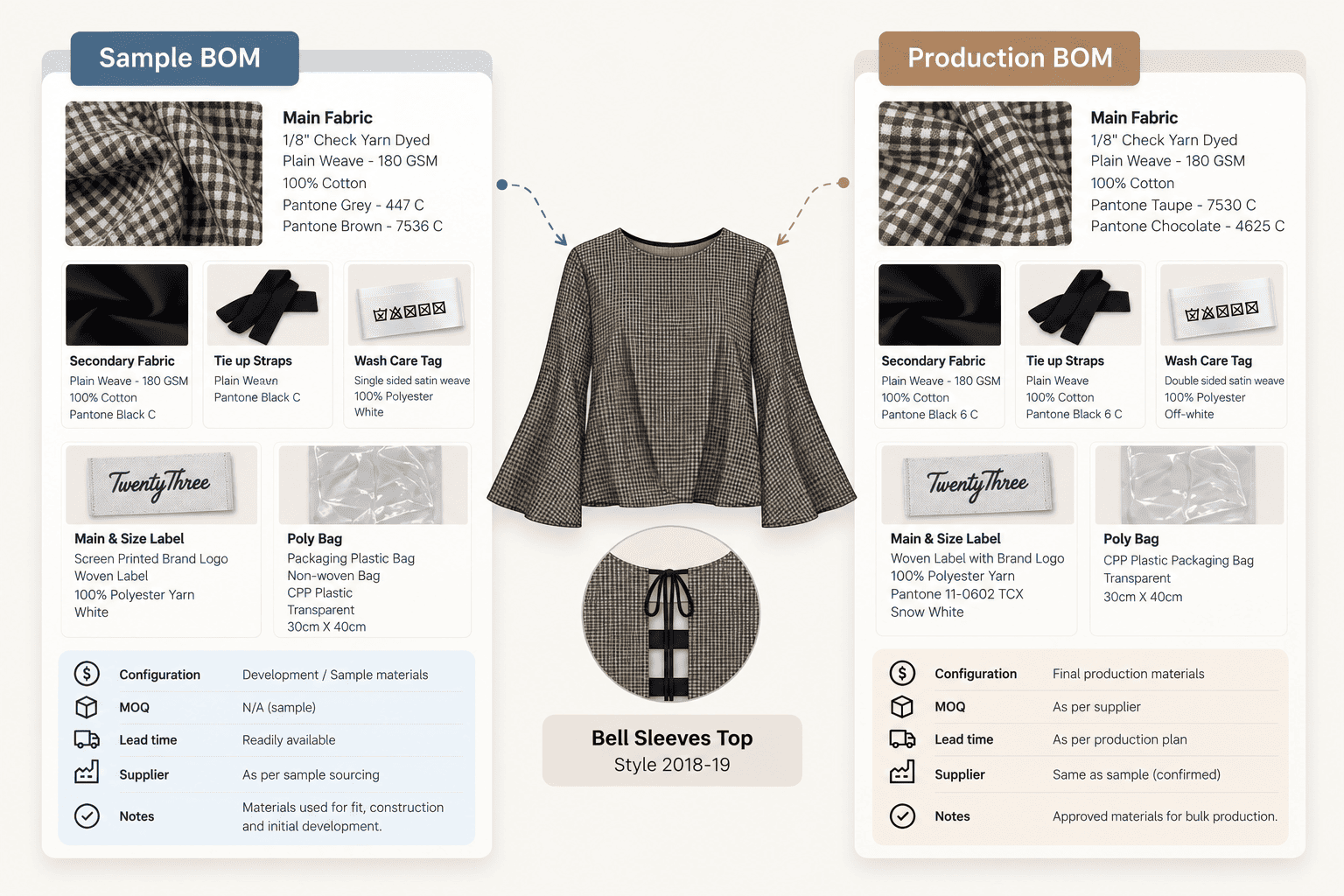
You could therefore have:
BOM 1 — Sample
- Check main fabric in sample colors (Pantone Grey 447 C / Brown 7536 C)
- Black secondary fabric and tie-up straps
- Single-sided satin wash care tag
- Screen-printed main & size label
- Poly bag
- Development information
BOM 2 — Production
- Same check fabric in final colors (Pantone Taupe 7530 C / Chocolate 4625 C)
- Secondary fabric and tie-up straps in Pantone Black 6 C
- Double-sided satin wash care tag
- Woven main & size label
- Transparent CPP poly bag, 30 × 40 cm
- Production sourcing information
The sample and production configurations are different.
But they're still part of the same product development story.
The problem
If you overwrite the sample BOM with the production materials, you lose the context of what was actually used during development.
If you create an entirely new tech pack for production, you duplicate all the information that didn't change.
Neither option is particularly clean.
The solution
Keep the sample and production BOMs as separate configurations under the same product.
The sample BOM documents what was used to develop and test the product.
The production BOM documents what was ultimately approved for manufacturing.
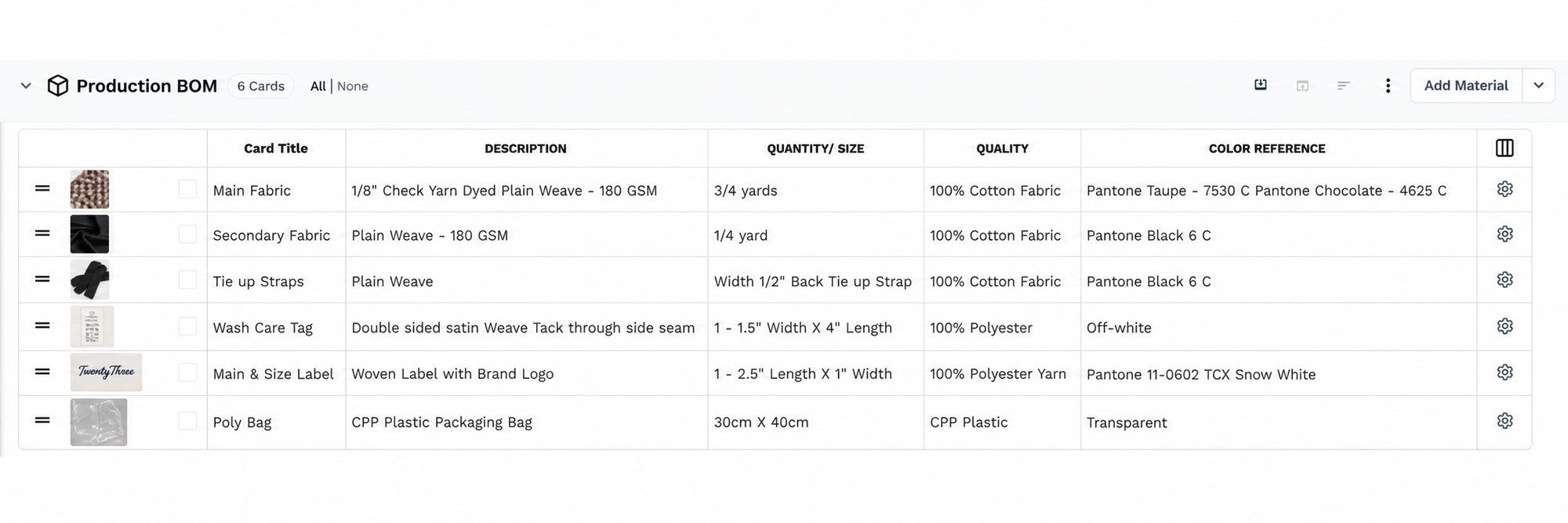
This preserves the development history while keeping the product itself in one place.
7. When one product has optional components or different product tiers
Sometimes the difference isn't about sourcing.
It's about what is included in the product.
Imagine you're developing a jacket that will be sold in two configurations.
The standard version is the base jacket.
The cold-weather version includes an additional insulated liner.
The core product is the same.
But one version contains additional components.
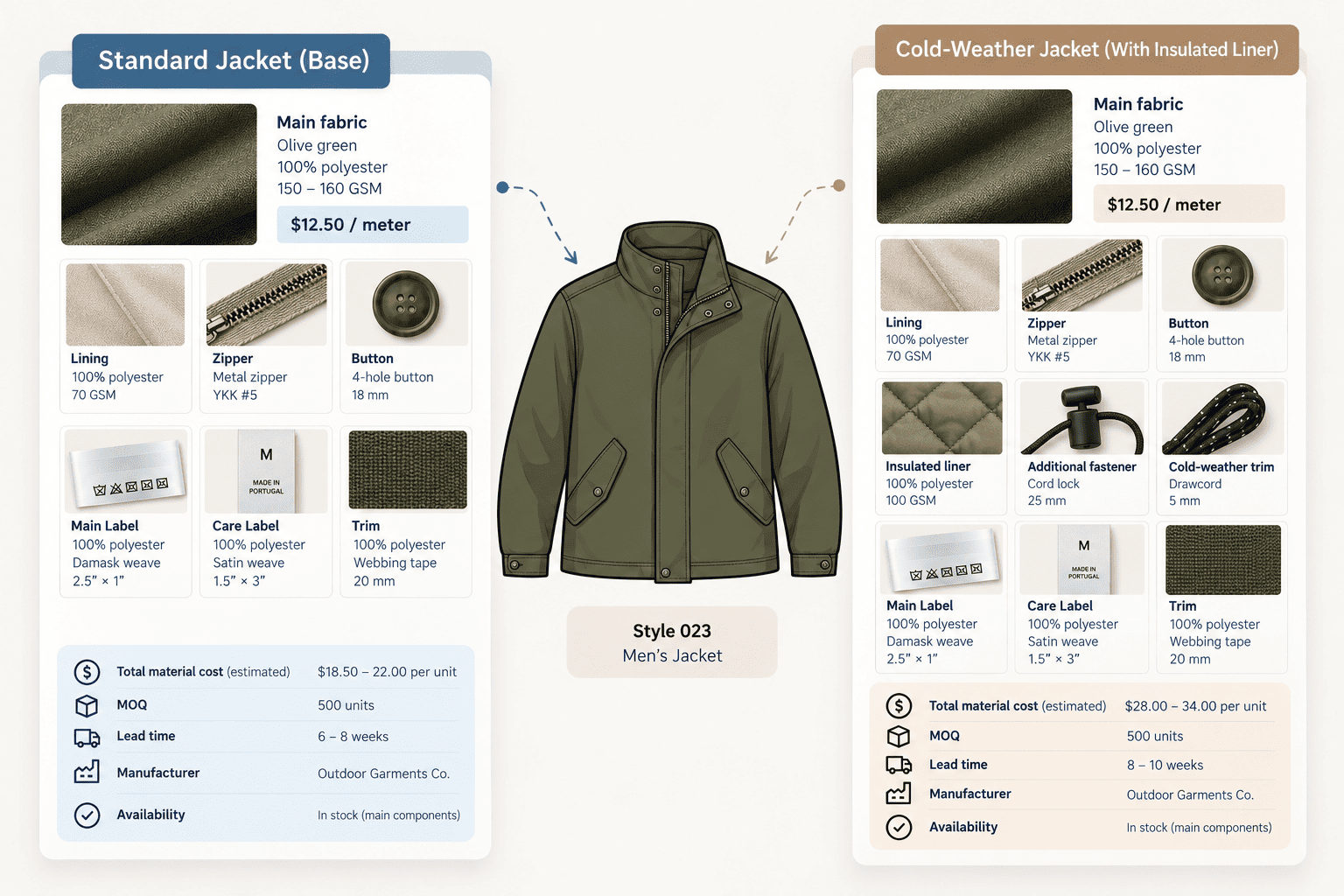
You might have:
BOM 1 — Standard
- Outer shell
- Lining
- Zippers
- Buttons
- Labels
- Standard trims
BOM 2 — Cold-weather
- Outer shell
- Lining
- Zippers
- Buttons
- Labels
- Standard trims
- Additional insulated liner
- Additional fasteners
- Cold-weather-specific components
This can also apply to different product tiers.
For example, a standard version might use basic hardware while a premium version uses upgraded hardware or includes additional accessories.
The underlying product can remain largely the same.
What changes is what is included in that particular configuration.
The problem
Putting every possible component into one BOM can make it difficult to understand what actually belongs to which version.
You might end up with a long list containing optional components, with notes such as:
- Use for premium only
- Use for cold weather
- Do not use for standard
- Optional
- Customer-specific
The BOM becomes harder to read precisely because it is trying to describe several configurations at once.
The solution
Create a BOM for each meaningful product configuration.
The standard BOM describes the standard product.
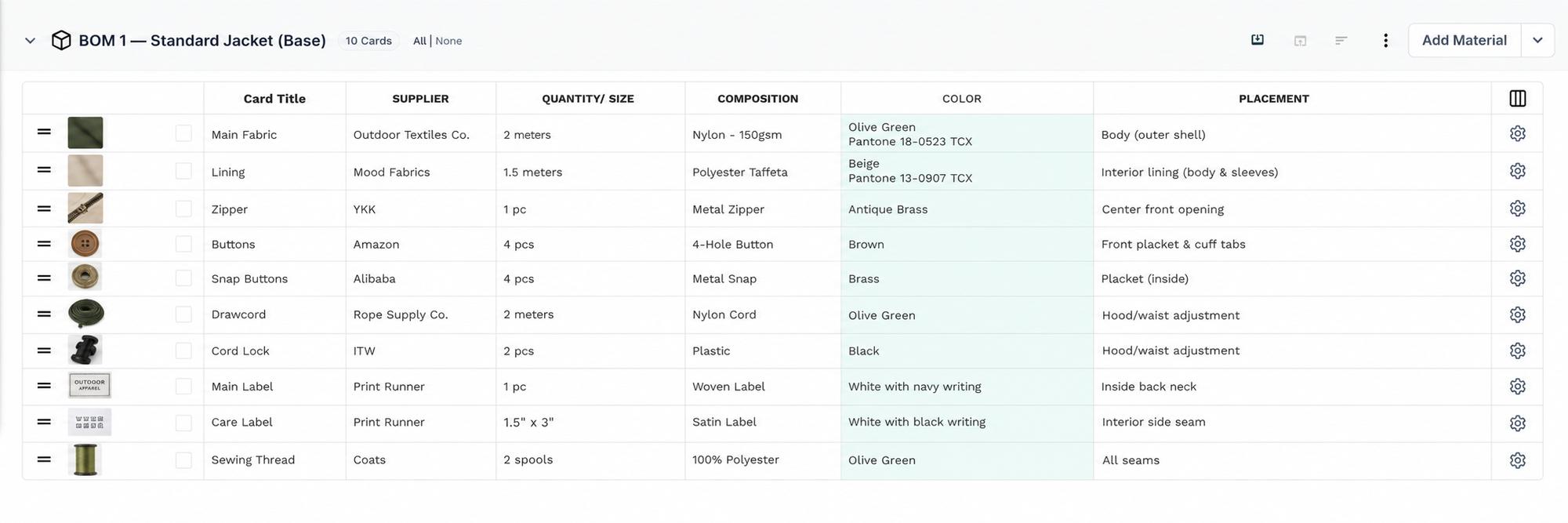
The cold-weather BOM describes the cold-weather version.
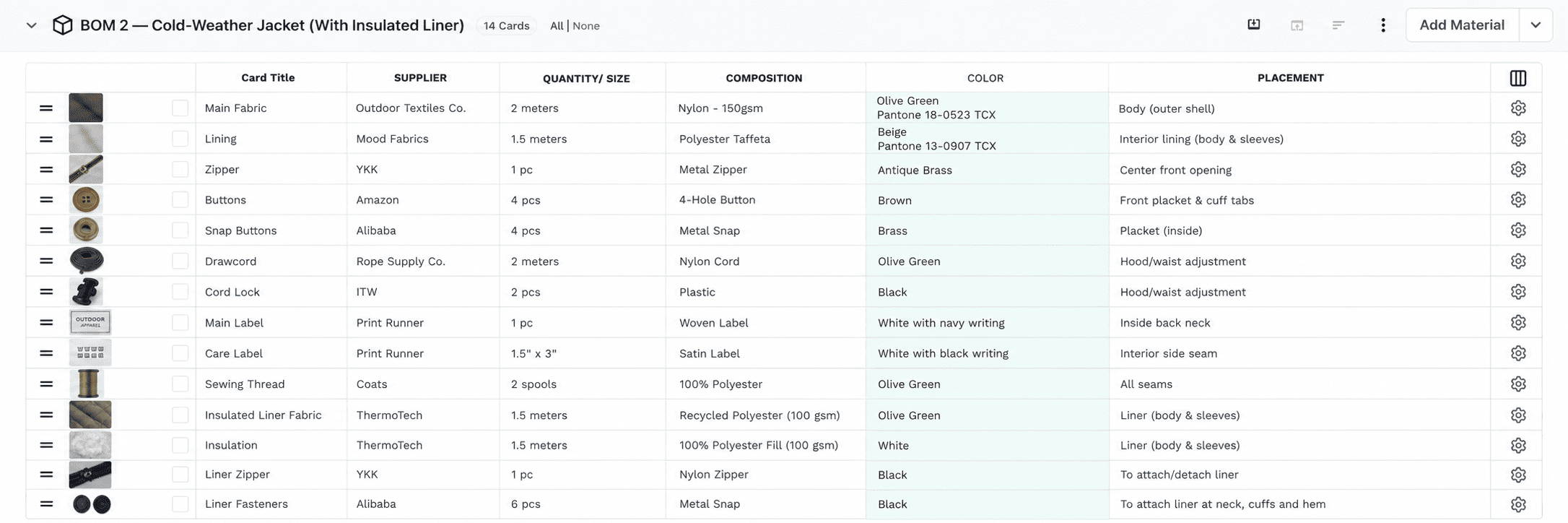
This keeps optional components attached to the configuration where they actually apply, instead of forcing everything into one complicated list.
8. When packaging needs its own BOM
Packaging is often treated as something separate from the product.
But packaging has materials, components, suppliers, and costs of its own.
And sometimes packaging varies depending on how or where the product is being sold.
Imagine you're producing a facial serum.
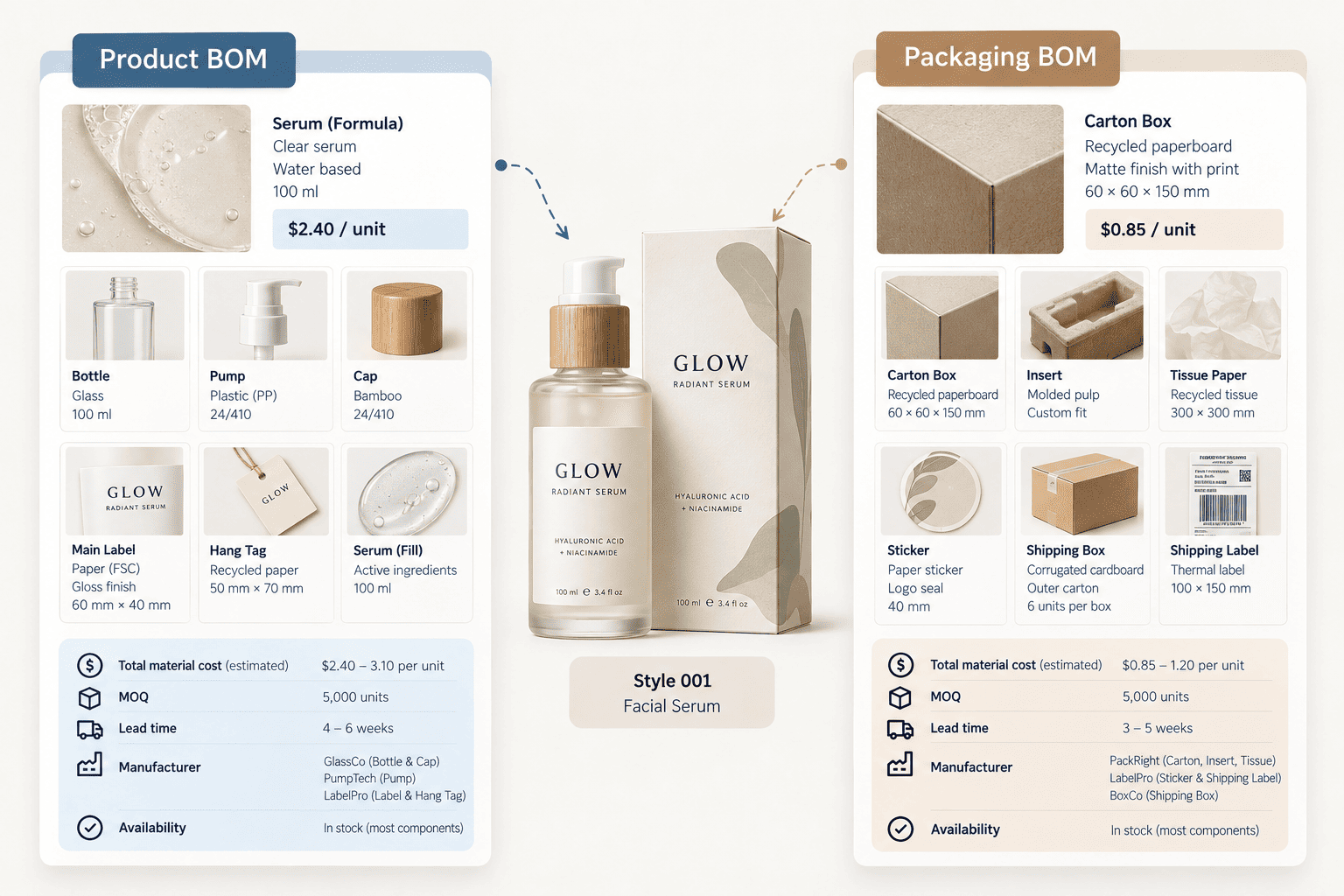
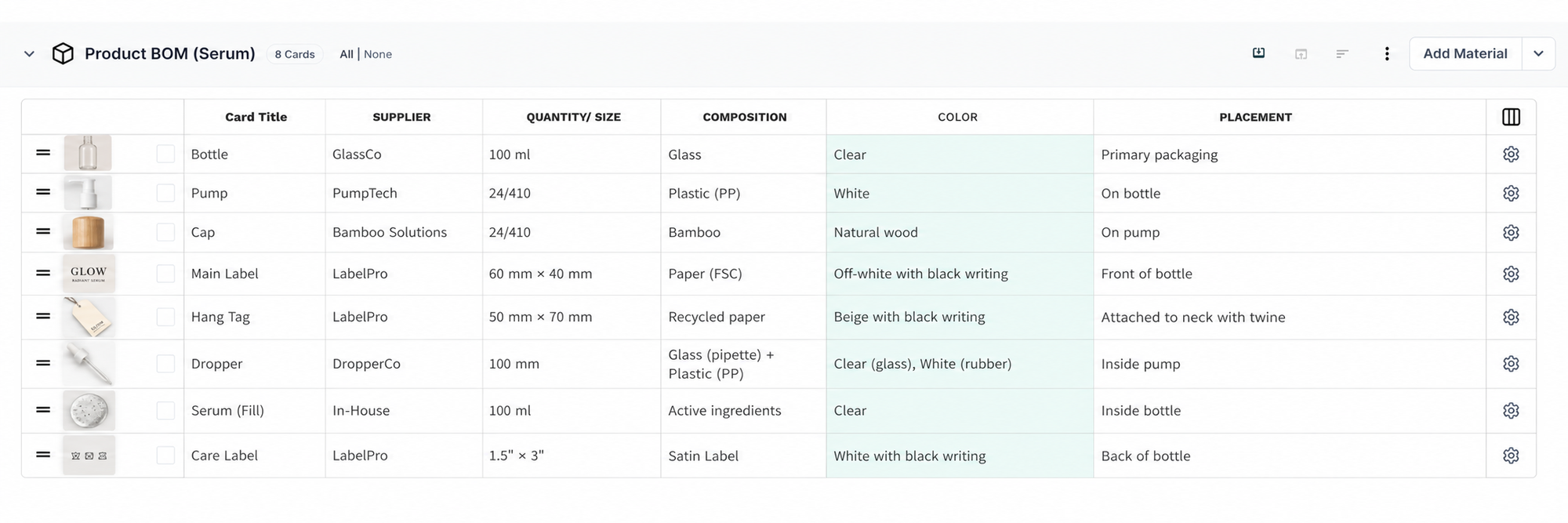
The product BOM might include:
- Bottle
- Pump
- Cap
- Main label
- Hang tag
- Serum (fill)
But the packaging configuration might include:
- Carton box
- Insert
- Tissue paper
- Sticker (logo seal)
- Shipping box
- Shipping label
Now imagine that the same product is sold through different channels.
A retail version may need a printed carton and insert.
A direct-to-consumer version may need additional protective packaging.
A wholesale version may require different outer packaging.
The product itself hasn't changed.
The packaging configuration has.
The problem
If packaging is added into one giant product BOM, it can become difficult to distinguish the materials that make the product from the materials that package it.
And if every channel gets its own tech pack, you are again duplicating the product information simply because the packaging changed.
The solution
Maintain a separate packaging BOM or packaging configuration alongside the product's core BOM.
This allows packaging materials to be documented separately while remaining connected to the same product.
The product BOM describes what goes into the product.
The packaging BOM describes what is needed to package and ship it.
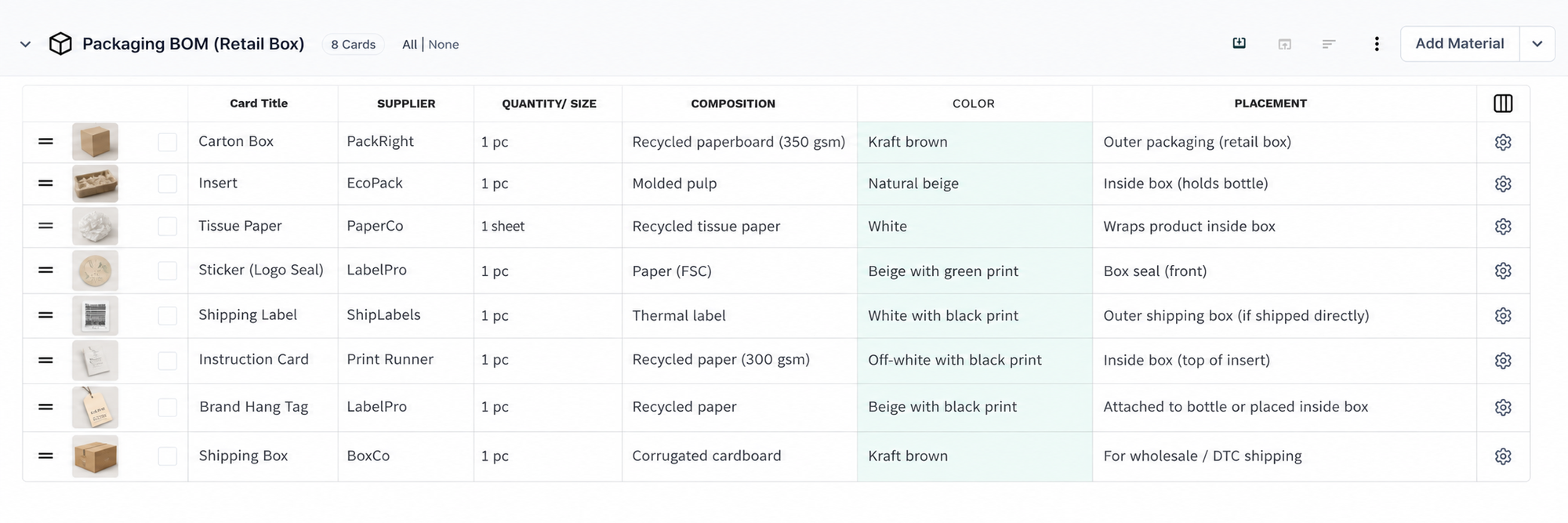
If the packaging changes for a particular channel or market, that variation can be documented without recreating the entire product.
9. When a complex product needs separate component or assembly BOMs
The need for multiple BOMs isn't limited to variations between finished products.
Sometimes the product itself is complex enough that one BOM doesn't tell the whole story clearly.
This is particularly relevant for products made from multiple assemblies.
An assembly is a group of components that are put together as a distinct part of the finished product.
Take footwear.
A finished shoe might involve:
- Upper
- Sole
- Laces
- Labels
- Packaging
But the upper itself has its own material structure.
It might contain a mesh main fabric, suede overlays, lining, and thread.
The sole can have another set of materials.
Packaging has another.
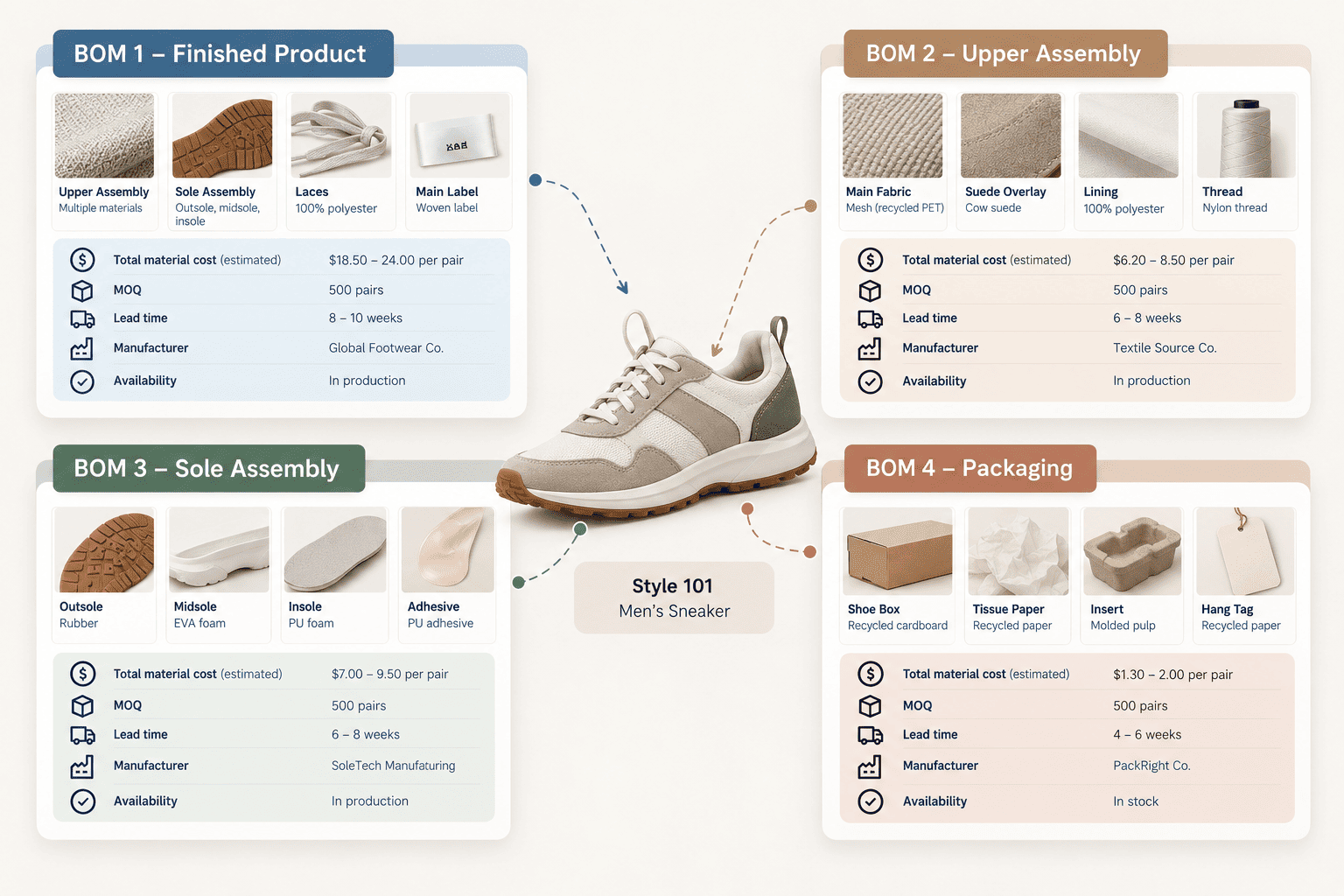
So you might want:
BOM 1 — Finished product
The upper assembly, sole assembly, laces, and main label that make up the final shoe.
BOM 2 — Upper assembly
- Mesh main fabric (recycled PET)
- Suede overlay
- Lining
- Thread
BOM 3 — Sole assembly
- Outsole
- Midsole
- Insole
- Adhesive
BOM 4 — Packaging
- Shoe box
- Tissue paper
- Insert
- Hang tag
The product hasn't become four products.
The BOM structure is simply reflecting the way the product is actually manufactured.
The problem
Putting every single component into one BOM can make a complex product difficult to understand.
You may have hundreds of materials and components in one long list.
It becomes harder to tell:
- Which materials belong to which assembly?
- Which supplier handles which component?
- Which components are part of the upper?
- Which belong to the sole?
- Which are packaging?
The problem isn't the amount of information.
It's the structure of the information.
The solution
Use separate BOMs where the product has meaningful component or assembly structures.
The finished-product BOM can describe the overall product.
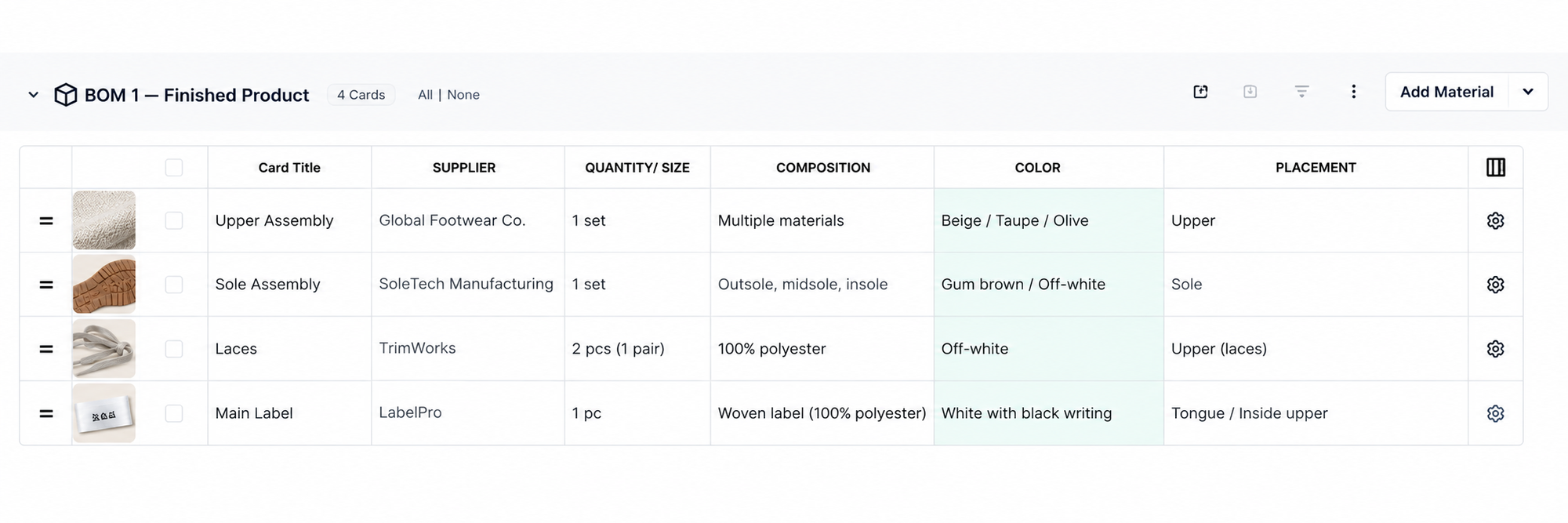
Additional BOMs can describe the material structures of individual assemblies.
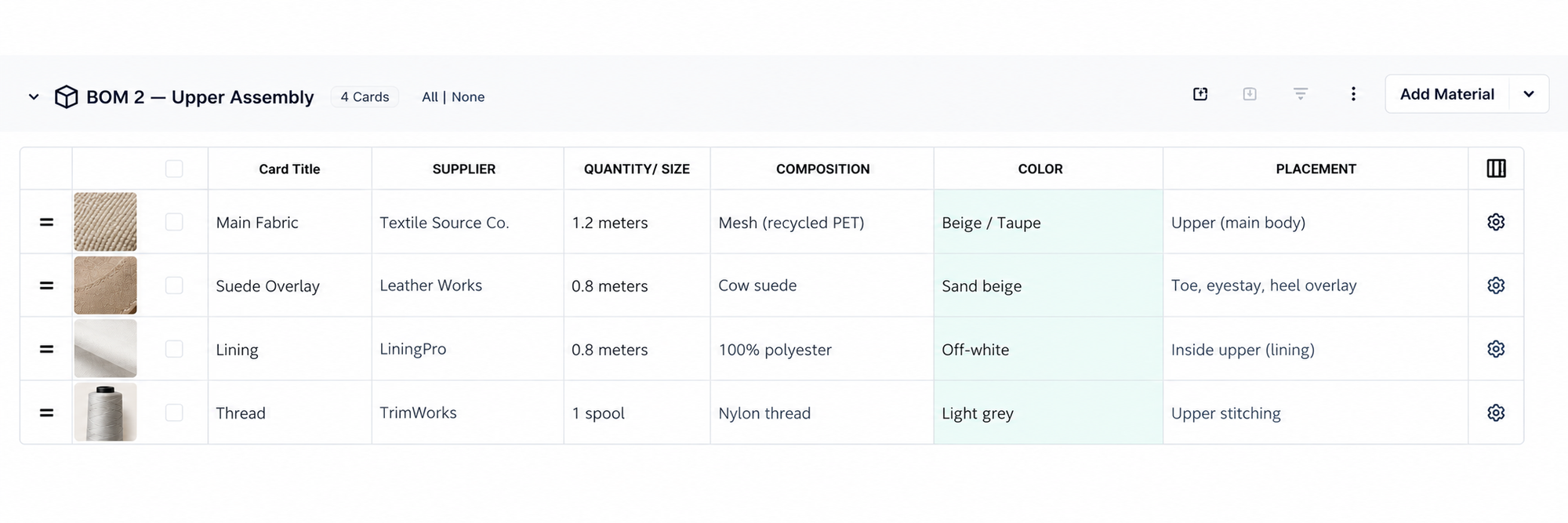
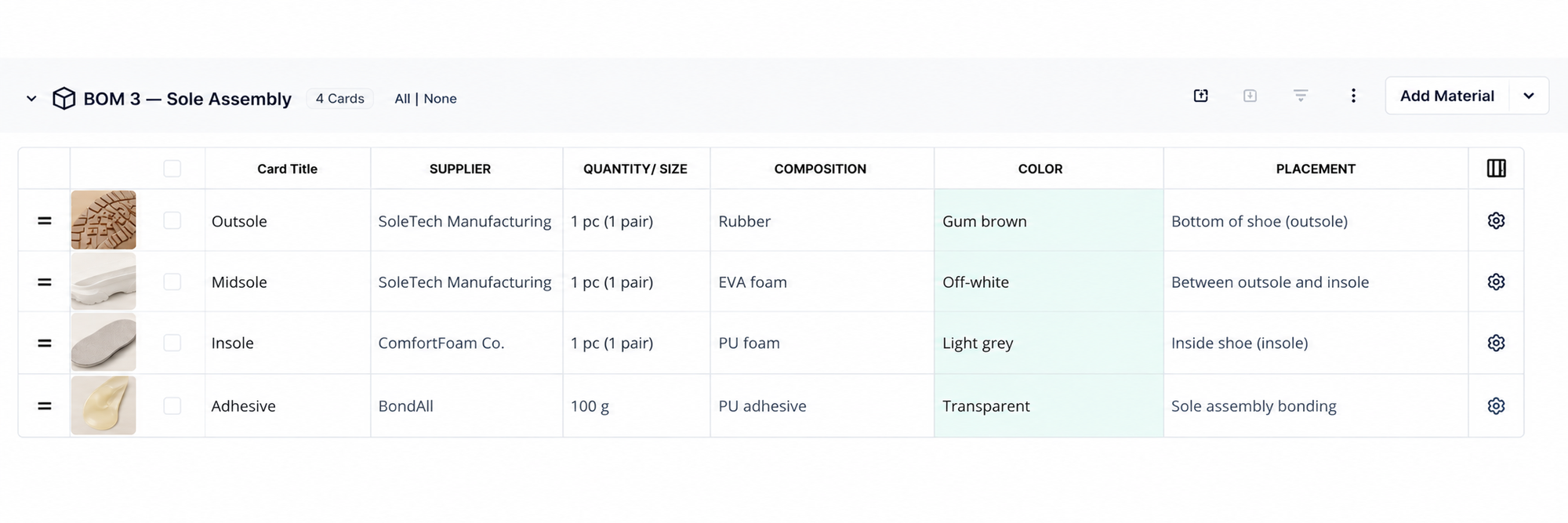
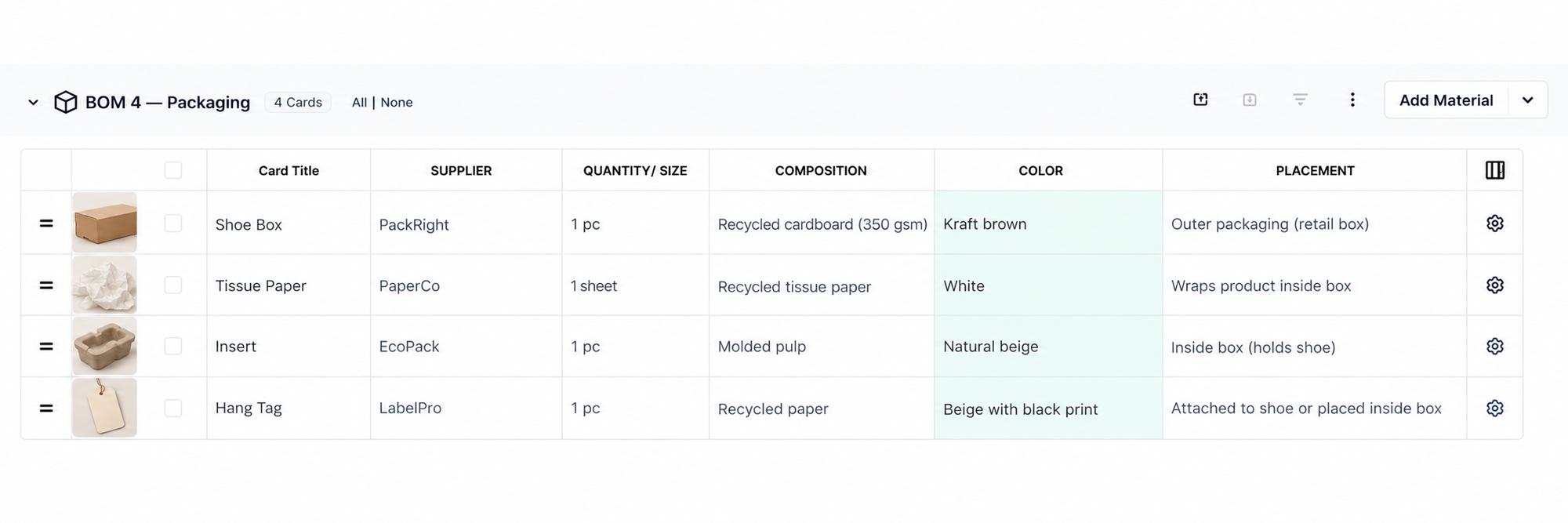
This gives teams a way to document complex products at the level at which they are actually sourced or manufactured, without creating completely separate product workspaces for every assembly.
The common thread behind all of these use cases
At first, these scenarios can look unrelated.
But they all have something in common.
The product itself doesn't always change just because the information needed to produce it does.
Sometimes the difference is the supplier.
Sometimes it's the material.
Sometimes it's the color.
Sometimes it's the artwork.
Sometimes it's the market.
Sometimes it's the production stage.
Sometimes it's the packaging.
And sometimes it's the way the product is manufactured.
In all of these cases, the question isn't simply:
"Do I have two versions?"
You probably do.
The more useful question is:
"How much of the product actually changed?"
If the measurements, construction, and core product definition remain the same, creating a completely separate tech pack may introduce more duplication than value.
The goal isn't to avoid having multiple versions.
The goal is to separate the information that is genuinely different without duplicating everything that isn't.
Managing multiple BOMs in PLMBR
This is the thinking behind the multiple BOM capability in PLMBR.
Instead of treating a tech pack as something that can contain only one BOM, you can add multiple BOM sections within the same tech pack workspace.
Here's what that looks like.
Let's go back to the bell sleeves top from earlier.
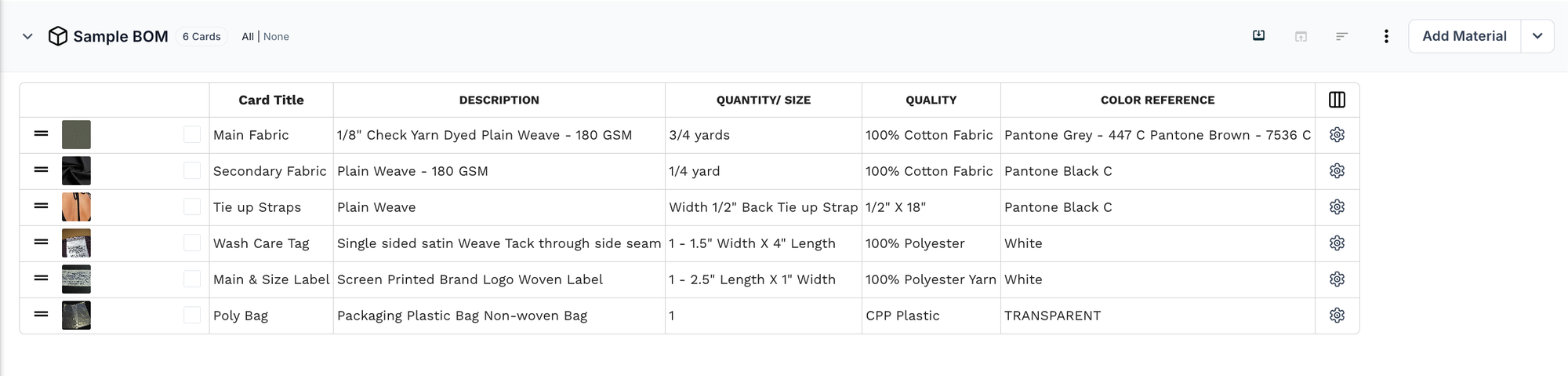
You already have a sample BOM.
Now you need a production BOM for the same product.
Step 1: Duplicate the BOM
Start with the BOM you already have.
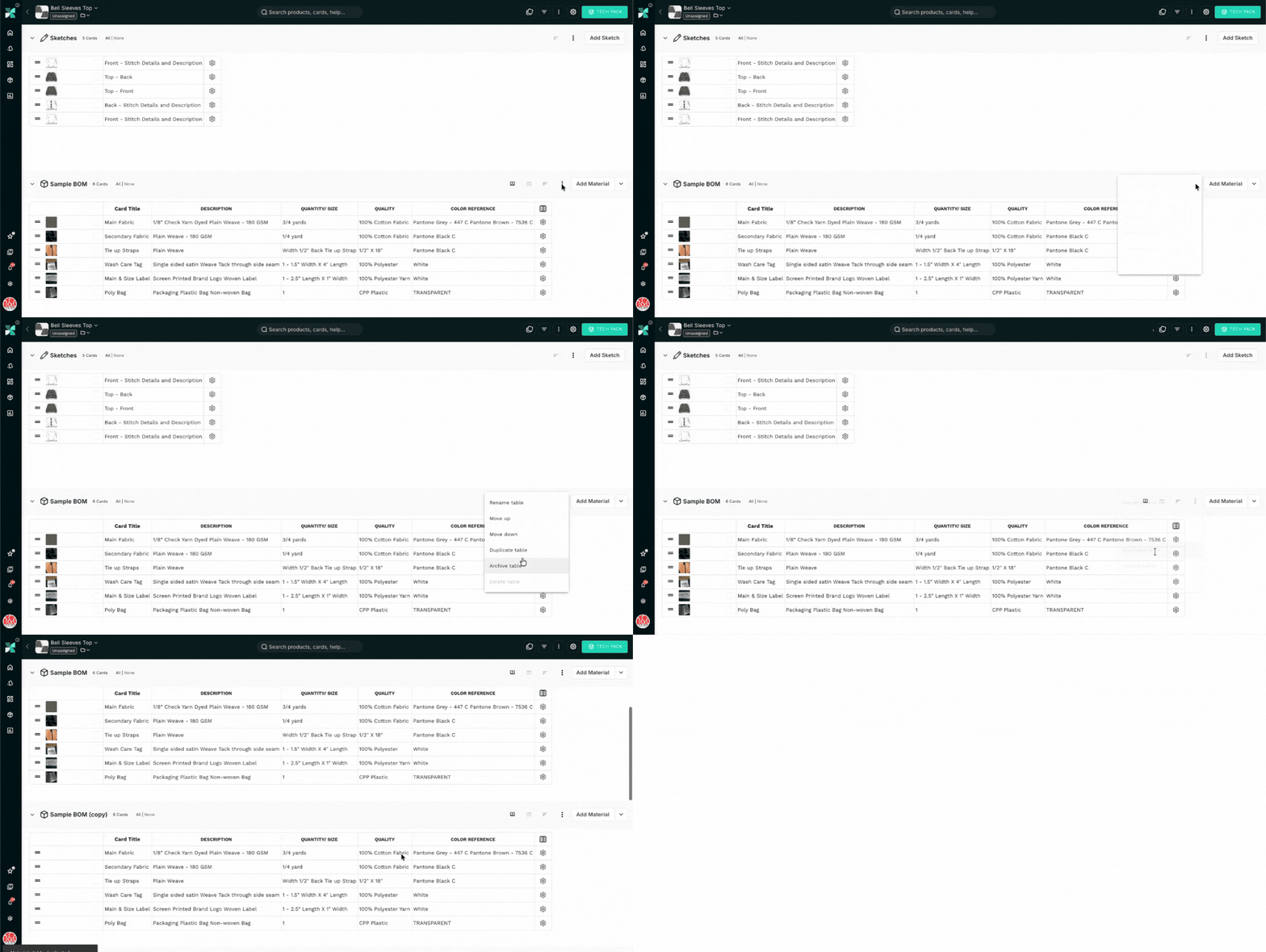
Open the table options (⋮) next to Add Material and select Duplicate table.
A copy appears right below it, with all the same materials.
Step 2: Rename it
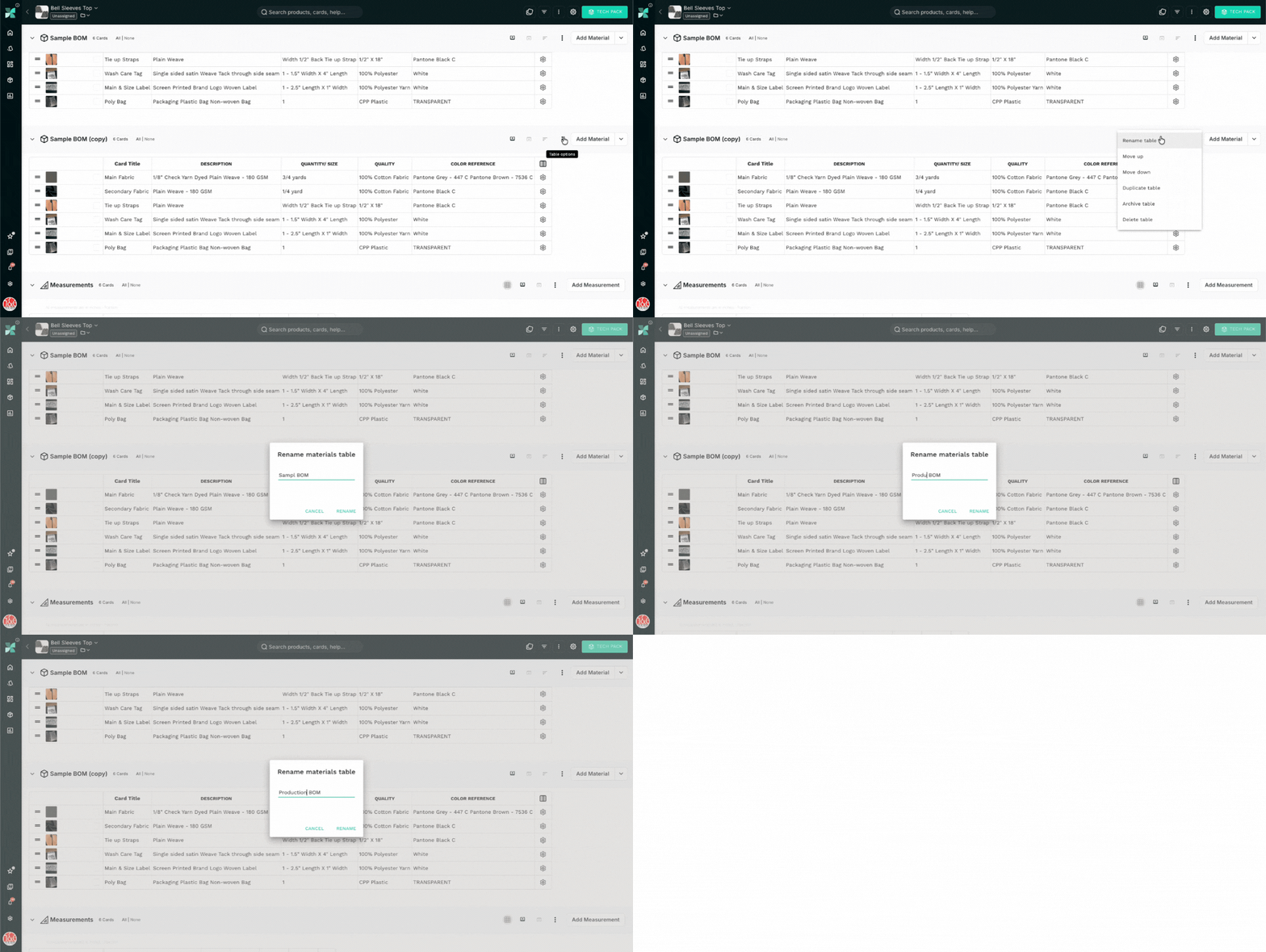
The copy shows up as "Sample BOM (copy)".
Open the table options again, select Rename table, and call it Production BOM.
Step 3: Open the material that changes
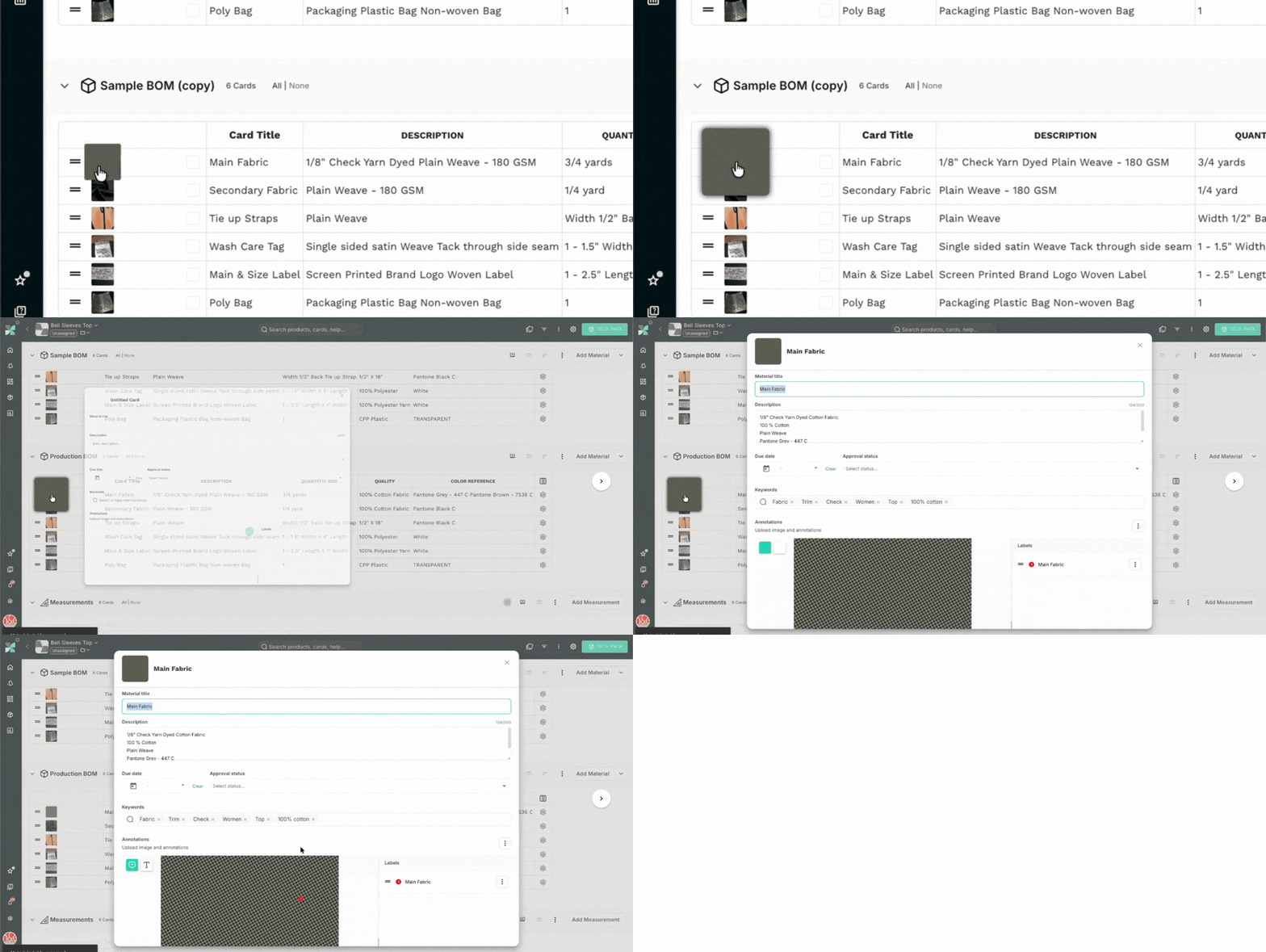
In this case, it's the main fabric.
Click its thumbnail and the material card opens.
Step 4: Switch the image
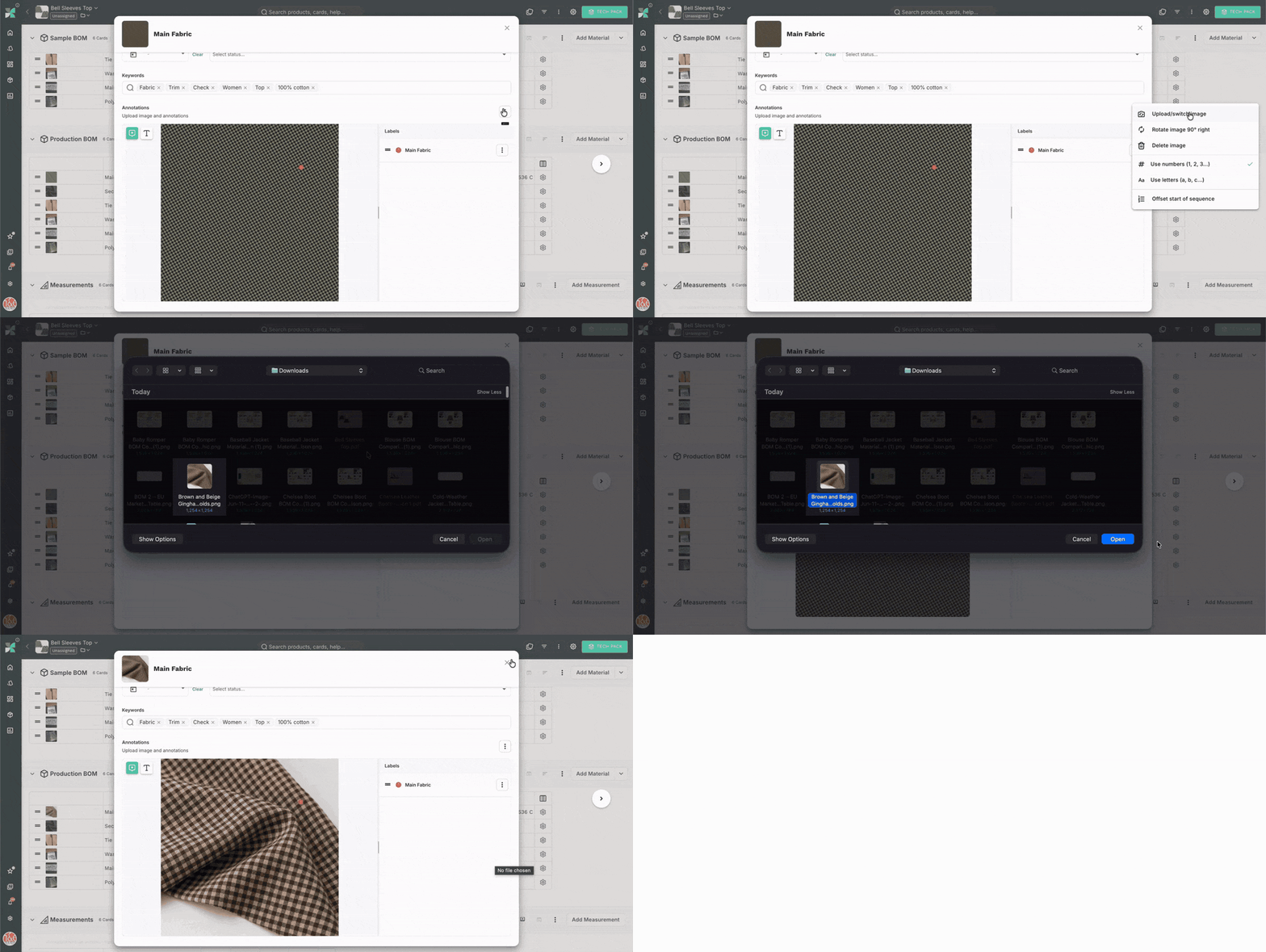
In the annotations area, open the options menu and select Upload/switch image.
Pick the production fabric.
The image changes. Your annotation labels stay where they were.
Step 5: Update the details
Then update whatever else has changed.
You can edit the table directly. Here, it's the color reference.
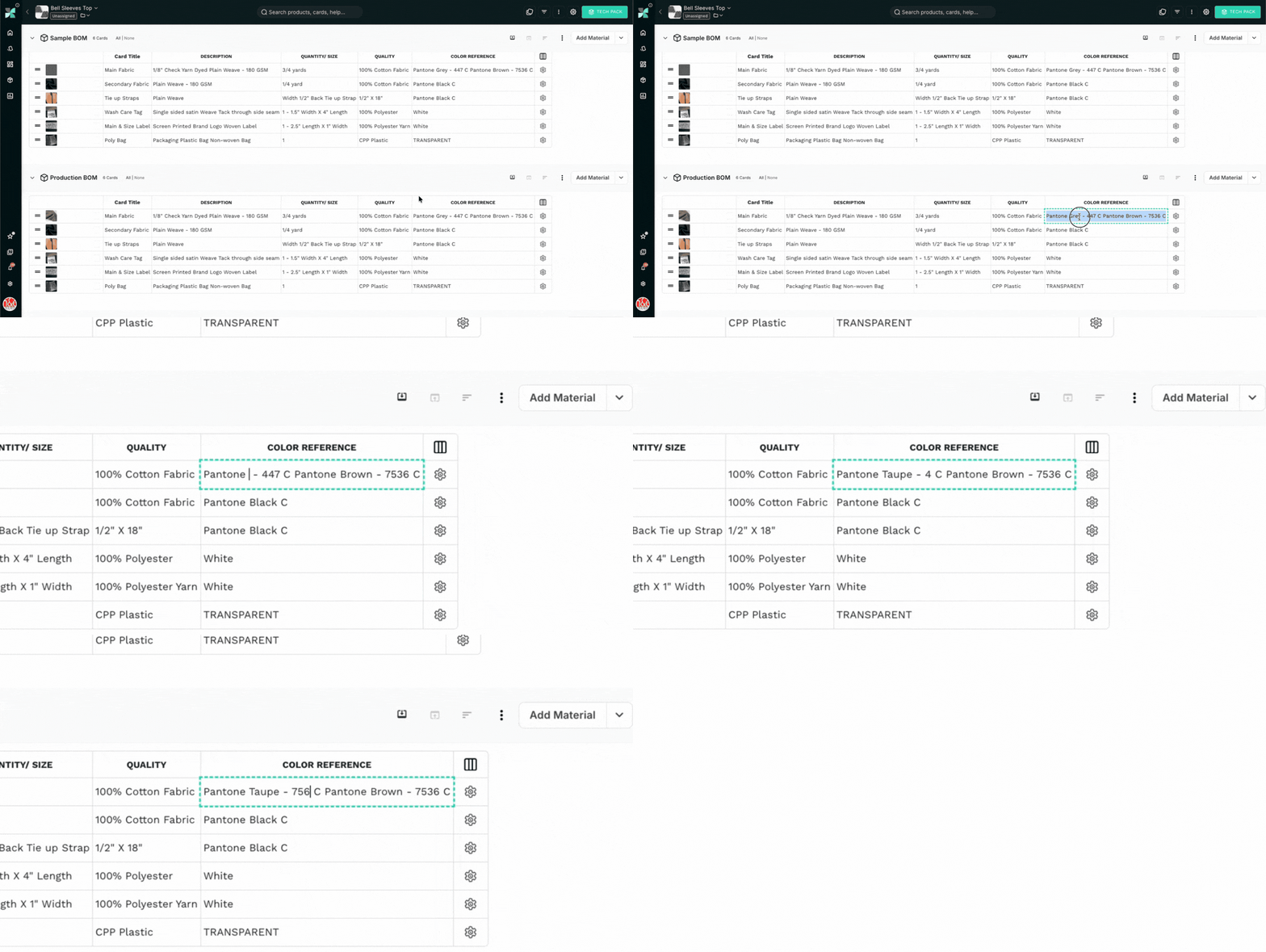
And that's it.
The sample BOM hasn't changed.
The production BOM has its own materials.
The sketches, measurements, and construction details are still shared.
One product. Two BOMs. Nothing duplicated.
That means you can keep the core product information together while creating separate BOMs for different material, sourcing, manufacturing, or product configurations.
For example:
BOM 1 — Supplier A
Supplier-specific materials, components, sourcing information, and costs.
BOM 2 — Supplier B
Alternative materials, components, sourcing information, and costs.
Or:
BOM 1 — Tan Chelsea Boot
Tan-specific materials and components.
BOM 2 — Black Chelsea Boot
Black-specific materials and components.
Or:
BOM 1 — Yellow Sunshine
Materials and artwork for the Yellow Sunshine print.
BOM 2 — Blue Winter
Materials and artwork for the Blue Winter print.
The exact structure depends on how your team works.
The important part is that you don't have to create an entirely new product just because you need another BOM.
The shared product information can remain in one workspace.
The differences can be documented where they actually occur.
When should you use multiple BOMs?
Not every tech pack needs multiple BOMs.
If you're making one product, with one sourcing configuration, one BOM is probably all you need.
Multiple BOMs become useful when there is a genuine reason to maintain more than one material or component configuration for the same product.
That might be because:
- You're comparing suppliers.
- You have a preferred material and an approved backup.
- Different colorways require different materials or trims.
- Different AOPs require different artwork or material configurations.
- The same product is being prepared for different markets.
- Your sample materials differ from the final production materials.
- The product has optional components or different tiers.
- Packaging changes by market or sales channel.
- A complex product has distinct assemblies.
In short:
There is a meaningful difference worth documenting, but not enough of a difference to justify duplicating the entire product.
Not every difference needs a new BOM
There is one important distinction here.
Multiple BOMs aren't useful simply because you can create them.
If two configurations have exactly the same materials, quantities, sourcing information, and costs, there may be no reason to create two BOMs just for the sake of having two.
The point is not to create more versions.
The point is to represent meaningful differences without duplicating everything else.
A colorway that only changes the name may not need a separate BOM.
A supplier that uses exactly the same materials and components may not need a separate BOM.
A market that has no difference in materials, labels, packaging, or other relevant requirements may not need its own BOM.
The decision should be based on whether the information actually needs to be different.
That's what makes multiple BOMs useful.
They give product teams a way to preserve variations where the variation matters, while keeping shared product information in one place.
The bigger idea: product development isn't always one-to-one
For a long time, we've treated a tech pack almost like a one-to-one relationship:
One product → one tech pack → one BOM.
But real product development doesn't always work that way.
A product can have multiple suppliers.
Multiple sourcing options.
Multiple colorways.
Multiple AOPs.
Multiple markets.
Multiple material alternatives.
Multiple packaging configurations.
Multiple assemblies.
The product is still one product.
The technical information around it just isn't always singular.
And once you look at tech packs this way, multiple BOMs stop feeling like a workaround.
They become a way of representing how products are actually developed.
One product. Multiple variations. One workspace.