
Contents
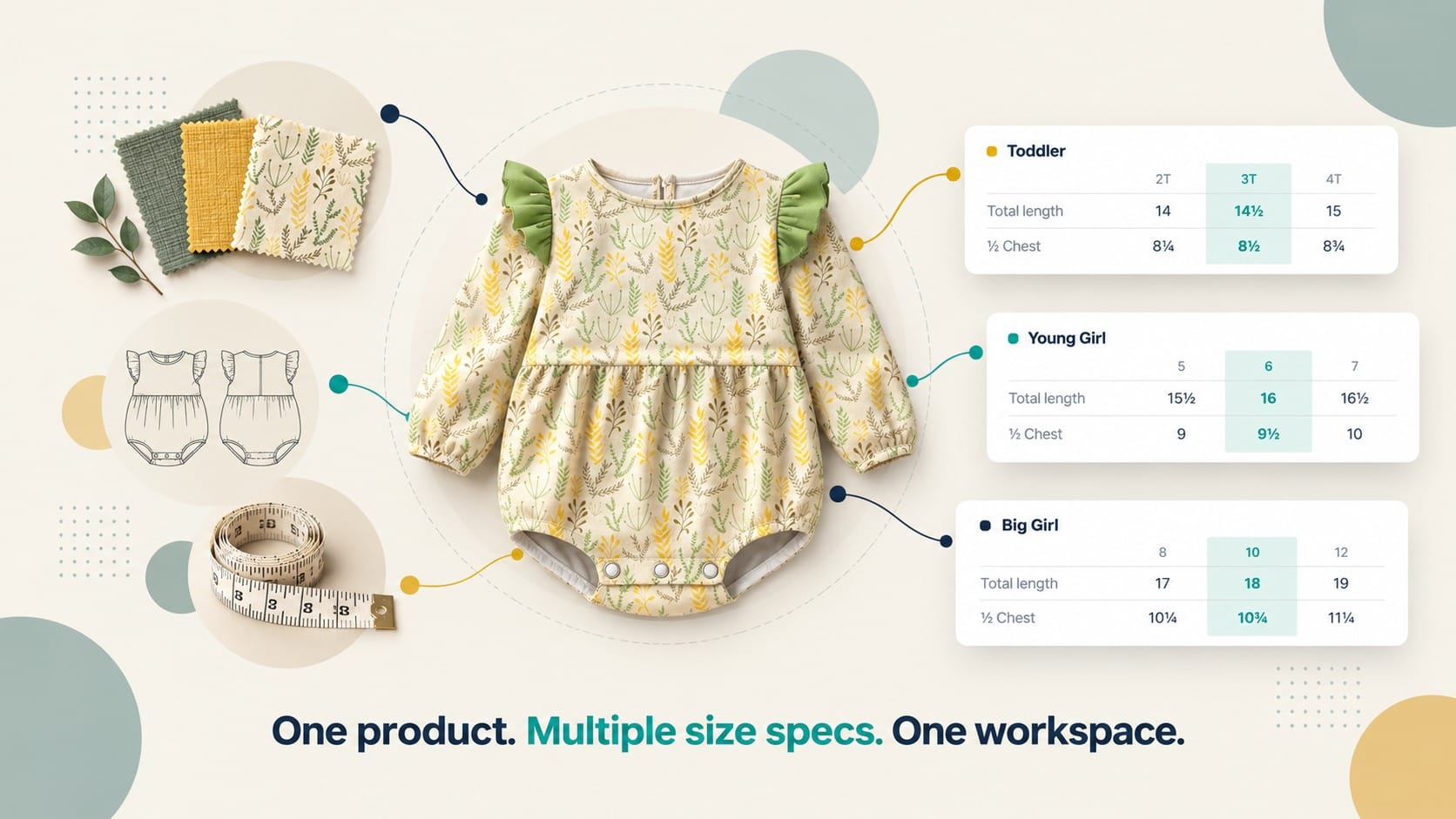
In our previous article on multiple BOMs in a tech pack, we looked at how you can manage different material combinations, colorways, and sourcing options without creating a separate tech pack for every variation.
But materials aren't the only part of product development that can get complicated.
Sometimes the design stays the same, but the measurements don't.
Maybe you're developing the same romper in toddler, young girl, and big girl sizes.
Maybe a shirt is coming in a regular fit and a relaxed fit.
Maybe you're offering a wrap dress in petite, regular, and tall.
Maybe a tote is being made in small, medium, and large.
Or perhaps the same jacket needs a different fit block for a different market.
The design, materials, and construction are shared. The measurement specifications aren't.
So how do you manage these differences without duplicating the entire tech pack?
This is where having multiple measurement sections in the same tech pack starts to make sense.
Why one tech pack per size spec isn't always the answer
Let's say you're developing a tote in three sizes.
The small, medium, and large versions share the same silhouette, leather, lining, hardware, and construction.
The main difference is the finished dimensions.
One obvious option is to create three tech packs, one for each size.
It sounds simple.
But now you've duplicated everything, not just the part that changed.
You have three sets of:
- Sketches
- BOMs
- Construction details
- Comments
- Product information
- Files and references
And the moment something changes, you have another problem.
If the zipper changes, do you update all three tech packs?
If a stitching detail changes, do you update all three?
If the factory asks a question, which version is the source of truth?
The other option is to put every measurement into one chart.
That works for a simple size range. But it gets harder to read when each version has its own base size, its own grading, or its own points of measurement.
A better approach can be:
One product → shared product information → multiple measurement sections for different size specs.
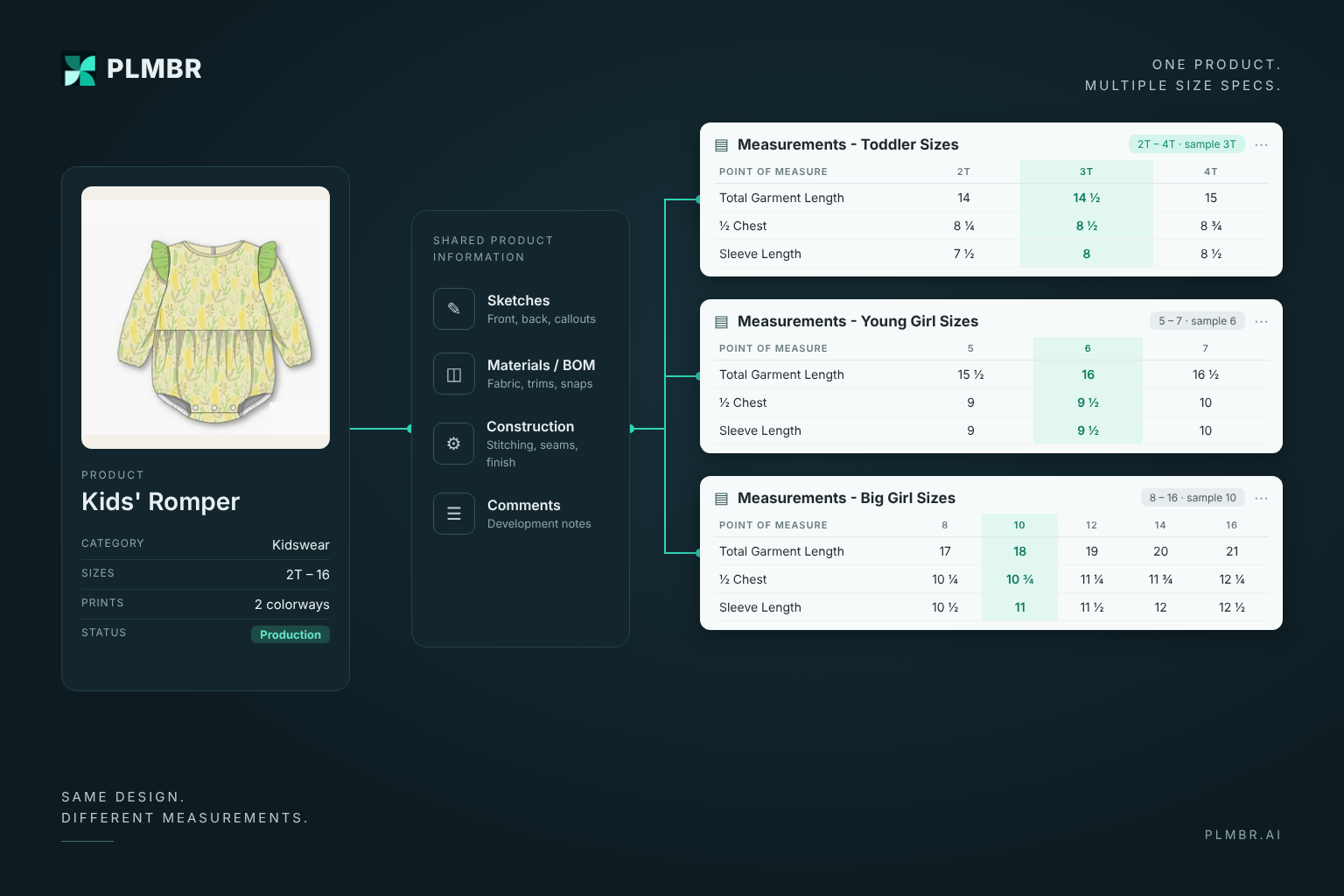
That way, the information that is shared stays shared.
And the measurements that are different get their own place.
A measurement chart isn't the same as a size range
Before getting into the use cases, it helps to separate a few terms that often get used interchangeably.
A size range is the set of sizes a product is offered in, such as XS–XL or 2T–4T.
A measurement chart lists the finished measurements of the product for every size in that range. It's sometimes called a spec sheet or graded spec.
This is different from a size chart, which usually shows customers the body measurements each size is meant to fit.
The points of measurement (POMs) are the specific places those measurements are taken, such as chest width, front length from HPS (high point shoulder), or handle drop.
Two more terms come up throughout this article:
- The base size (or sample size) is the size the pattern is developed and fitted in first. Every other size is graded from it.
- Grading is the set of rules that defines how each measurement increases or decreases from one size to the next.
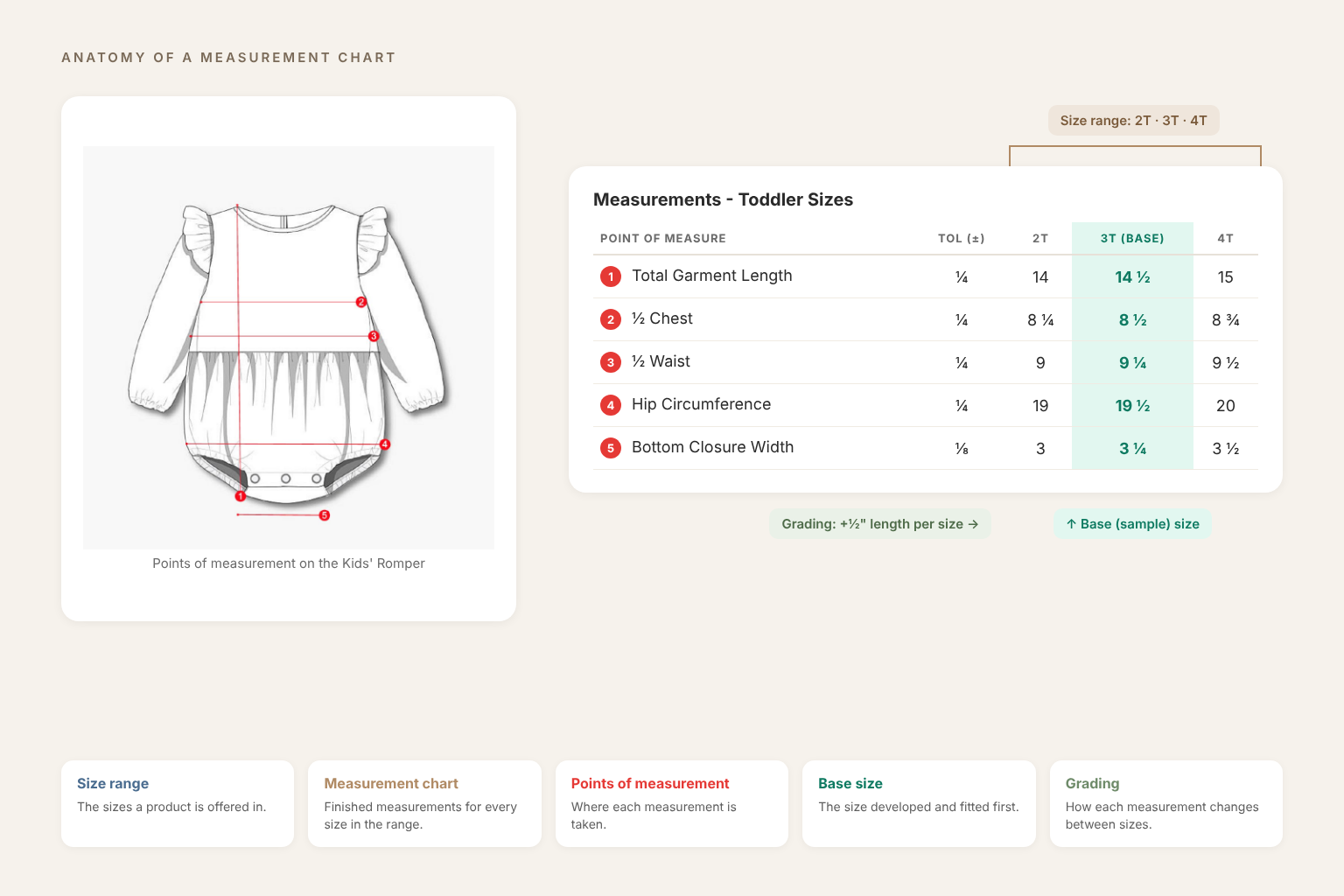
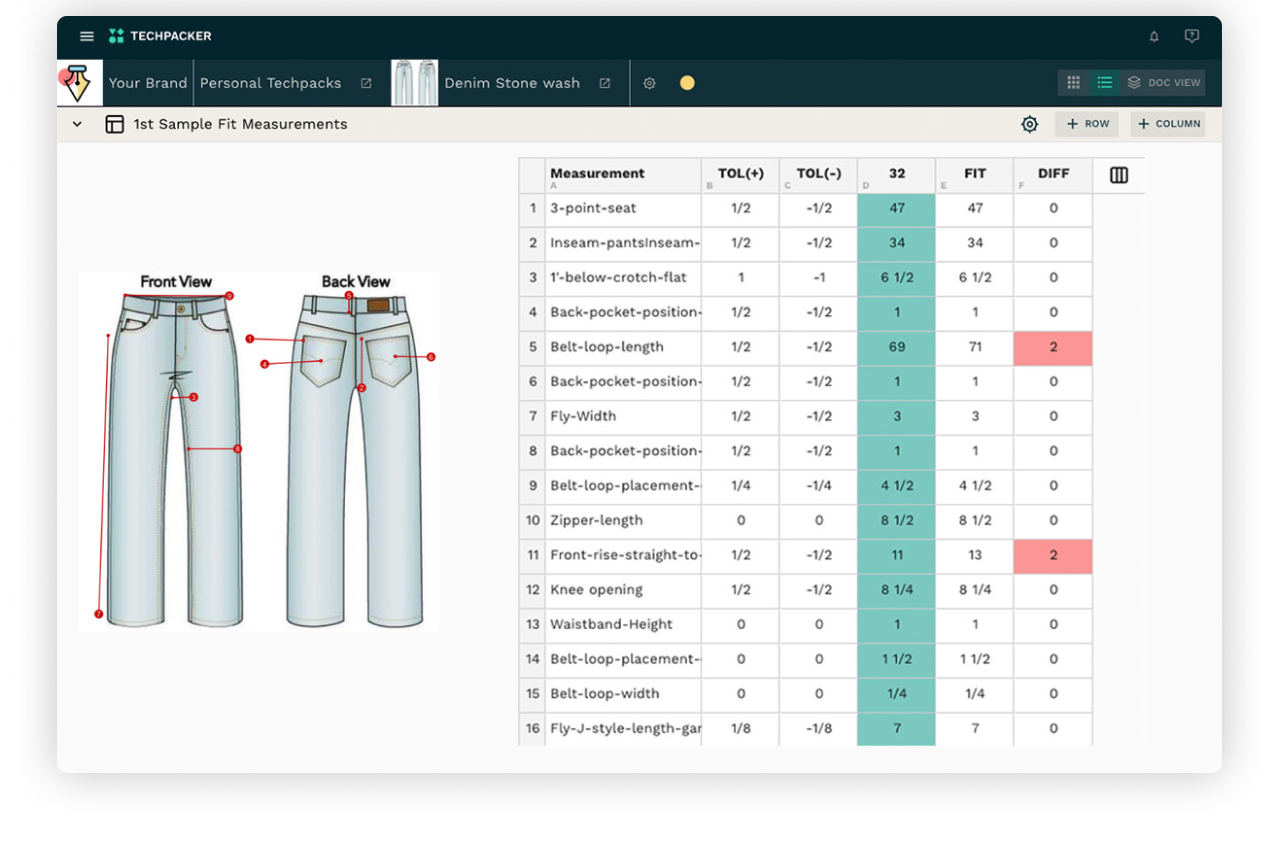
If you're new to measurement charts, this guide covers the basics:

Most products need only one measurement chart. One size range, one base size, one set of grading rules.
But some products need more than one.
When does having multiple measurement sections actually make sense?
A product can keep the same design while its measurements change by age group, proportion, fit, body type, size, configuration, or market.
Here are nine situations where keeping those differences in separate measurement sections can make sense.
1. When you're developing for different age groups
Kidswear is one of the clearest examples.
Imagine you're developing a long-sleeve romper with a round neckline, shoulder ruffles, and a gathered waist panel.
It comes in three size ranges:
- Toddler sizes: 2T, 3T, and 4T
- Young Girl sizes: 5, 6, and 7
- Big Girl sizes: 8, 10, 12, 14, and 16
The design is the same.
The micro modal fabric is the same.
The snap buttons and elastic are the same.
The construction is the same.
But each range has its own sample size, and the measurements grade differently from one range to the next.
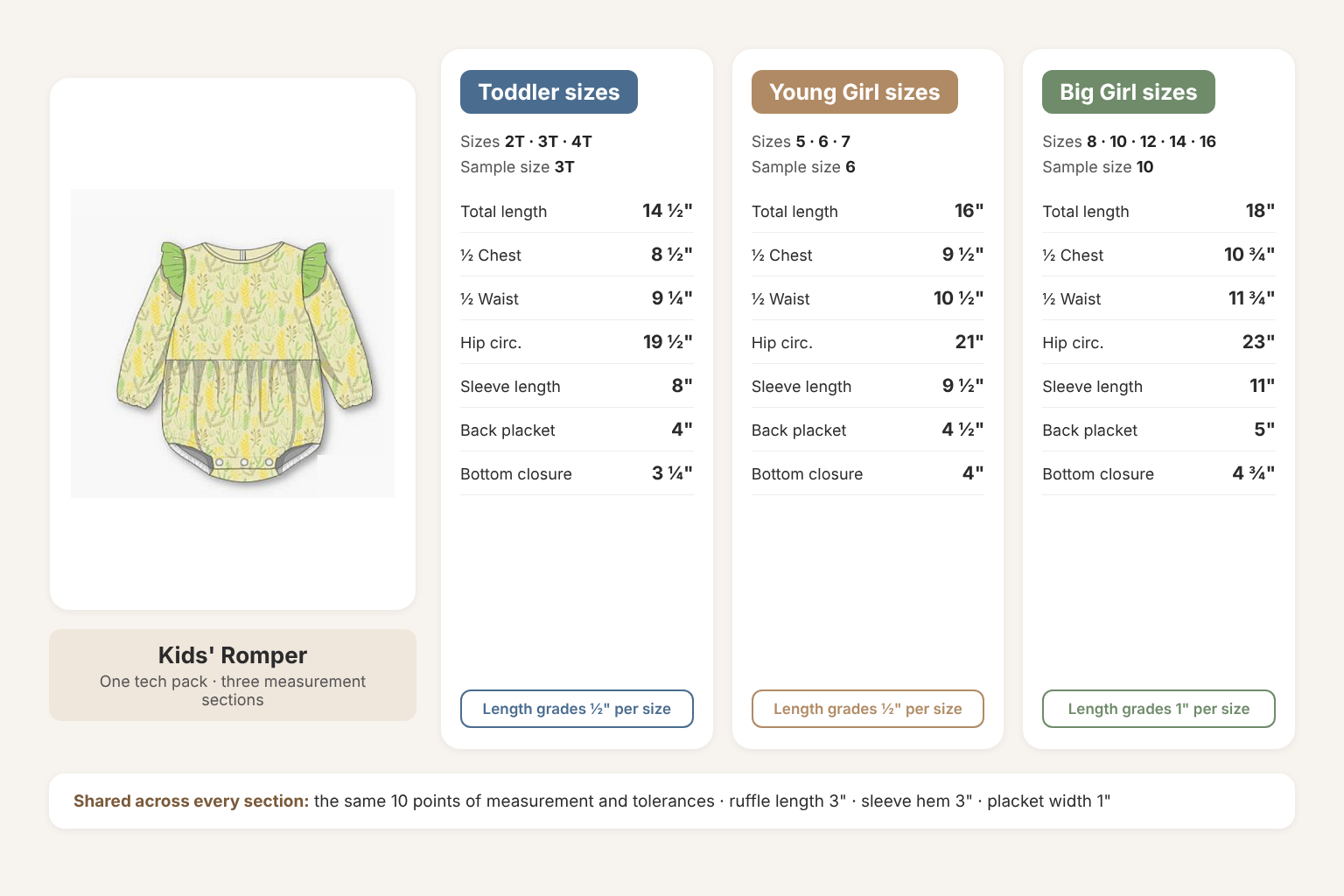
So you might have:
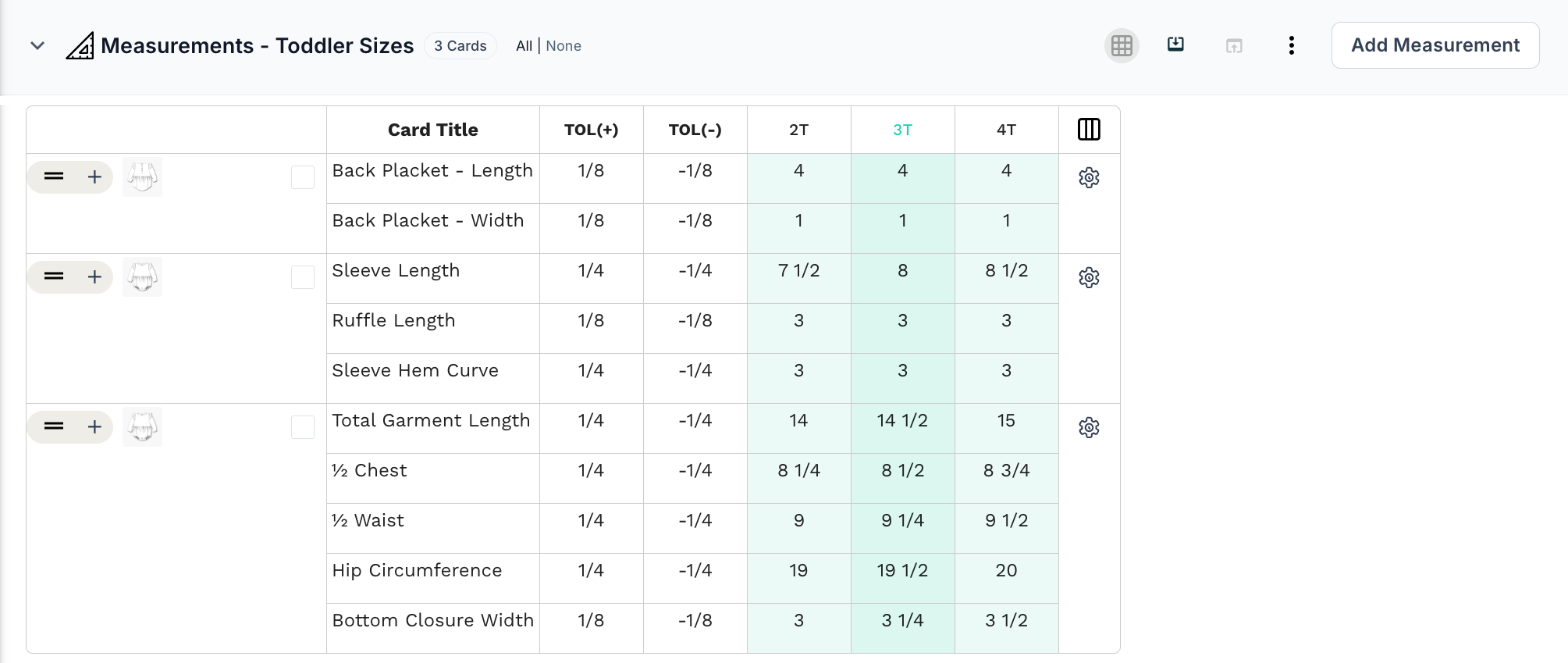
Measurement section 1 — Toddler sizes (2T–4T, sample size 3T)
- Total garment length: 14 ½"
- ½ chest: 8 ½"
- ½ waist: 9 ¼"
- Hip circumference: 19 ½"
- Sleeve length: 8"
- Back placket length: 4"
- Bottom closure width: 3 ¼"
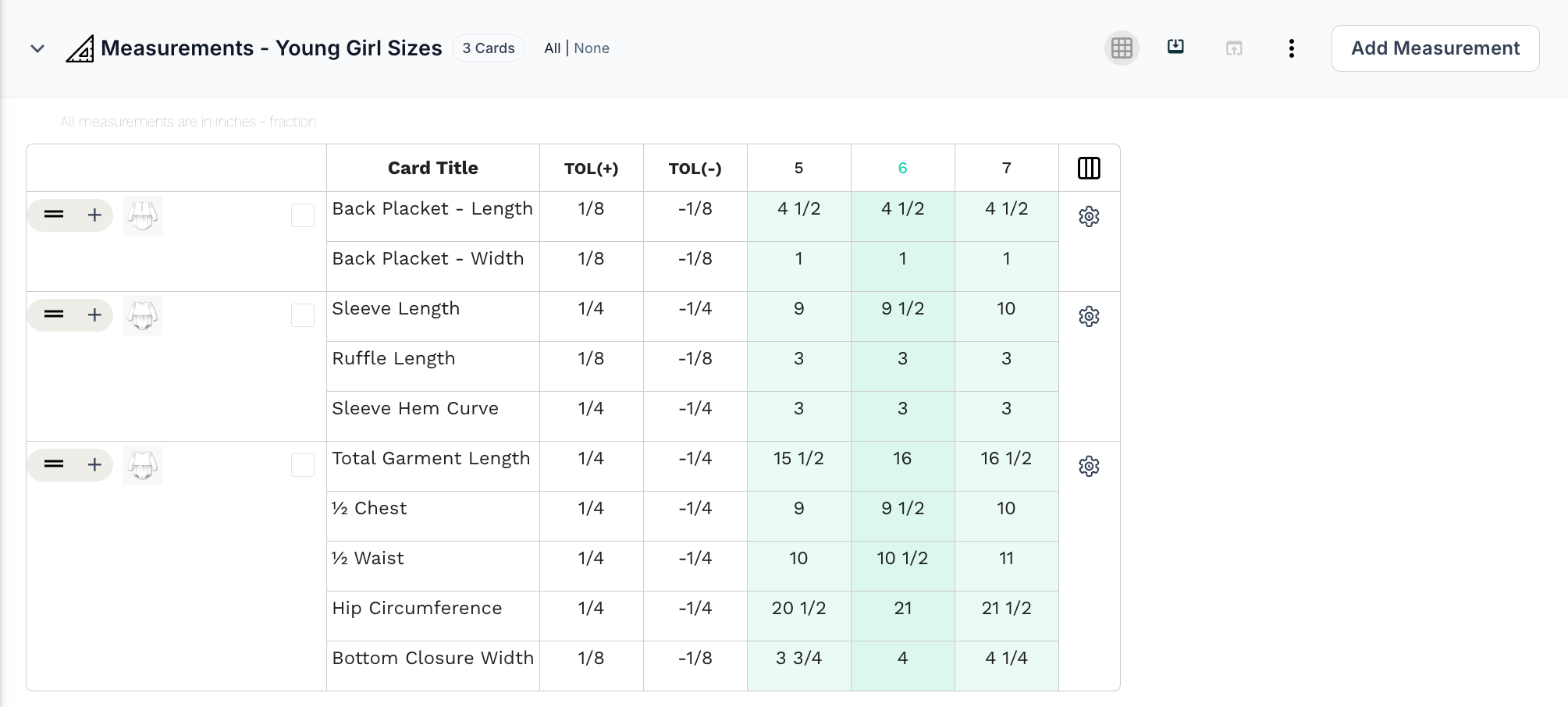
Measurement section 2 — Young Girl sizes (5–7, sample size 6)
- Total garment length: 16"
- ½ chest: 9 ½"
- ½ waist: 10 ½"
- Hip circumference: 21"
- Sleeve length: 9 ½"
- Back placket length: 4 ½"
- Bottom closure width: 4"
Measurement section 3 — Big Girl sizes (8–16, sample size 10)
- Total garment length: 18"
- ½ chest: 10 ¾"
- ½ waist: 11 ¾"
- Hip circumference: 23"
- Sleeve length: 11"
- Back placket length: 5"
- Bottom closure width: 4 ¾"
Notice that not everything changes.
All three sections use the same 10 points of measurement and the same tolerances. The ruffle length, sleeve hem curve, and back placket width stay the same in every size.
What changes is the sample size, the measurements, and the grading. In the toddler and young girl ranges, the total garment length grows by ½" per size. In the big girl range, it grows by 1" per size.
The problem
Putting all three ranges into one chart means one long table with 11 sizes, three sample sizes, and three sets of grading rules.
Creating three tech packs means maintaining the same sketches, BOM, prints, and construction details three times.
Either way, it becomes easier for someone to grade from the wrong sample size, or apply a toddler grade rule to a big girl size.
The solution
Keep the shared design, BOM, and construction details together, and give each size range its own measurement section.
The toddler section documents sizes 2T to 4T.
The young girl section documents sizes 5 to 7.
The big girl section documents sizes 8 to 16.
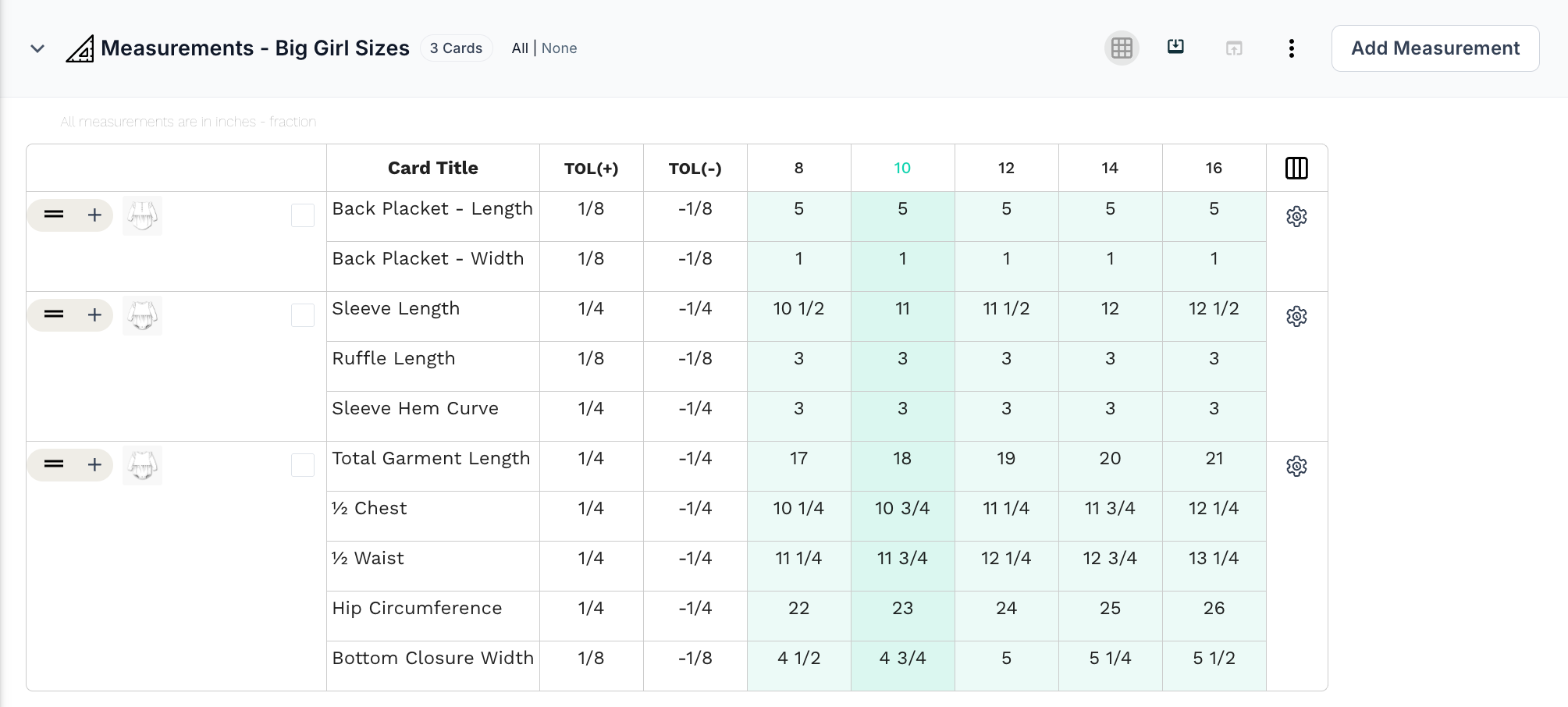
The team and the factory can go straight to the right spec without sorting through measurements meant for a different age group.
The same approach works for footwear or accessories made in both children's and adult ranges.
2. When the same style comes in petite, regular, and tall
Some products need to account for different proportions, not just different overall sizes.
Imagine you're developing a short wrap dress with a V-neckline, a tie waistband, and a ruffle at the hem.
It comes in sizes S, M, and L, in petite, regular, and tall.
Two customers can wear the same size and still have very different torso and body lengths.
The polka dot fabric is the same.
The waistband is the same.
The labels and trims are the same.
The construction is the same.
But the lengths change.
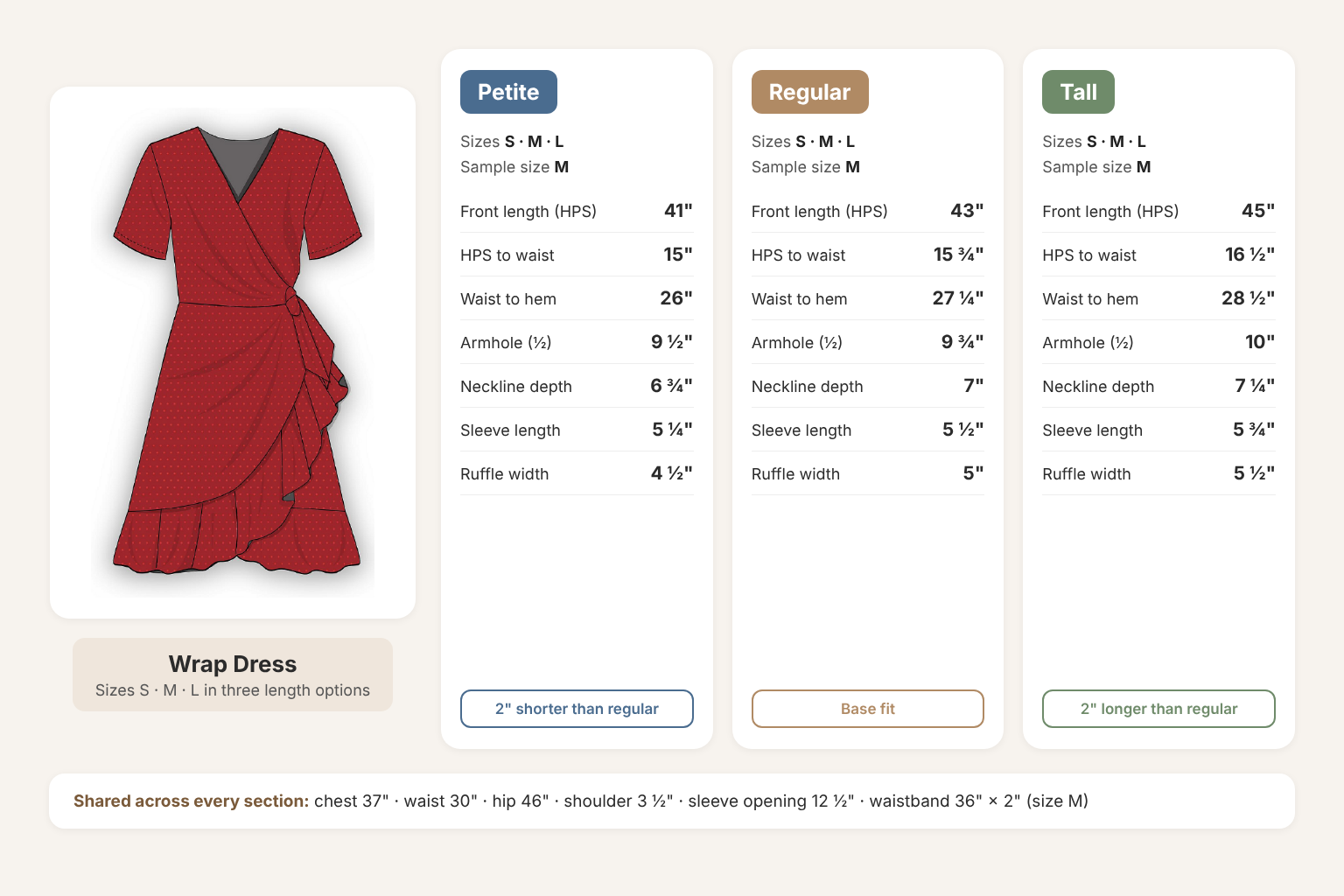
So you might have:
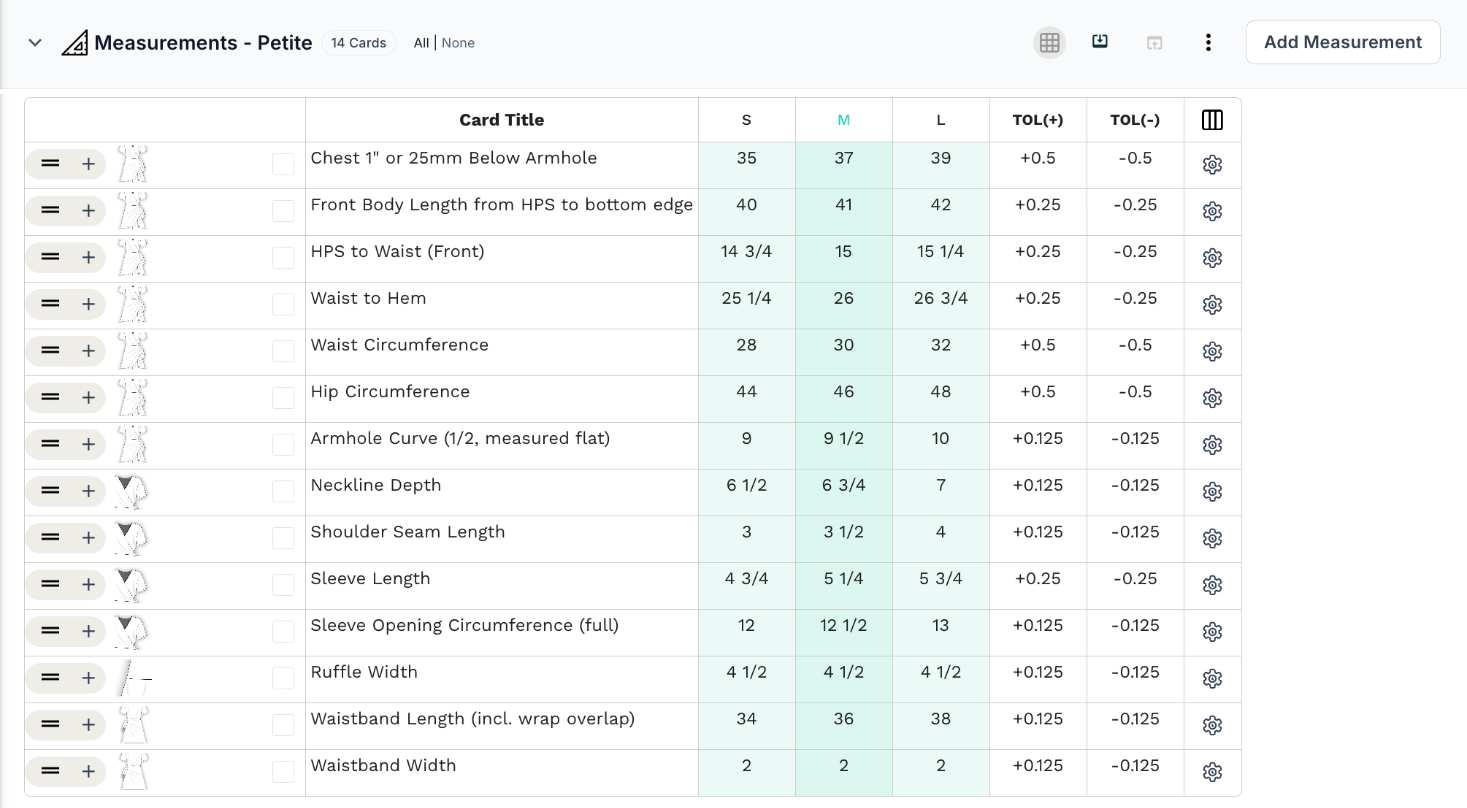
Measurement section 1 — Petite (S–L, sample size M)
- Front body length from HPS: 41"
- HPS to waist: 15"
- Waist to hem: 26"
- Armhole curve (½): 9 ½"
- Neckline depth: 6 ¾"
- Sleeve length: 5 ¼"
- Ruffle width: 4 ½"
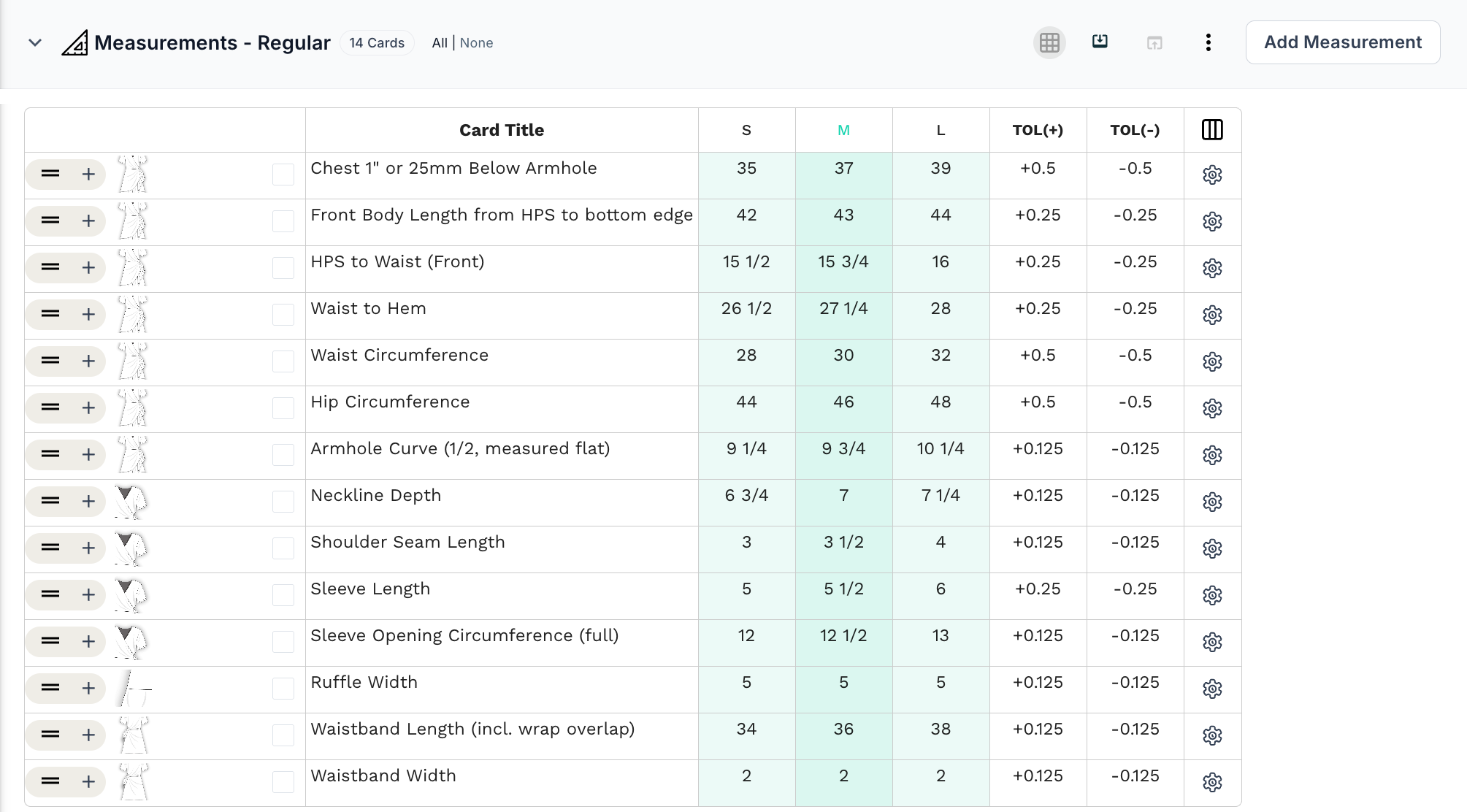
Measurement section 2 — Regular (S–L, sample size M)
- Front body length from HPS: 43"
- HPS to waist: 15 ¾"
- Waist to hem: 27 ¼"
- Armhole curve (½): 9 ¾"
- Neckline depth: 7"
- Sleeve length: 5 ½"
- Ruffle width: 5"
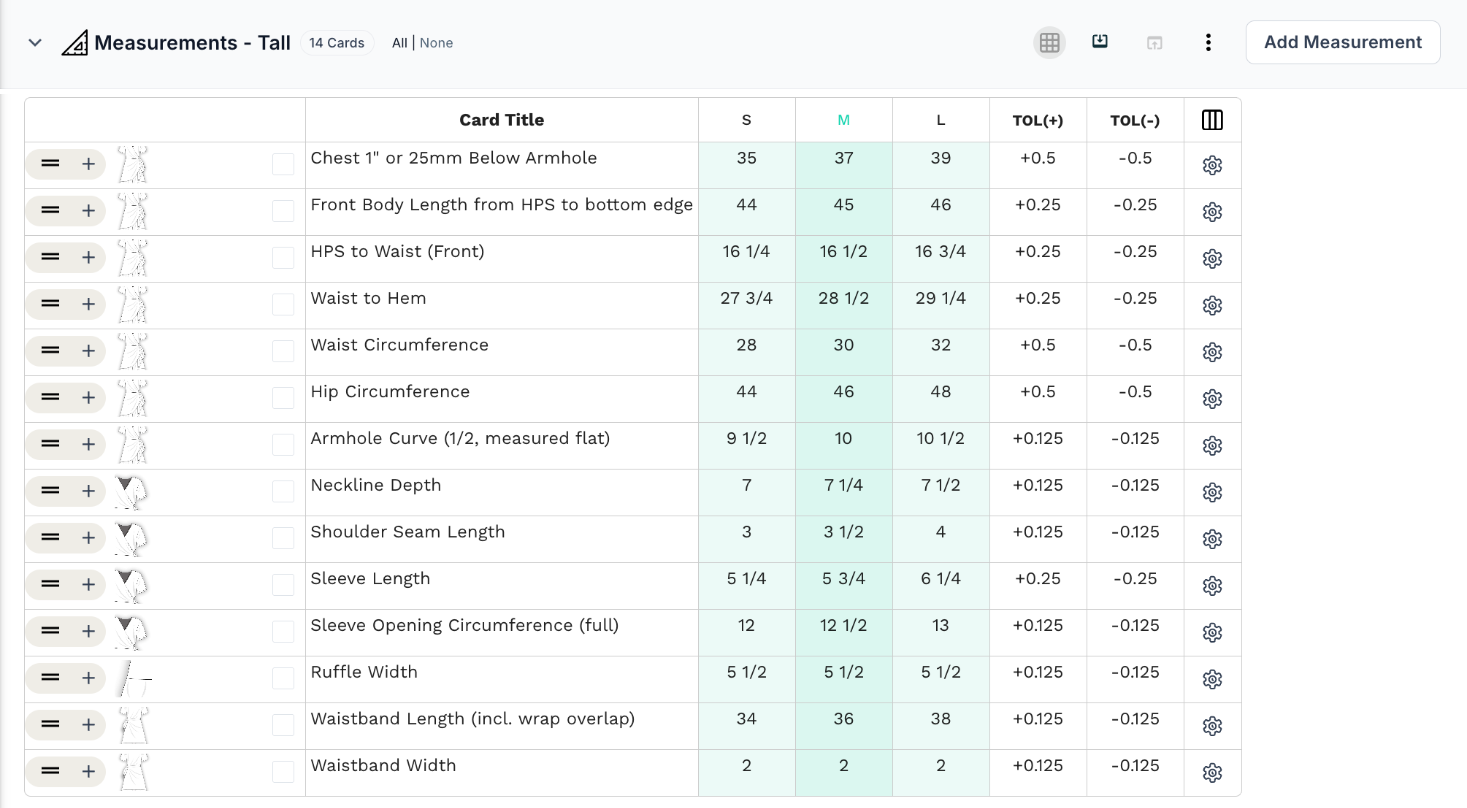
Measurement section 3 — Tall (S–L, sample size M)
- Front body length from HPS: 45"
- HPS to waist: 16 ½"
- Waist to hem: 28 ½"
- Armhole curve (½): 10"
- Neckline depth: 7 ¼"
- Sleeve length: 5 ¾"
- Ruffle width: 5 ½"
Notice that the width and circumference measurements don't change.
The chest (37"), waist (30"), hip (46"), shoulder seam, sleeve opening, and waistband are identical in all three sections.
What changes is the length. The petite front body length is 2" shorter than the regular, and the tall is 2" longer. That difference is split between the bodice and the skirt, with smaller adjustments to the armhole, neckline depth, sleeve length, and ruffle.
The problem
A graded measurement chart handles size changes well. It isn't designed to show three length options for every size.
You end up with notes like "+2 in for tall" or "−¾ in at the bodice for petite" scattered through the chart, and it becomes easy to cut the wrong length.
The solution
Give each proportion range its own measurement section.
The petite section documents the shorter lengths.
The regular section documents the base fit.
The tall section documents the longer lengths.
The same idea applies outside apparel. A backpack designed for different torso lengths may need its own back-panel and strap-placement measurements for each fit.
3. When the same style comes in different fits
Not every variation is about size. Sometimes it's about fit.
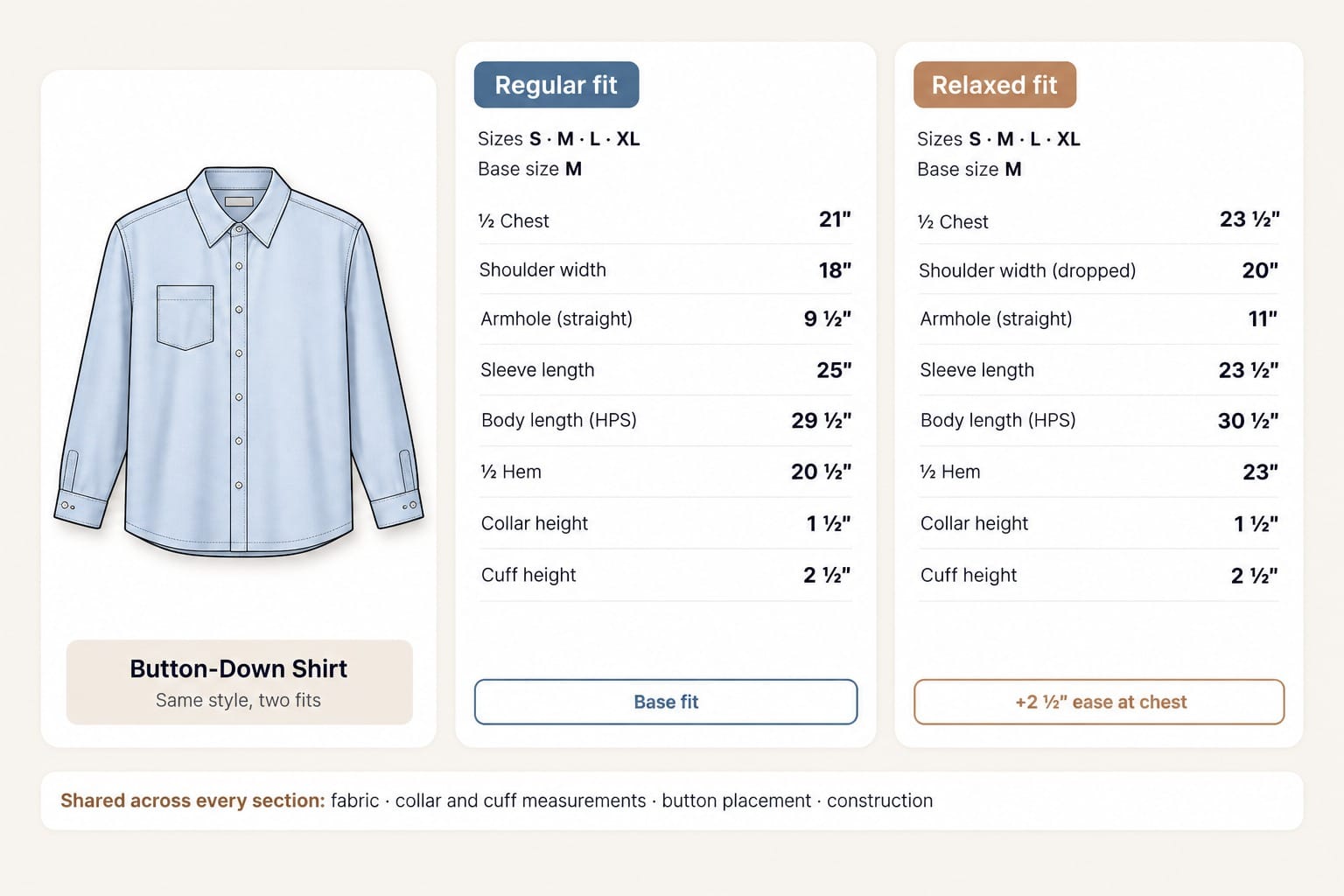
Imagine you're developing a button-down shirt in two fits:
- Regular fit
- Relaxed fit
The collar is the same.
The button placement is the same.
The fabric is the same.
But the relaxed fit has more ease through the chest and body. Ease is the extra room between the body and the garment.
So you might have:
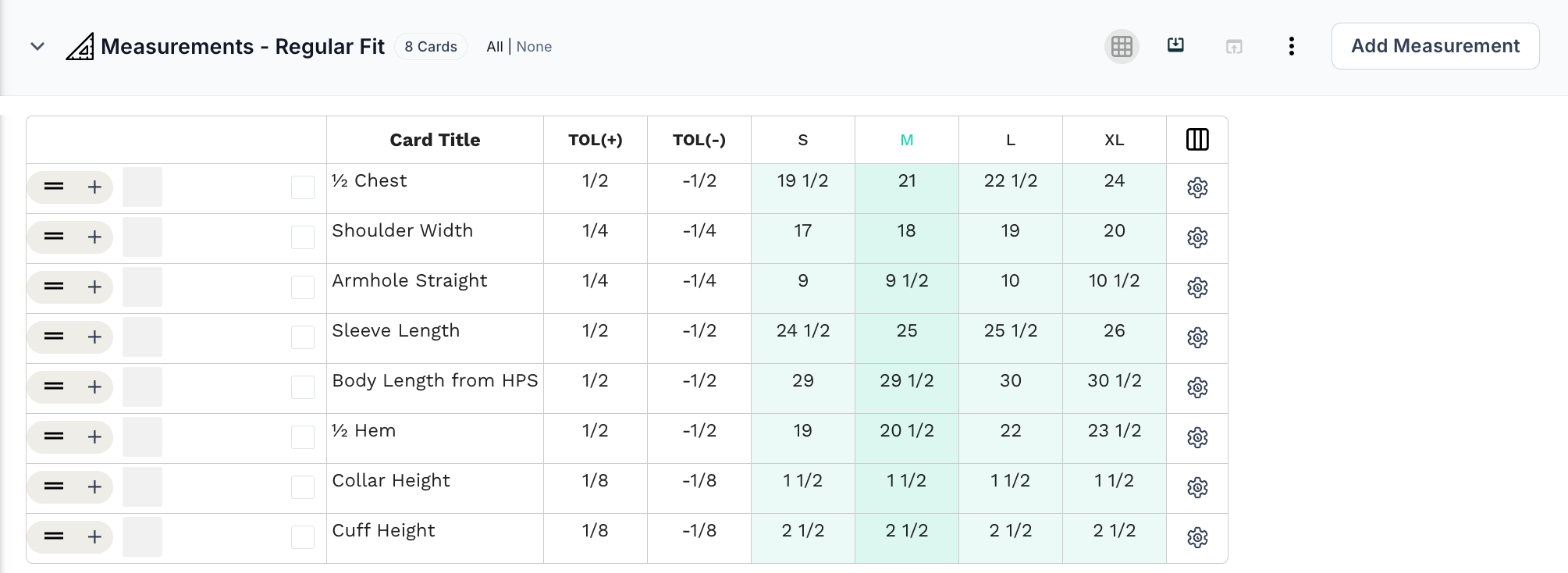
Measurement section 1 — Regular fit (base size M)
- ½ chest: 21"
- Shoulder width: 18"
- Armhole (straight): 9 ½"
- Sleeve length: 25"
- Body length (HPS): 29 ½"
- ½ hem: 20 ½"
- Collar height: 1 ½"
- Cuff height: 2 ½"
Measurement section 2 — Relaxed fit (base size M)
- ½ chest: 23 ½"
- Shoulder width (dropped): 20"
- Armhole (straight): 11"
- Sleeve length: 23 ½"
- Body length (HPS): 30 ½"
- ½ hem: 23"
- Collar height: 1 ½"
- Cuff height: 2 ½"
Notice that the collar and cuff don't change. The fit-dependent measurements do.
The problem
When both fits are sampled at the same time, it's easy for a relaxed-fit comment to end up on the regular-fit spec, or the other way round.
Duplicating the tech pack avoids that, but now the collar, buttons, and construction details live in two places.
The solution
Keep the shared product details together and use a separate measurement section for each fit.
The regular fit section documents the base fit.
The relaxed fit section documents the extra ease through the chest and body.
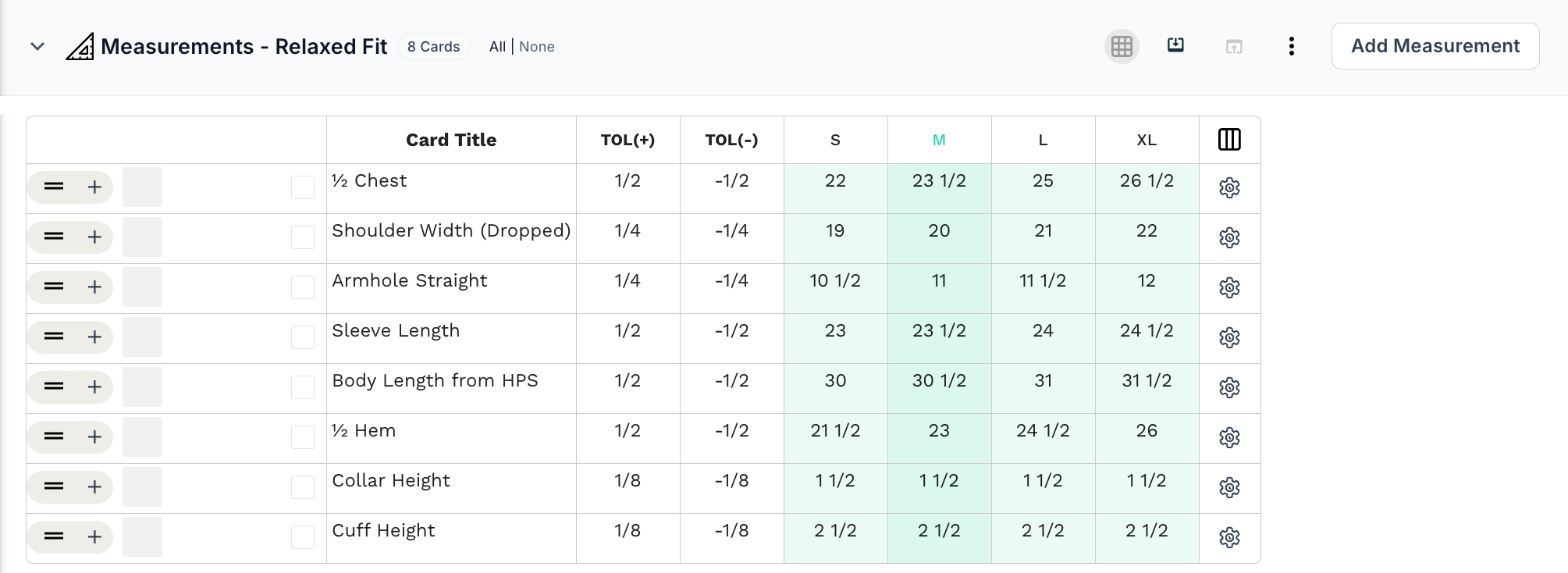
Each fit has its own spec, and both stay connected to the same shirt.
4. When you're making men's, women's, and unisex versions
Some brands develop the same product for different customer groups.
Imagine you're developing a basic hoodie in men's, women's, and unisex versions.
The fabric is the same.
The artwork is the same.
The trims and construction are the same.
But each version is built on a different fit block. A fit block is the base pattern a brand uses as the starting point for a particular fit.
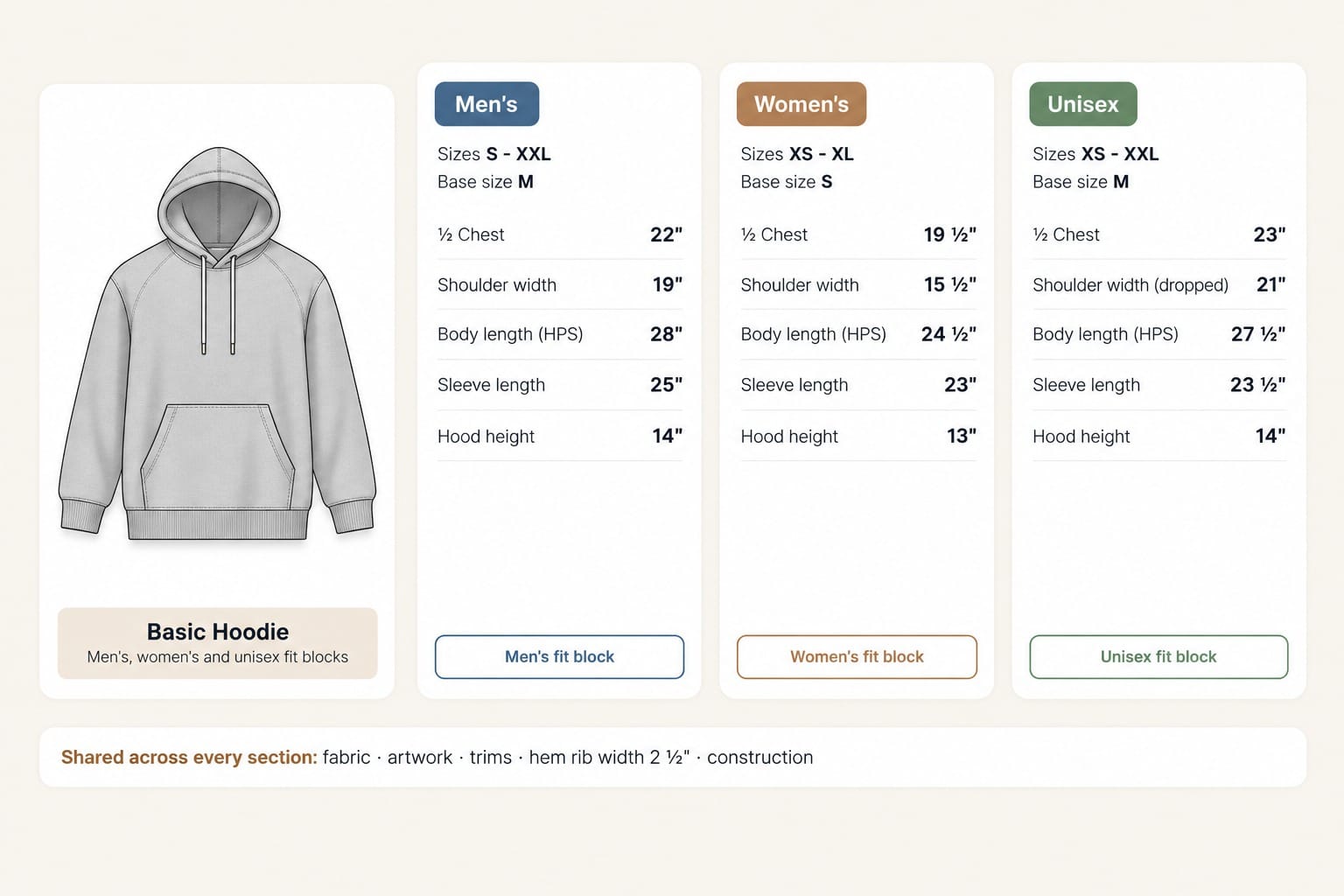
So you might have:
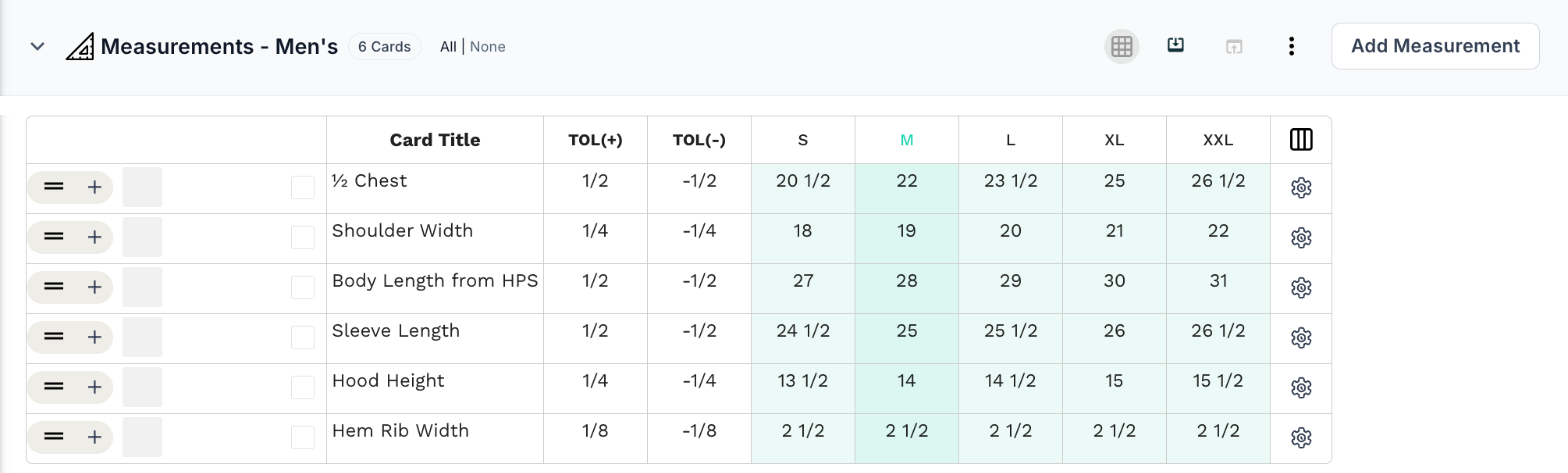
Measurement section 1 — Men's (S–XXL, base size M)
- ½ chest: 22"
- Shoulder width: 19"
- Body length (HPS): 28"
- Sleeve length: 25"
- Hood height: 14"
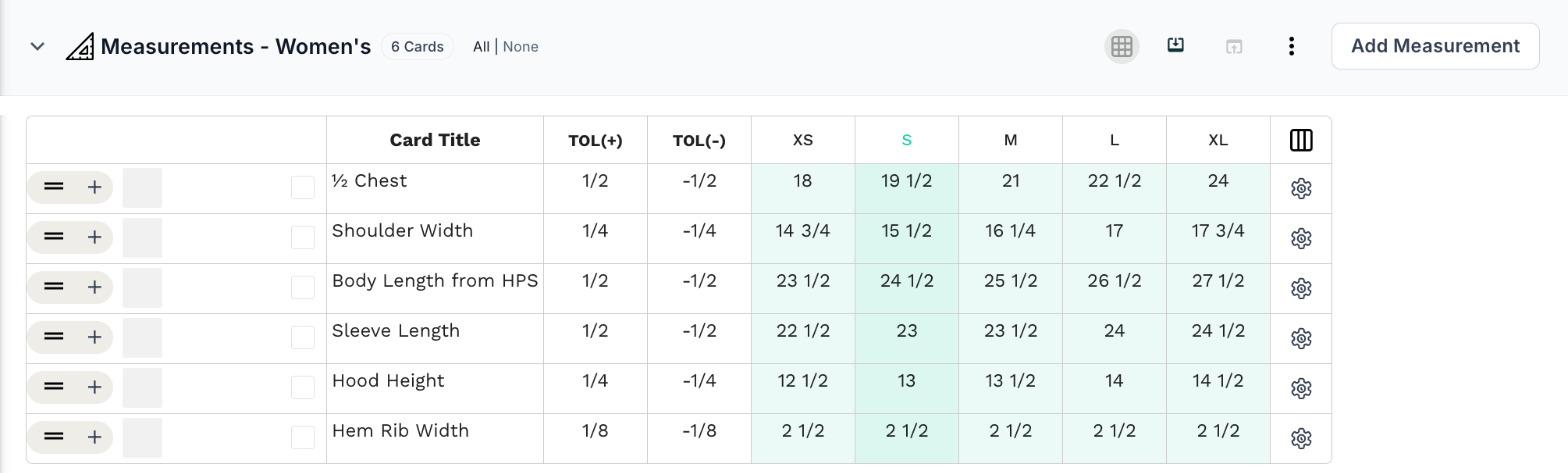
Measurement section 2 — Women's (XS–XL, base size S)
- ½ chest: 19 ½"
- Shoulder width: 15 ½"
- Body length (HPS): 24 ½"
- Sleeve length: 23"
- Hood height: 13"
Measurement section 3 — Unisex (XS–XXL, base size M)
- ½ chest: 23"
- Shoulder width (dropped): 21"
- Body length (HPS): 27 ½"
- Sleeve length: 23 ½"
- Hood height: 14"
Notice that the size ranges and base sizes differ, not just the measurements.
The problem
Three tech packs means the artwork, trims, and construction details are maintained three times.
One combined chart means three size ranges and three base sizes in one table.
Neither makes it easy to review, sample, and approve each version on its own.
The solution
Use one measurement section for each fit block.
The men's section documents sizes S to XXL.
The women's section documents sizes XS to XL.
The unisex section documents sizes XS to XXL.
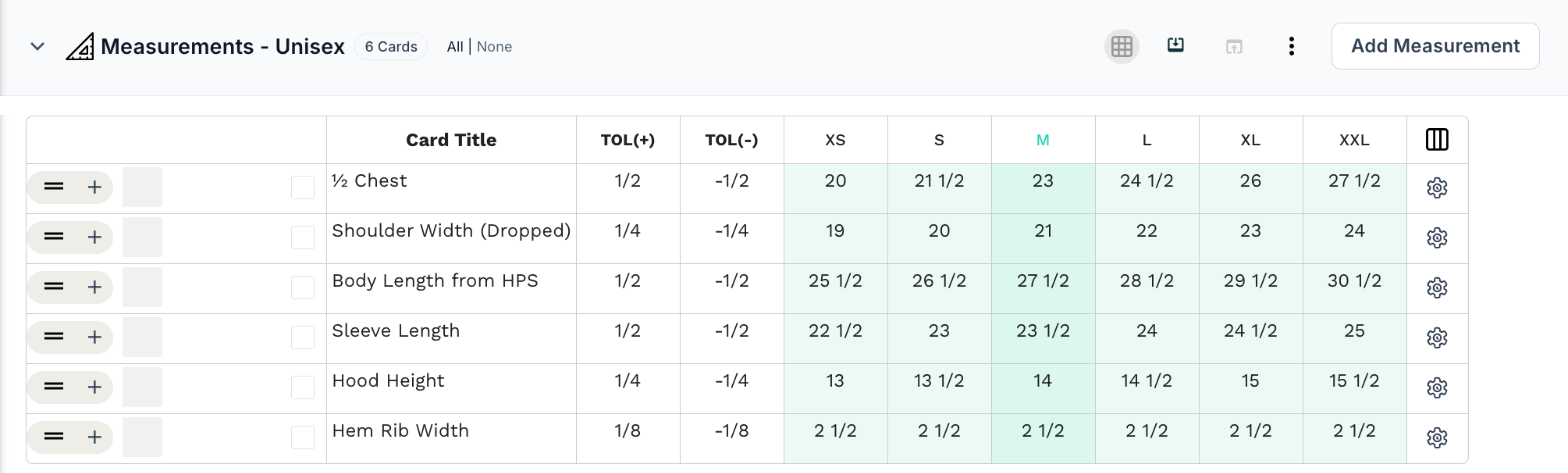
Each version can be fitted and approved independently, while the shared hoodie details stay in one place.
5. When a version has specialized fit requirements
Sometimes two versions of a product are designed for different functional needs.
Take maternity wear.
Imagine you're developing a jersey midi dress in a regular version and a maternity version.
The fabric, color, and design details are the same.
But the maternity version needs room for the bump.
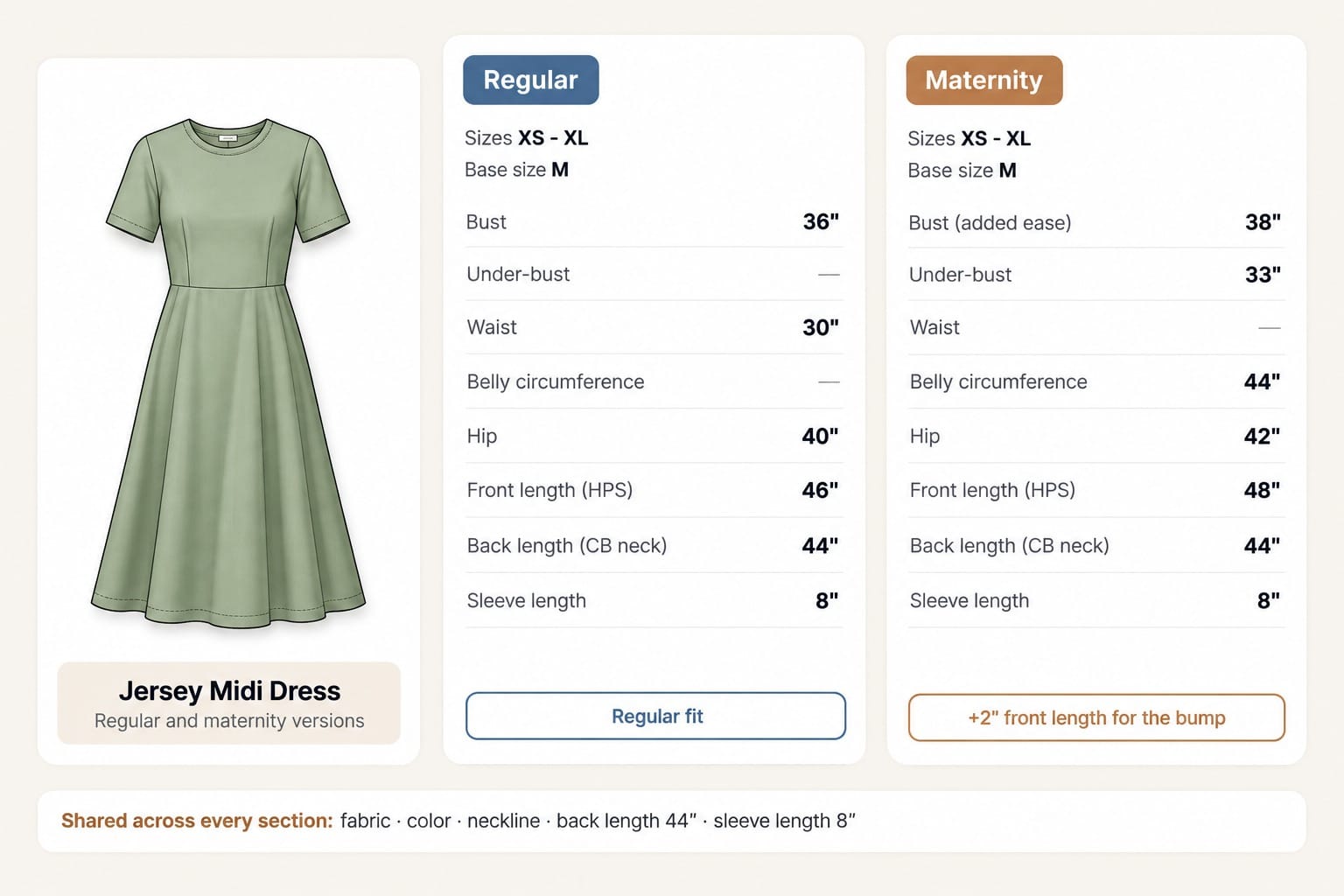
So you might have:
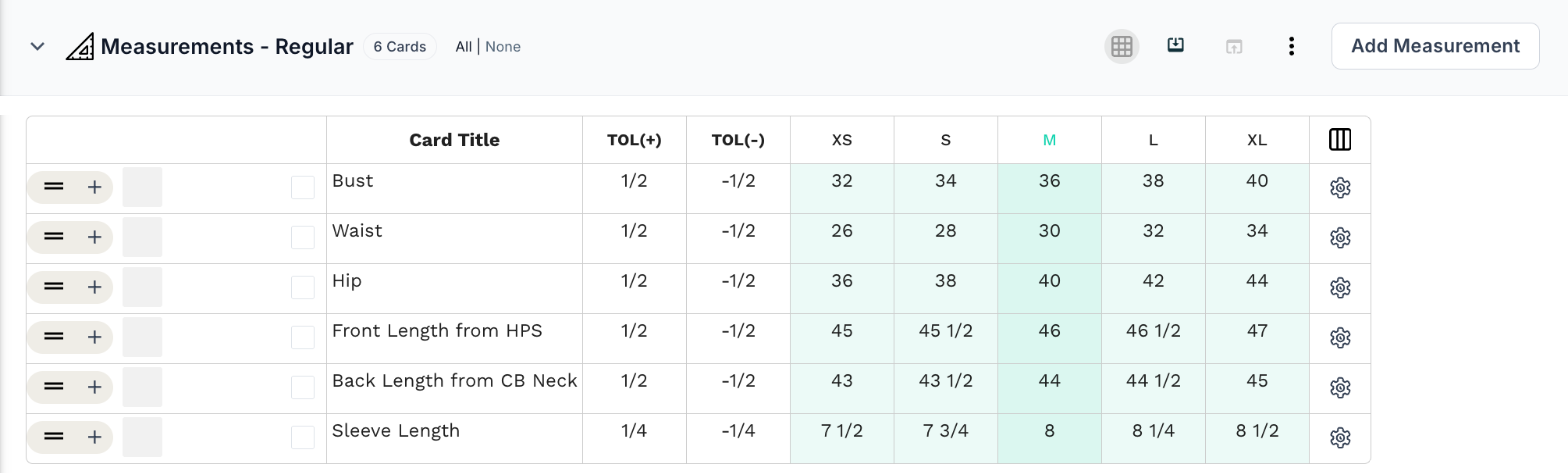
Measurement section 1 — Regular
- Bust: 36"
- Waist: 30"
- Hip: 40"
- Front length (HPS): 46"
- Back length (CB neck): 44"
- Sleeve length: 8"
Measurement section 2 — Maternity
- Bust (added ease): 38"
- Under-bust: 33"
- Belly circumference: 44"
- Hip: 42"
- Front length (HPS): 48"
- Back length (CB neck): 44"
- Sleeve length: 8"
Activewear works the same way.
A compression top and a relaxed training top can share fabric and design details. But compression garments are usually specified smaller than the body (negative ease), while a relaxed top is bigger than the body (positive ease). Their measurement charts look very different.
The problem
Treating the maternity or compression version as a small adjustment to the regular chart hides how different the spec actually is.
Notes like "add 2 in at belly for maternity" are easy to miss during sampling.
The solution
Give each version its own measurement section.
The regular section documents the standard fit.
The maternity section documents the extra room for the bump.
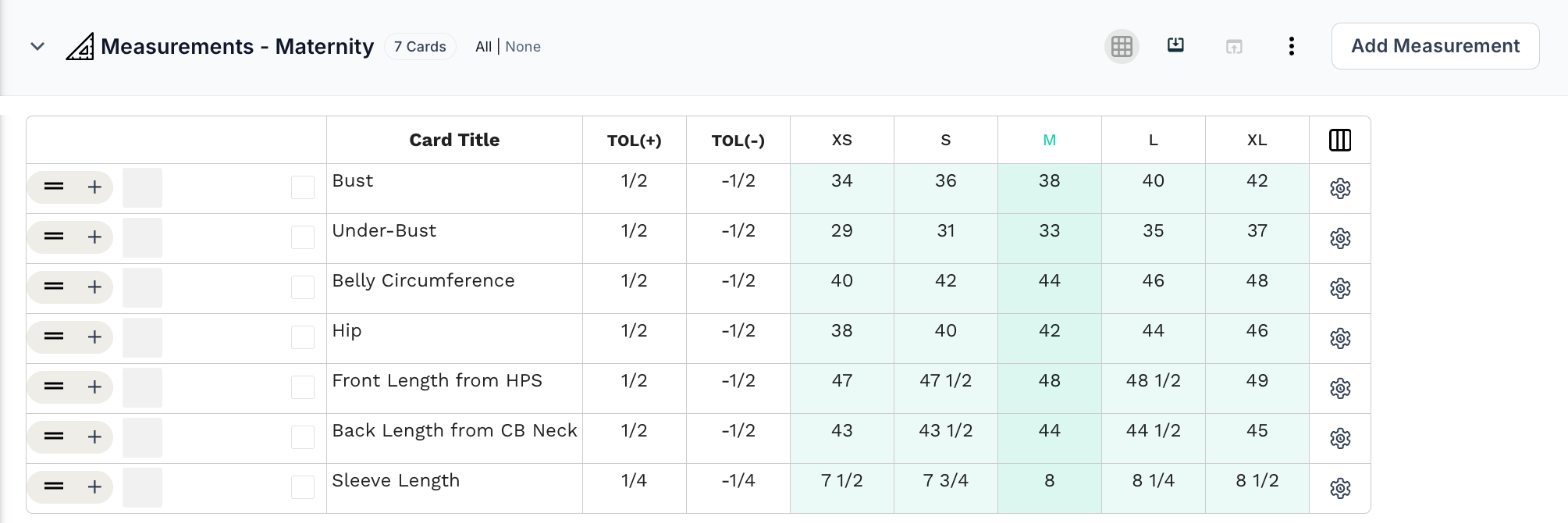
The fit requirements are documented as a spec in their own right, not as a footnote to another one.
6. When the same product comes in different physical sizes
This use case isn't limited to clothing.
Imagine you're developing a structured tote in three sizes:
- Small: for everyday essentials
- Medium: for daily use, with more room
- Large: for a laptop and more
The silhouette is the same.
The leather and lining are the same.
The hardware is the same.
The construction is the same.
But the bags aren't simply scaled up.
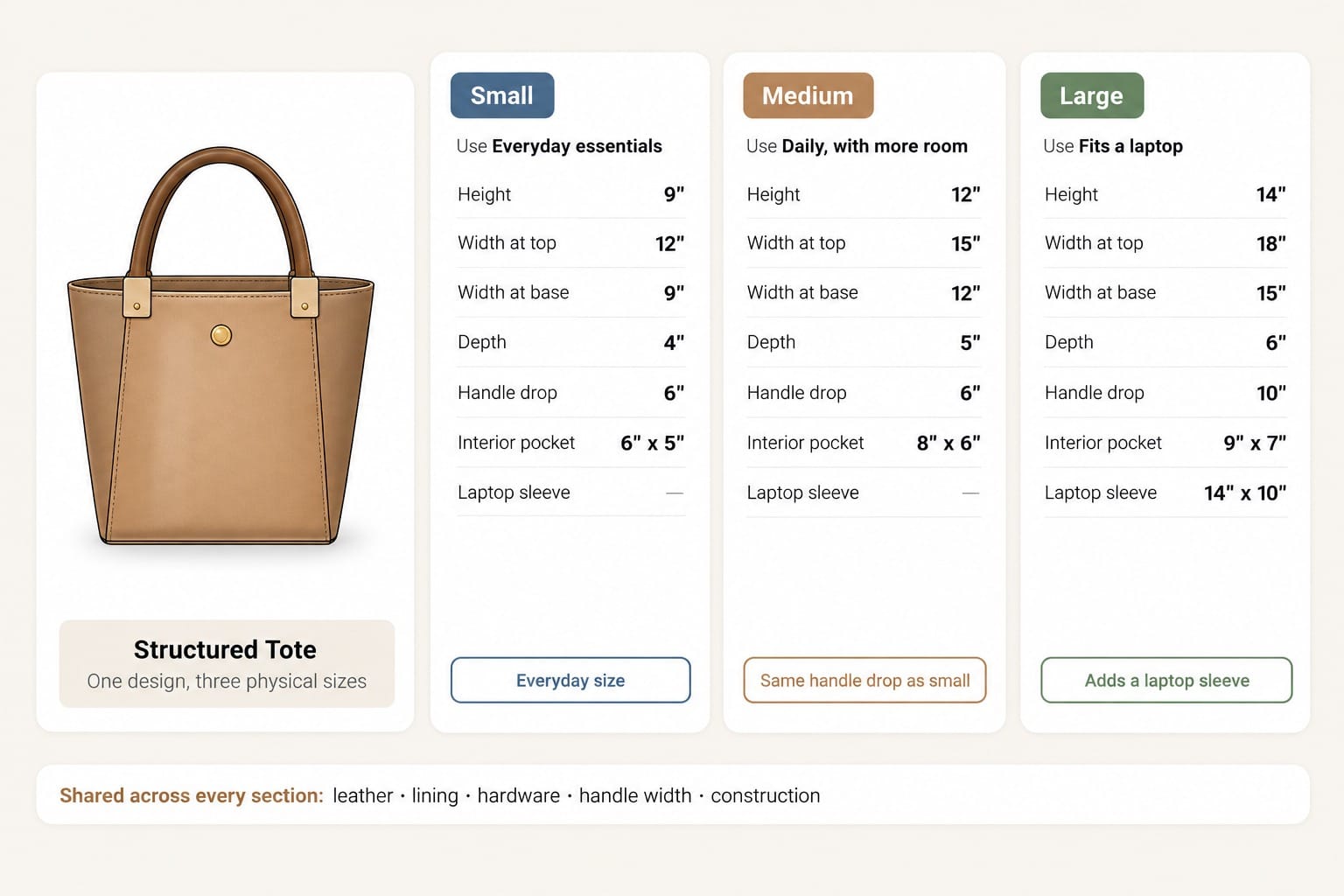
So you might have:
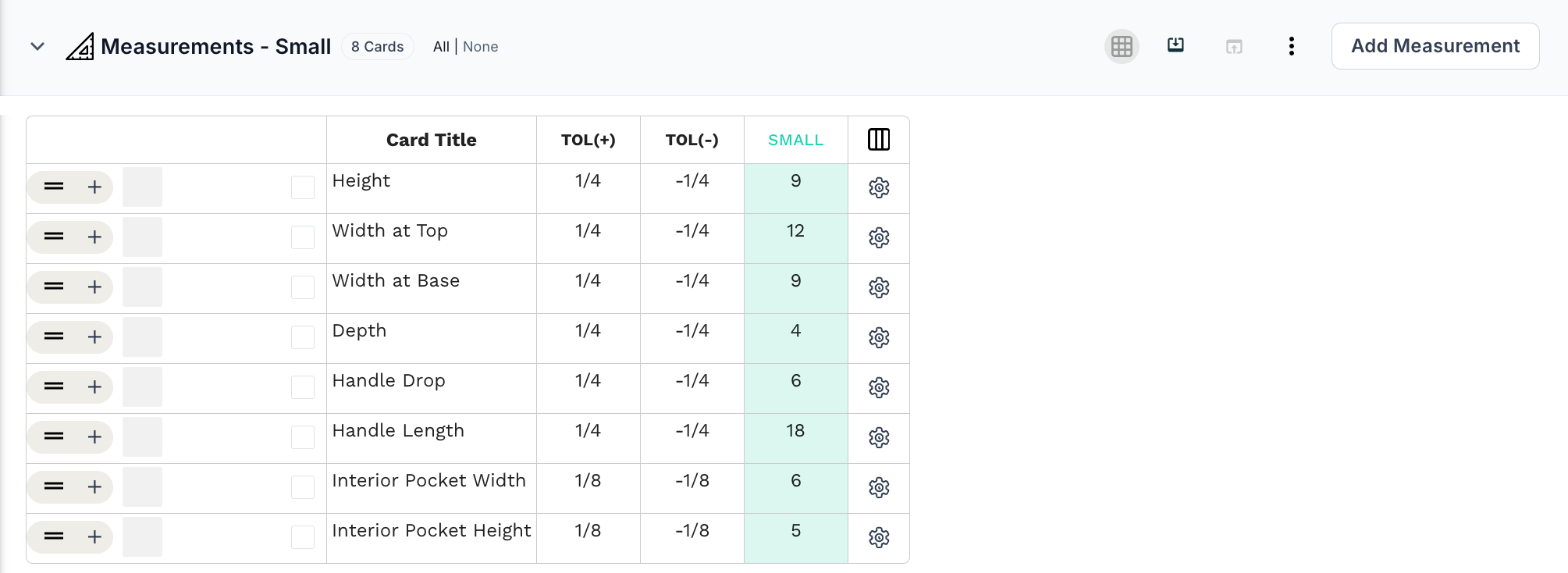
Measurement section 1 — Small
- Height: 9"
- Width at top: 12"
- Width at base: 9"
- Depth: 4"
- Handle drop: 6"
- Interior pocket: 6" × 5"
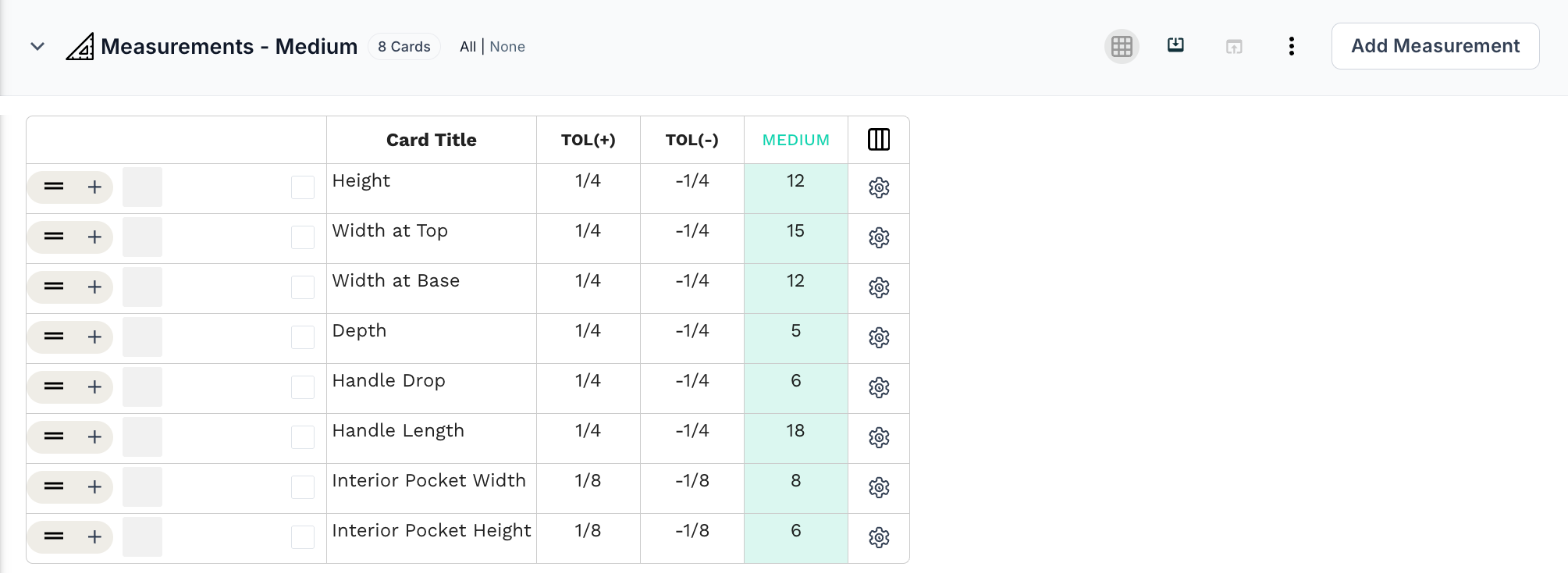
Measurement section 2 — Medium
- Height: 12"
- Width at top: 15"
- Width at base: 12"
- Depth: 5"
- Handle drop: 6"
- Interior pocket: 8" × 6"
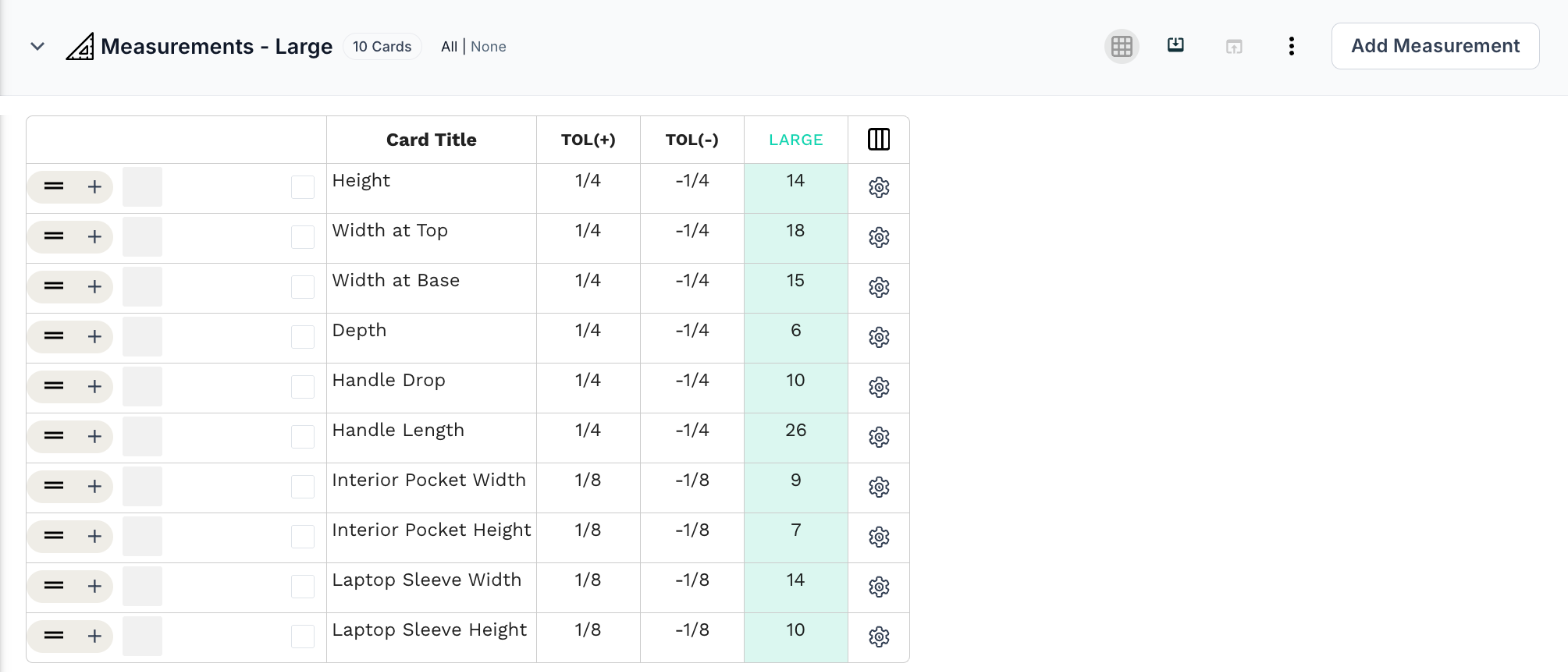
Measurement section 3 — Large
- Height: 14"
- Width at top: 18"
- Width at base: 15"
- Depth: 6"
- Handle drop: 10"
- Interior pocket: 9" × 7"
- Laptop sleeve: 14" × 10"
Notice that not every measurement scales in proportion. The handle drop stays the same on the small and medium, and only the large has a laptop sleeve.
The problem
Bags don't grade the way garments do. One chart with S, M, and L columns can hide the fact that some components change shape, and some only exist in one size.
Separate tech packs avoid that, but then the leather, hardware, and construction details live in three places.
The solution
Give each size its own measurement section, and keep the shared design and material information in one place.
The small section documents the everyday size.
The medium section documents the mid size.
The large section documents the laptop size, including the sleeve.
The same approach works for pouches, backpacks, luggage, and other products made in multiple physical sizes.
7. When the product is sized for different wearers, including pets
Products made for different wearers can also need their own measurement specs.
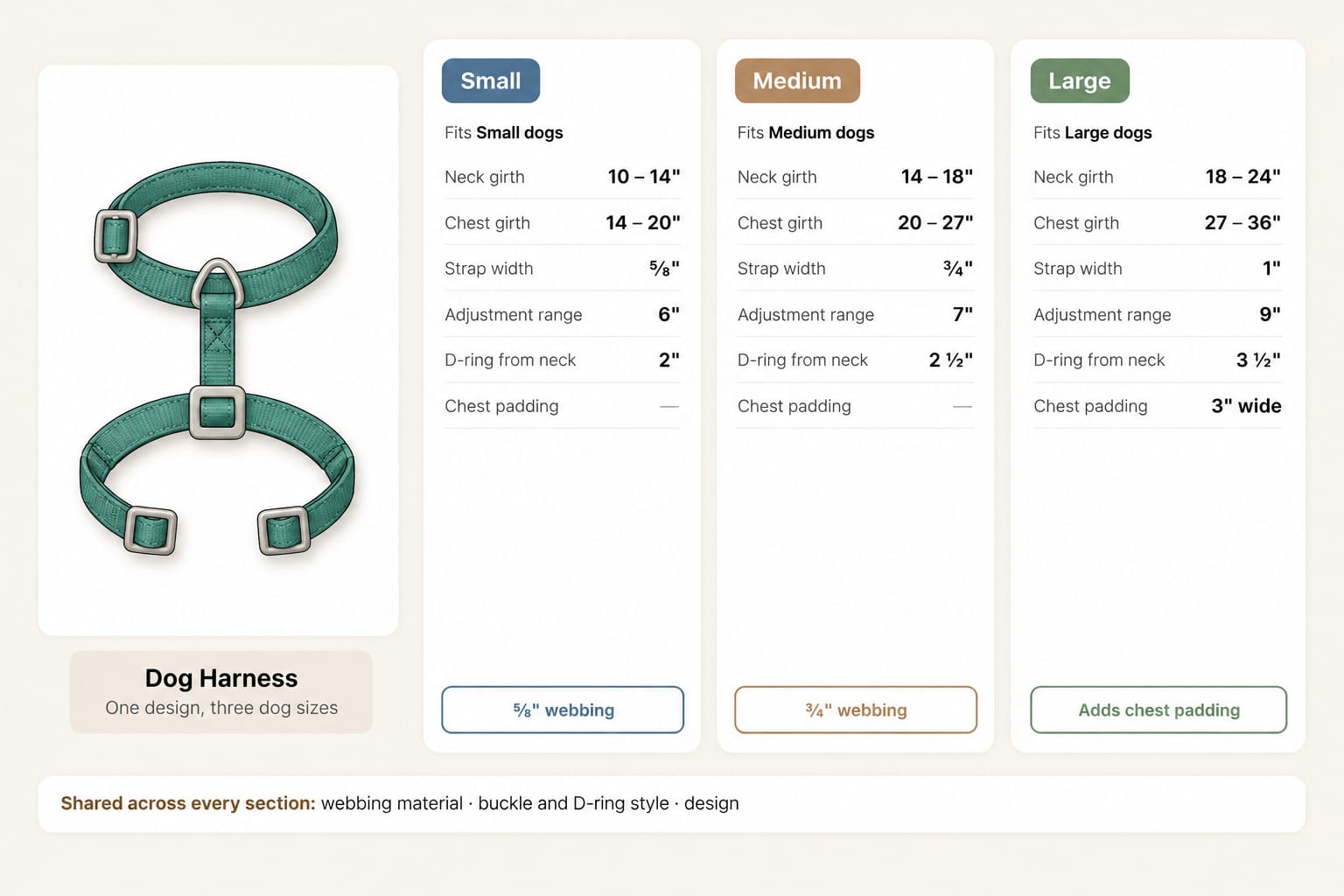
Imagine you're developing a dog harness in small, medium, and large.
The webbing is the same.
The buckle and D-ring style is the same.
The design is the same.
But a large harness isn't just a small harness with a different label.
So you might have:
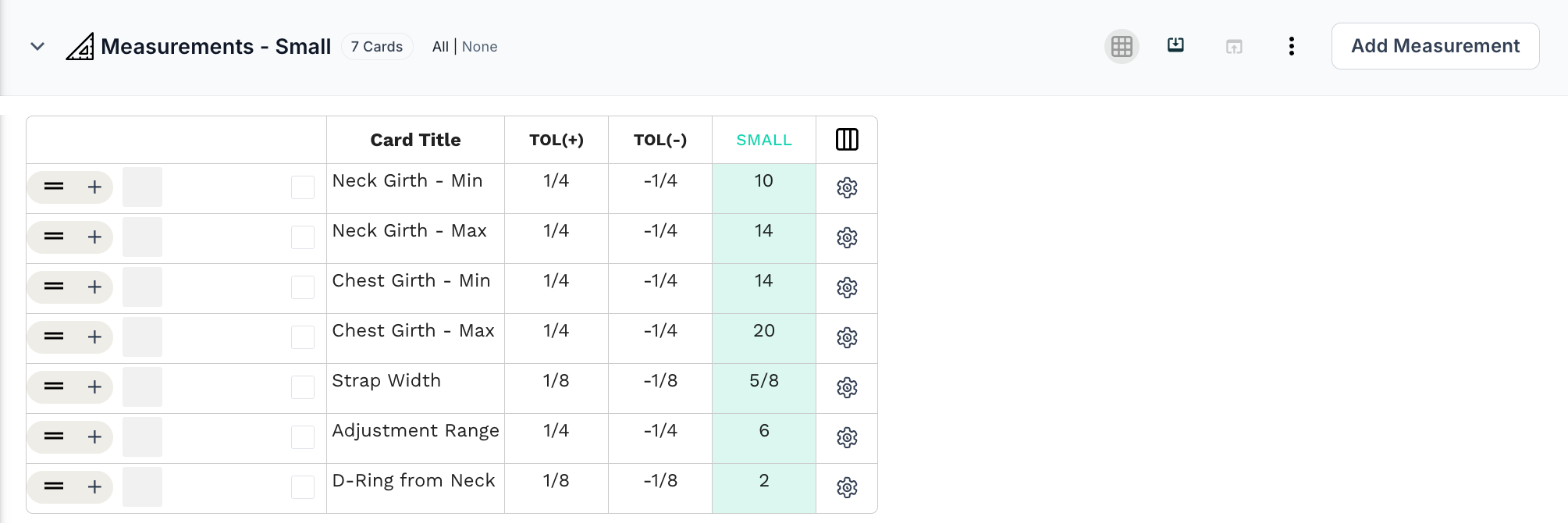
Measurement section 1 — Small
- Neck girth: 10 – 14"
- Chest girth: 14 – 20"
- Strap width: ⅝"
- Adjustment range: 6"
- D-ring from neck: 2"
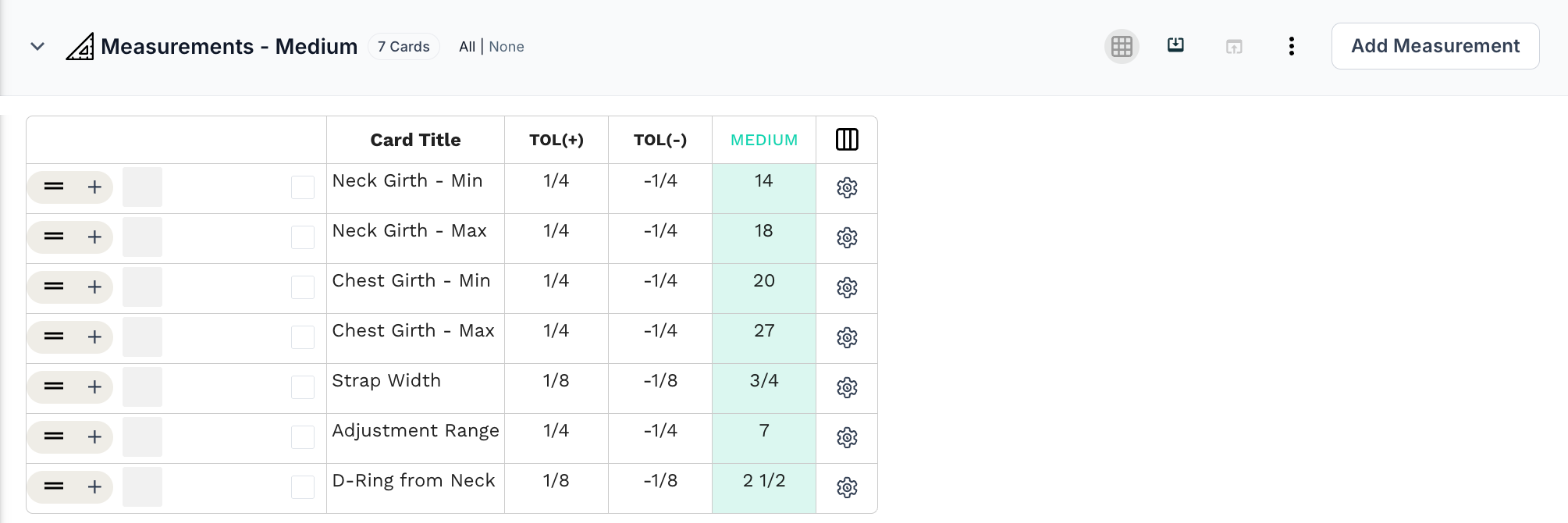
Measurement section 2 — Medium
- Neck girth: 14 – 18"
- Chest girth: 20 – 27"
- Strap width: ¾"
- Adjustment range: 7"
- D-ring from neck: 2 ½"
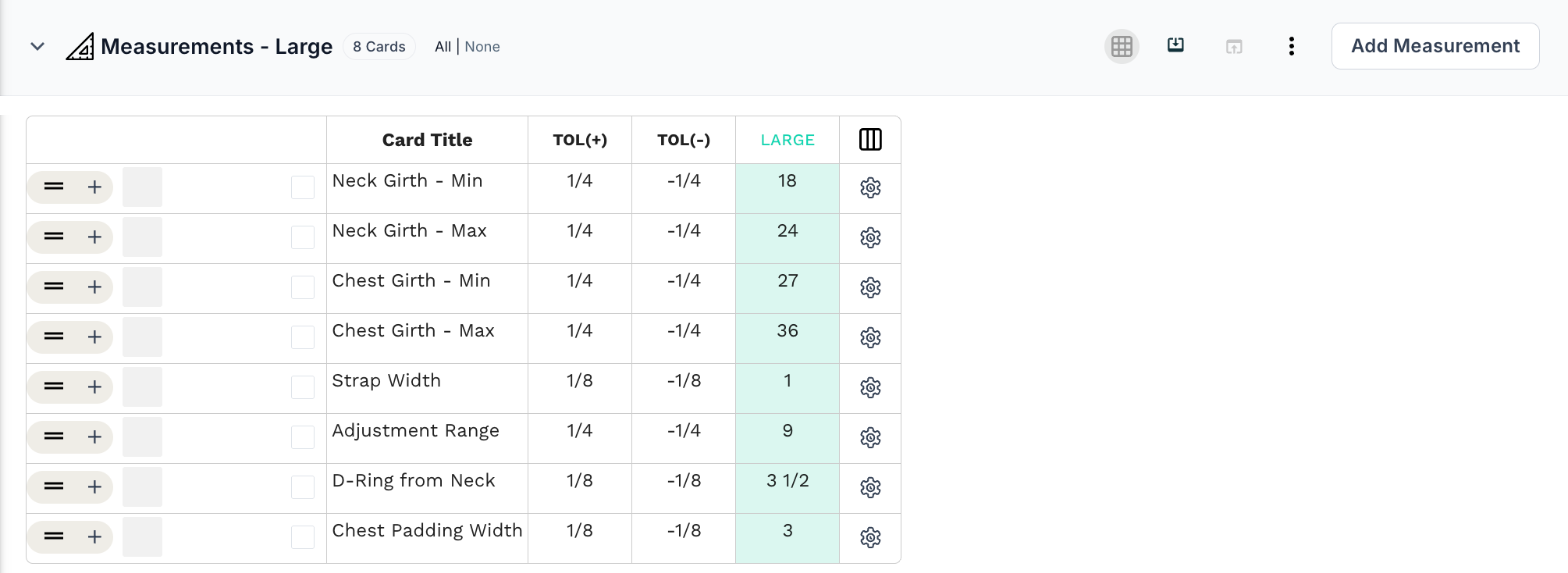
Measurement section 3 — Large
- Neck girth: 18 – 24"
- Chest girth: 27 – 36"
- Strap width: 1"
- Adjustment range: 9"
- D-ring from neck: 3 ½"
- Chest padding: 3" wide
Notice that the strap width changes as well as the length, which moves the hardware too.
Pet clothing works the same way. A coat made for different breeds may need separate charts for back length, chest girth, and neck girth.
The problem
In one combined chart, the adjustment ranges for each size are easy to misread. Getting them wrong means a harness that doesn't fit the dog it was made for.
The solution
Give each size group its own measurement section.
The small section documents the harness for small dogs.
The medium section documents the harness for medium dogs.
The large section documents the harness for large dogs, including the chest padding.
Each size has a clear reference without needing its own tech pack.
8. When the product comes in different configurations
Some products have configurations that change their finished dimensions.
Take furniture.
Imagine you're developing a sofa in two-seater, three-seater, and sectional configurations.
The upholstery fabric is the same.
The cushion foam is the same.
The legs and design details are the same.
So you might have:
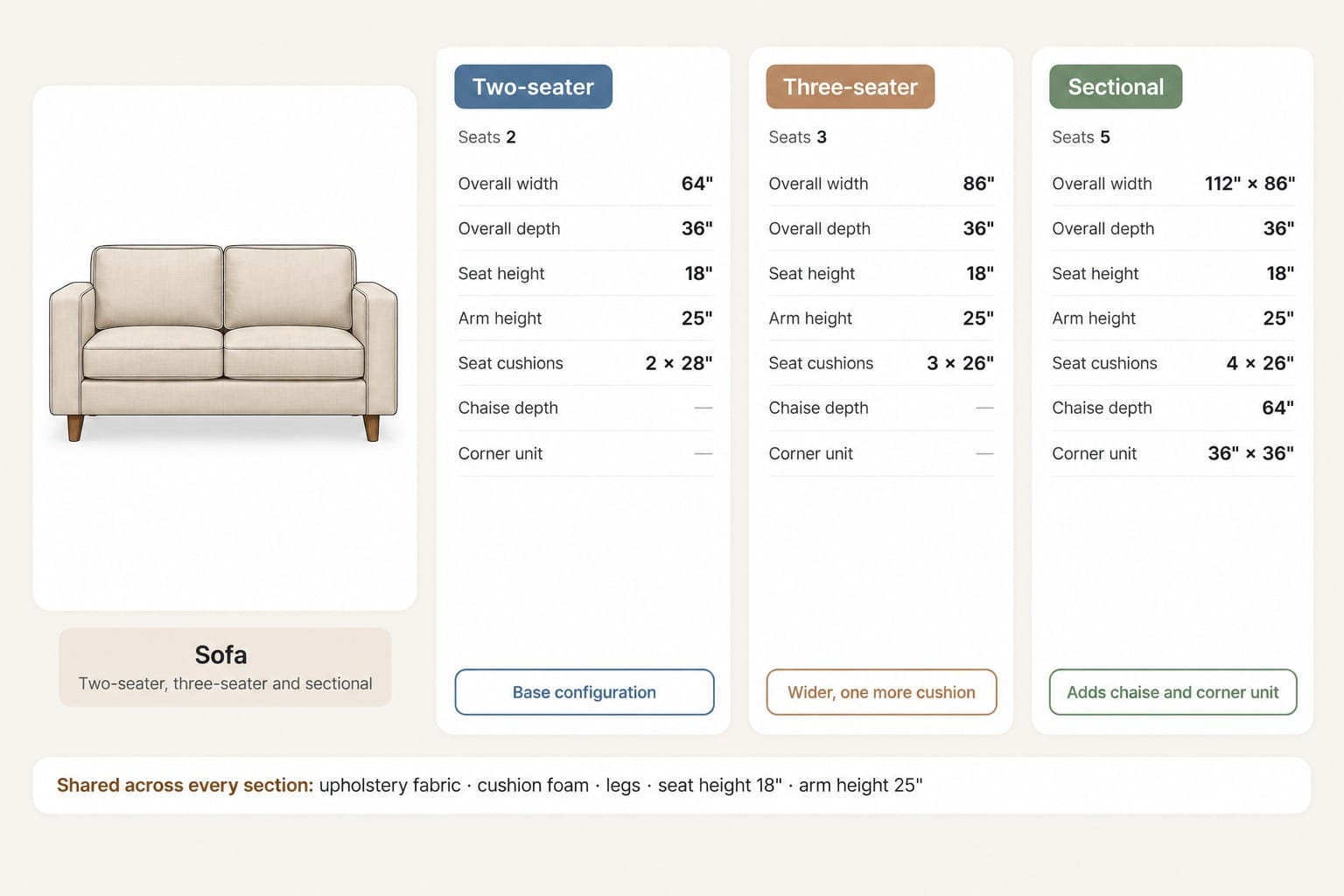
Measurement section 1 — Two-seater
- Overall width: 64"
- Overall depth: 36"
- Seat height: 18"
- Arm height: 25"
- Seat cushions: 2 × 28"
Measurement section 2 — Three-seater
- Overall width: 86"
- Overall depth: 36"
- Seat height: 18"
- Arm height: 25"
- Seat cushions: 3 × 26"
Measurement section 3 — Sectional
- Overall width: 112" × 86"
- Overall depth: 36"
- Seat height: 18"
- Arm height: 25"
- Seat cushions: 4 × 26"
- Chaise depth: 64"
- Corner unit: 36" × 36"
Notice that the seat height and arm height stay the same in every configuration. The width and number of components change, and the sectional adds measurements the other two don't have.
The problem
One chart for all three configurations mixes measurements that only apply to one of them, such as chaise depth, with ones that apply to all.
Three tech packs means maintaining the same fabric, foam, and leg specifications three times.
The solution
Give each configuration its own measurement section.
The two-seater section documents the base configuration.
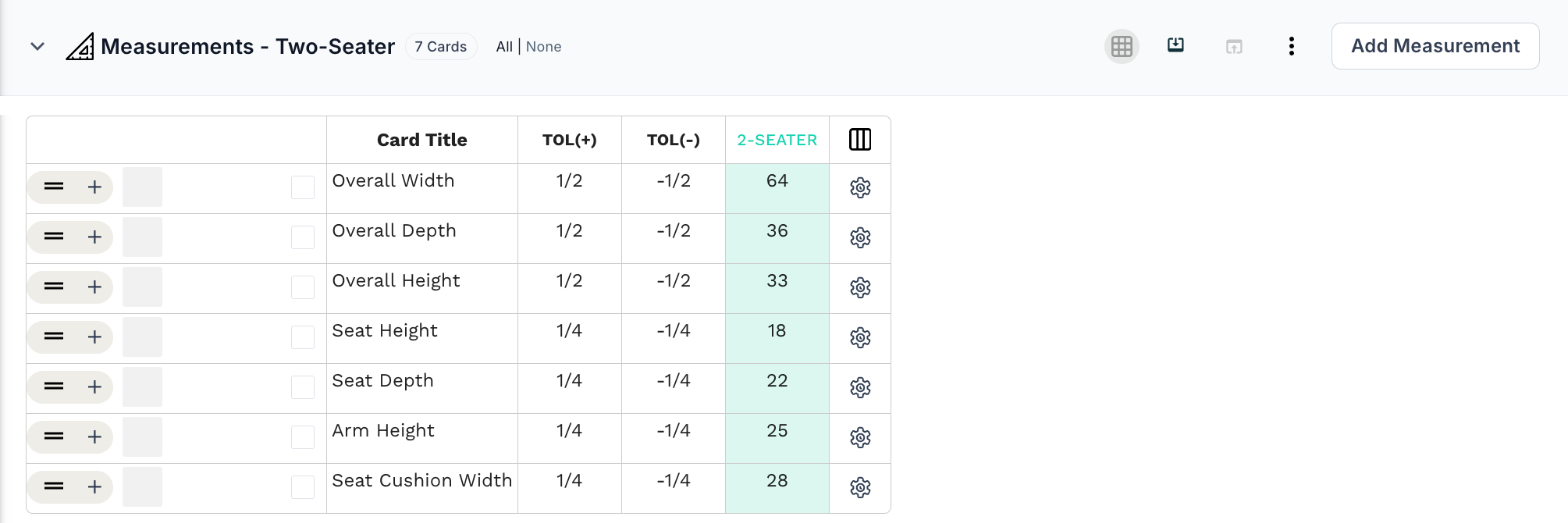
The three-seater section documents the wider frame.
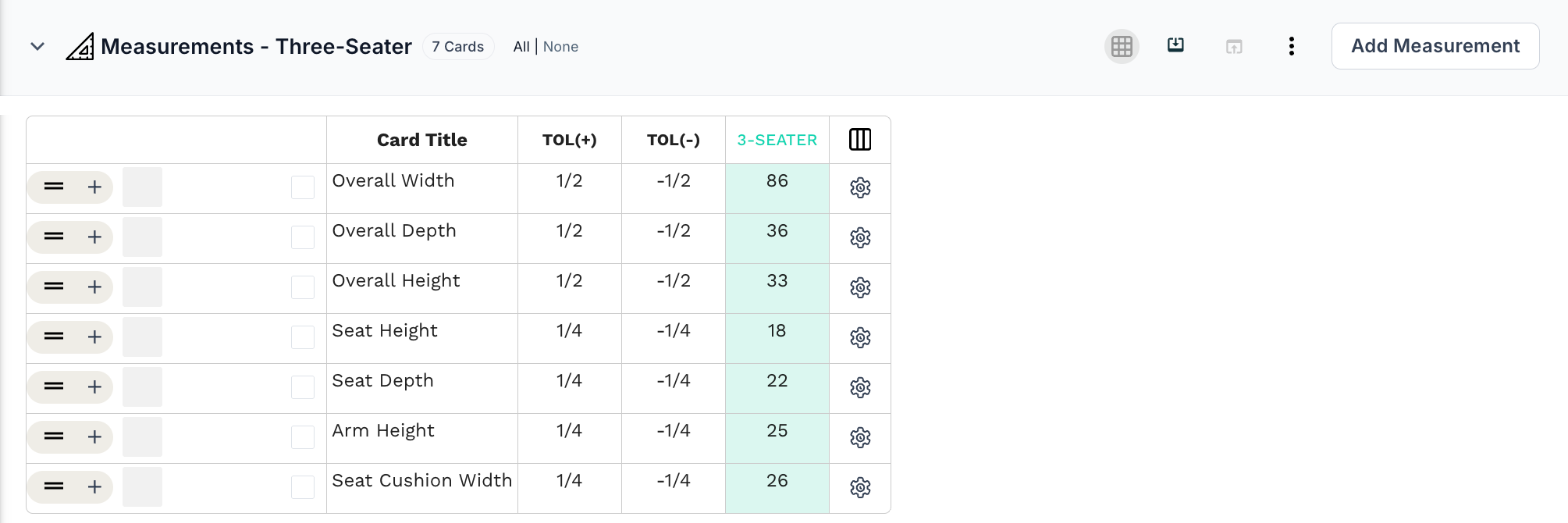
The sectional configuration adds the chaise and corner unit.
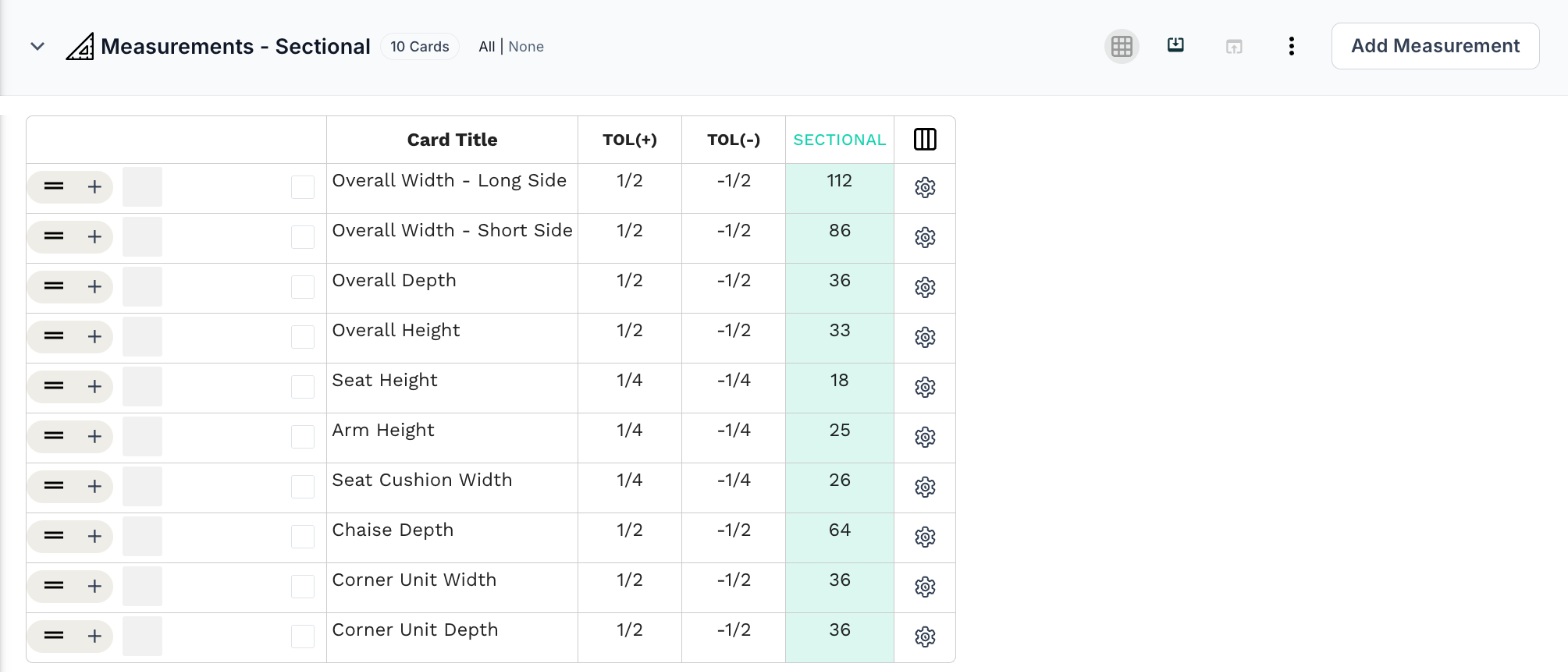
Modular storage and luggage collections can work the same way.
9. When different markets need different size specs
Brands selling in more than one market sometimes need different measurements for the same product.
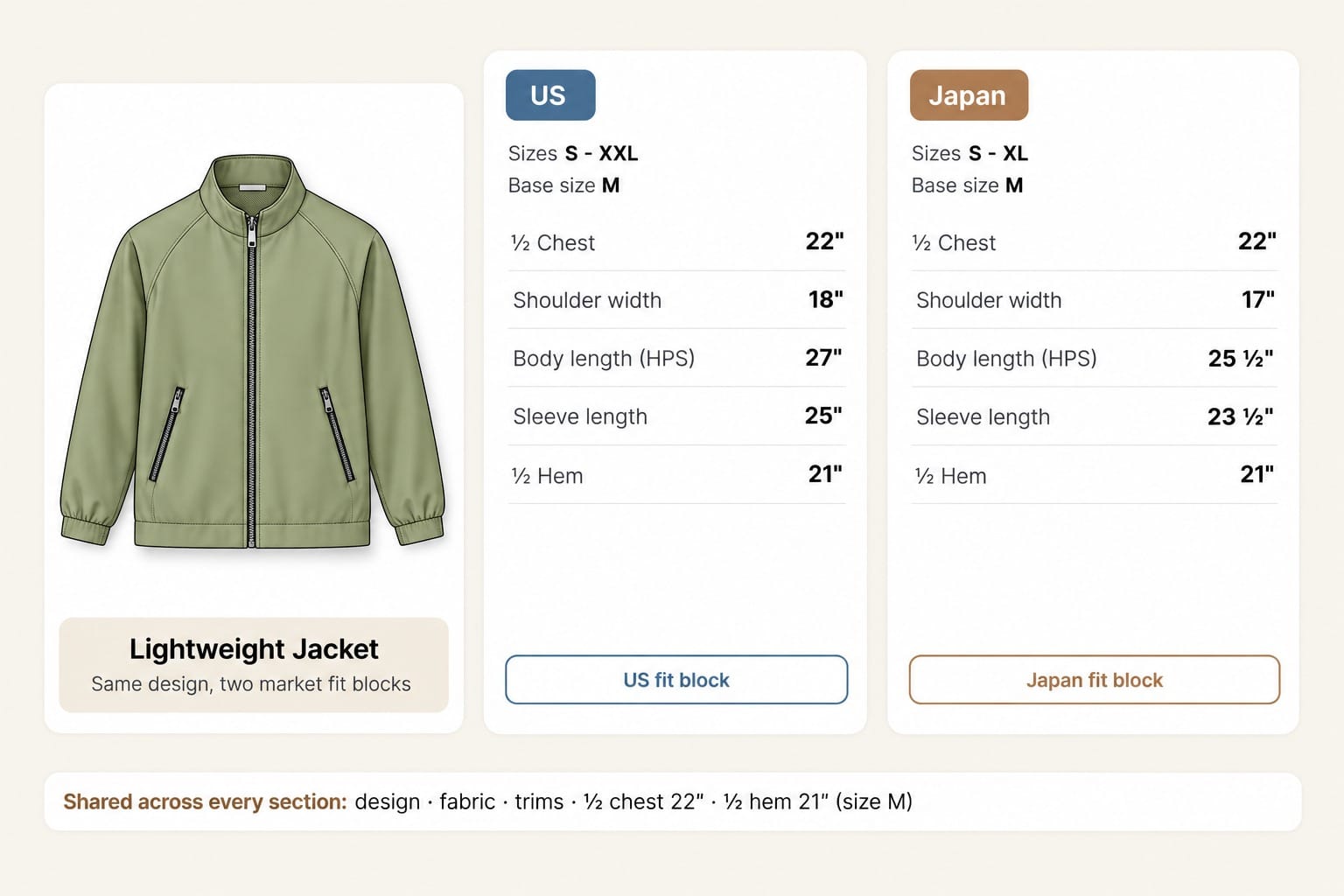
Imagine you're selling the same lightweight jacket in the US and Japan.
The design, fabric, and trims are the same.
But your Japan range uses its own fit block, with a shorter body, shorter sleeves, and a narrower shoulder.
So you might have:
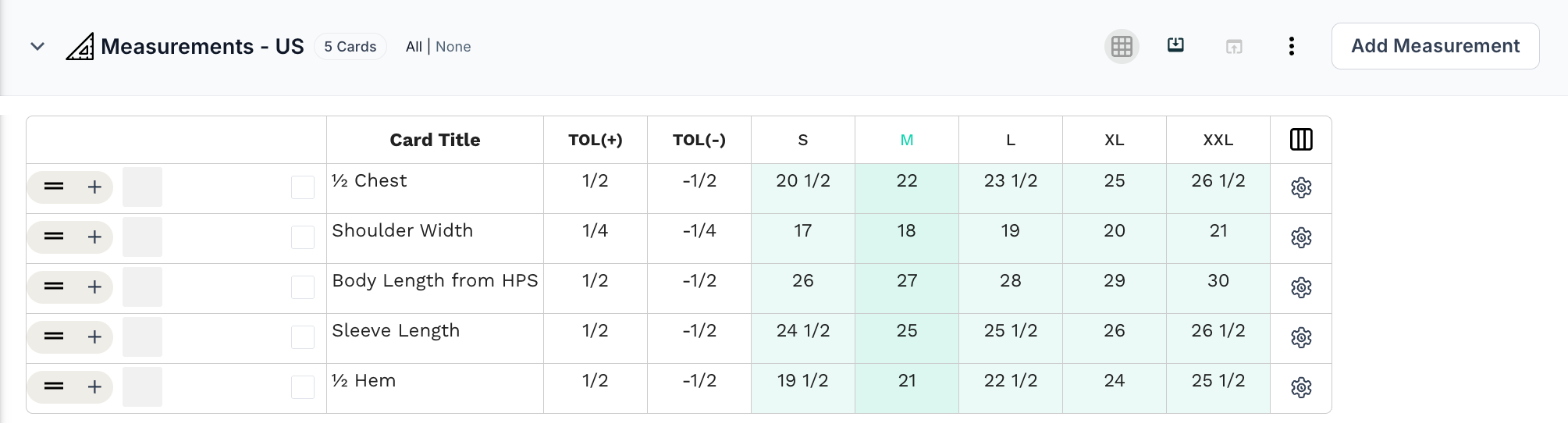
Measurement section 1 — US (S–XXL, base size M)
- ½ chest: 22"
- Shoulder width: 18"
- Body length (HPS): 27"
- Sleeve length: 25"
- ½ hem: 21"
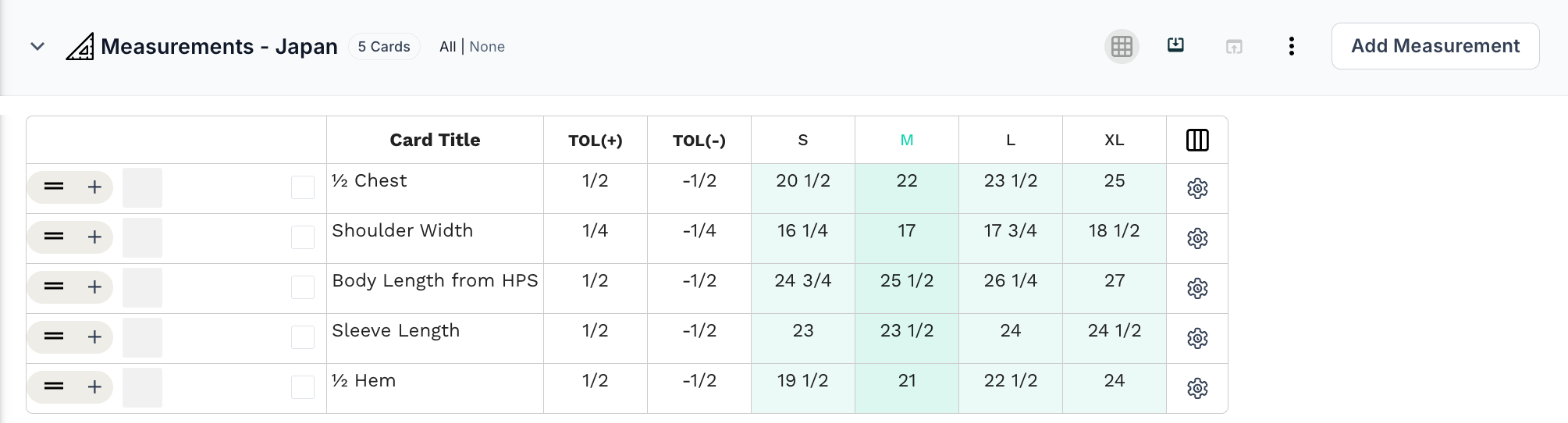
Measurement section 2 — Japan (S–XL, base size M)
- ½ chest: 22"
- Shoulder width: 17"
- Body length (HPS): 25 ½"
- Sleeve length: 23 ½"
- ½ hem: 21"
Notice that a Japan M and a US M aren't the same garment, even though they share a label.
The problem
If both fit blocks live in one chart, it's easy to send the wrong spec to the factory during sampling or bulk production.
The solution
Keep a separate measurement section for each market where the underlying specs differ.
The US section documents the US fit block.
The Japan section documents the Japan fit block.
Each market's spec stays distinct and easy to review, while the shared jacket details stay in one place.
The common thread behind all of these use cases
At first, these scenarios can look unrelated.
But they all have something in common.
The product itself doesn't change just because the measurements do.
Sometimes the difference is the age group.
Sometimes it's the proportions.
Sometimes it's the fit.
Sometimes it's the fit block.
Sometimes it's a specialized need.
Sometimes it's the physical size.
Sometimes it's the wearer.
Sometimes it's the configuration.
And sometimes it's the market.
In all of these cases, the question isn't simply:
"Do I need another tech pack?"
The more useful question is:
"Which measurements actually changed?"
If the design, materials, and construction stay the same, a separate tech pack for every size spec can create more work than it saves.
Managing multiple measurement sections in PLMBR
This is the thinking behind multiple measurement sections in PLMBR.
Instead of treating a tech pack as something that can hold only one measurement chart, you can add several measurement sections within the same tech pack workspace.
Here's what that looks like.
Let's go back to the romper from the first use case.
You already have a measurement section for toddler sizes.
Now you need one for big girl sizes.
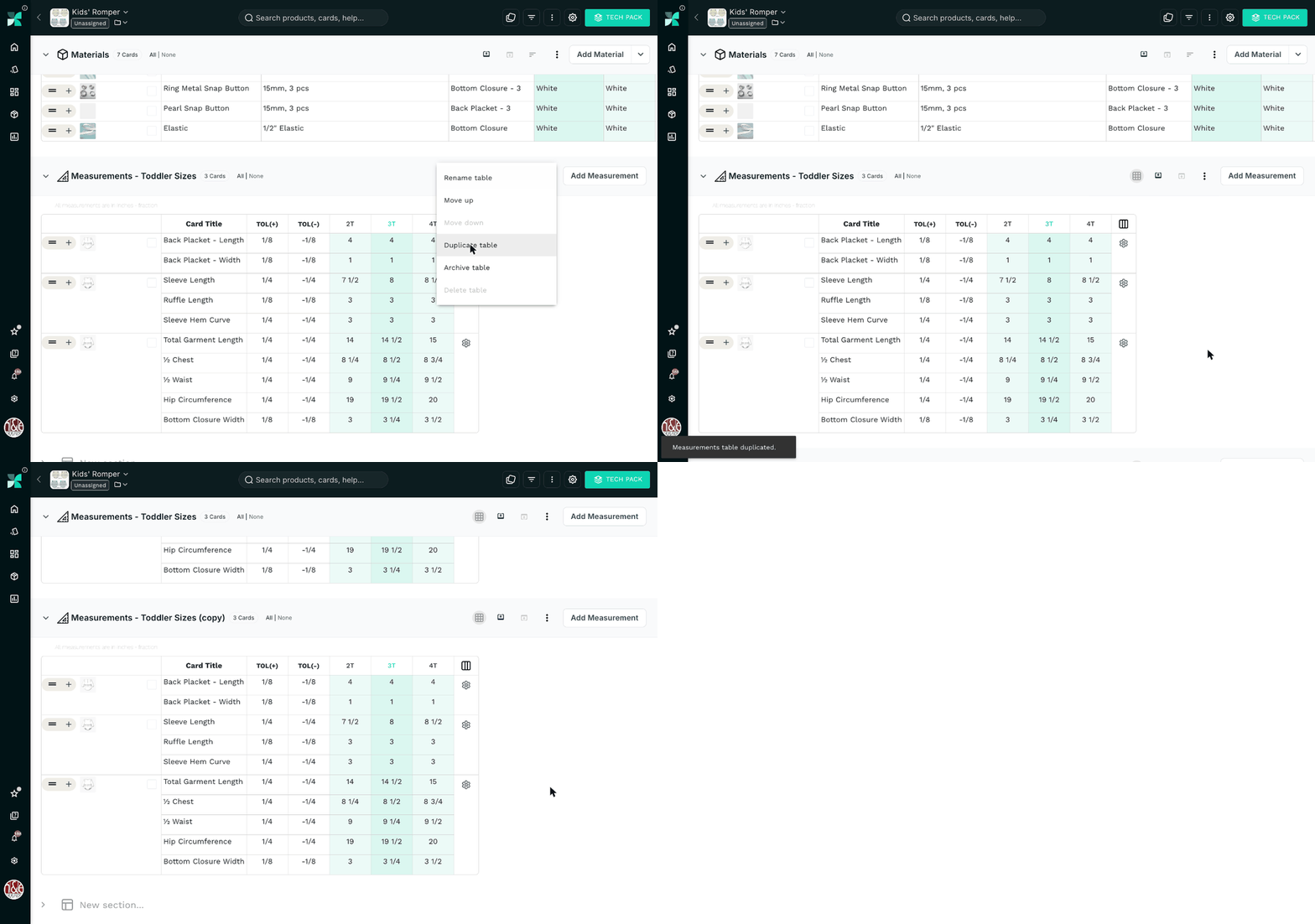
Step 1: Duplicate the measurement table
Start with the toddler measurement section. Open the table options (⋮) and select Duplicate table.
A copy appears right below it, with the same points of measurement and tolerances.
Step 2: Rename it
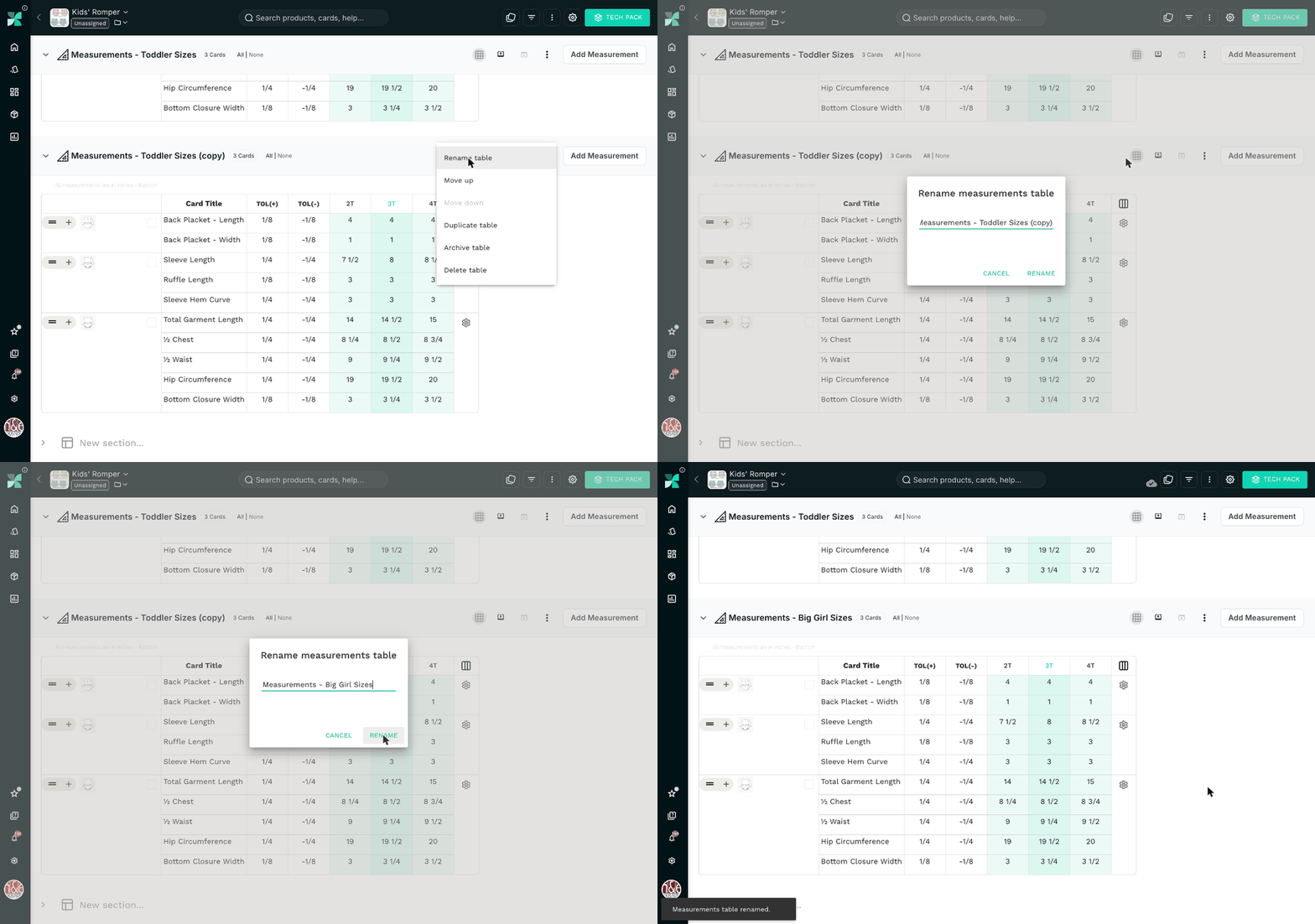
The copy is named "Measurements - Toddler Sizes (copy)".
Open the table options again, select Rename table, and call it Measurements - Big Girl Sizes.
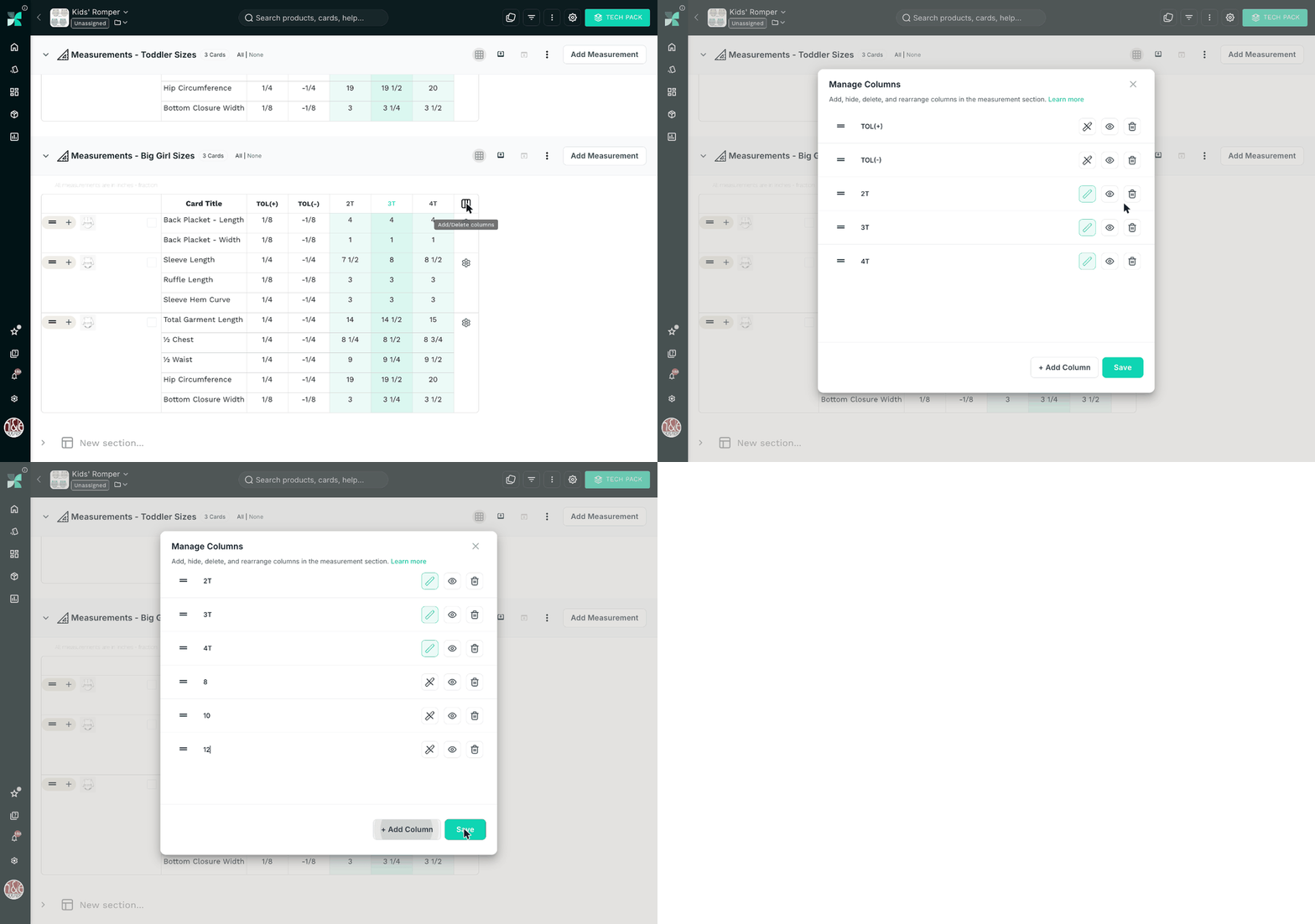
Step 3: Update the sizes and sample size
Click the column icon at the end of the table header to open Manage Columns. Add columns for 8, 10, 12, 14, and 16, remove 2T, 3T, and 4T, and save. Then set 10 as the sample size.
Step 4: Update the measurements
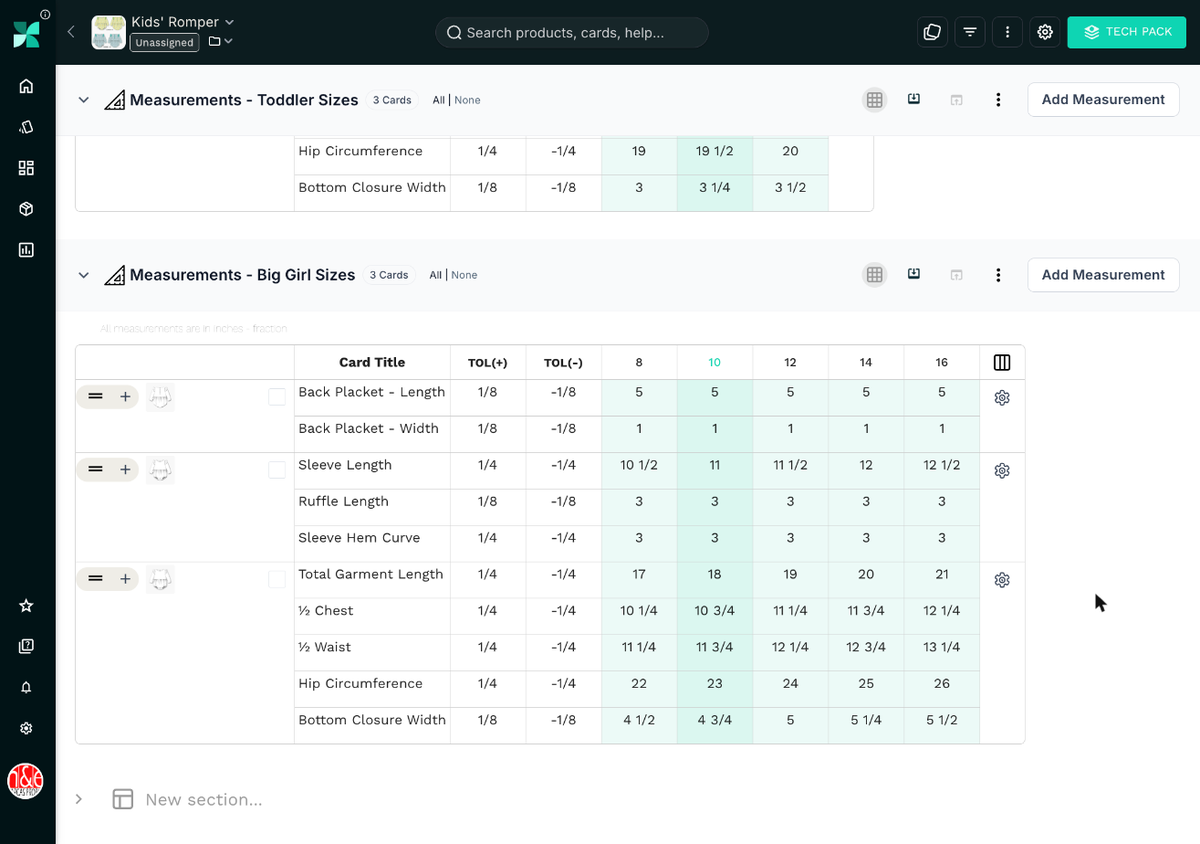
Enter the measurements for the new range. For example, the total garment length goes from 14 ½" at the toddler sample size to 18" at size 10.
You can edit the table directly.
And that's it.
The toddler measurements haven't changed.
The big girl range has its own measurement section.
The sketches, BOM, prints, and construction details are still shared.
One romper. Multiple size ranges. Nothing duplicated.
You can set up any of the other use cases the same way. For example:
Measurement section 1 — Regular fit
Regular-fit POMs and grading.
Measurement section 2 — Relaxed fit
Relaxed-fit POMs and grading.
Or:
Measurement section 1 — Small tote
Small dimensions and component measurements.
Measurement section 2 — Large tote
Large dimensions, including the laptop sleeve.
The exact structure depends on how your team works.
The important part is that you don't have to create a new product just because you need another measurement chart.
When should you use multiple measurement sections?
Not every tech pack needs more than one measurement section.
If you're making a basic T-shirt in XS–XL, with one base size and one set of grading rules, one graded measurement chart is probably all you need.
Multiple measurement sections become useful when the same product has more than one set of measurement requirements.
That might be because:
- You're developing for different age groups.
- The style comes in petite, regular, and tall.
- The style comes in different fits.
- You're making men's, women's, and unisex versions.
- A version has specialized fit requirements, such as maternity or compression.
- The product comes in different physical sizes.
- The product is sized for different wearers, including pets.
- The product comes in different configurations.
- Different markets use different fit blocks.
Before creating a new section, ask:
- Does this version have a different size range or base size?
- Does it need different POMs or grading rules?
- Would combining these measurements make the chart harder to read?
If the answer is yes, a separate section will probably make the product easier to manage.
Not every difference needs a new measurement section
Multiple measurement sections aren't useful simply because you can create them.
If two versions have exactly the same POMs, base size, grading, and measurements, there's no reason to split them.
A new colorway doesn't need its own measurement section. That's a BOM difference, not a measurement difference.
A size labeled M in two markets doesn't need its own section if the measurements are identical.
A product renamed for a different collection doesn't need one either.
The decision should be based on whether the measurements actually differ, not on whether the versions have different names.
The goal isn't to create more sections. It's to make the right measurements easy to find and hard to confuse.
One product, multiple measurement sections
Product variations don't always need separate tech packs.
Sometimes the design stays the same, but the measurements change.
Sometimes the materials change, but the measurements stay the same.
And sometimes both need to be managed independently.
In our article on multiple BOMs, we looked at the material side of that problem. Multiple measurement sections handle the measurement side.
Together, they let you keep related product information in one place while making room for the differences that matter.
If you're managing more than one size spec for the same product, try setting up multiple measurement sections in PLMBR.
One product. Multiple size specs. One workspace.