
Contents
Click here for TL;DR
- A tech pack (short for technical package) is the specification document that tells a manufacturer exactly how to produce your garment: flat sketches, measurements, materials, construction notes, and cost data in one place.
- Brands that send incomplete or missing tech packs to factories face an average of 3 to 5 sample revision rounds per style instead of 1 to 2, adding weeks of delay and thousands of dollars in rework costs per style.
- A spec sheet is not a tech pack. A spec sheet covers measurements only. A tech pack covers the full production picture, from materials sourcing to construction methods to revision history.
- Most designers build tech packs by toggling between Illustrator, Excel, and PDF folders. That multi-tool workflow creates version mismatches that are the actual cause of factory miscommunication, not missing information.
- Building a factory-ready tech pack no longer requires design software experience. Purpose-built desktop tools let any designer start immediately, work offline, and send a structured file directly to the factory.
Most new brand founders assume a tech pack is something complicated that big labels and technical designers produce in Adobe Illustrator. So they send a factory their sketches, a mood board, and a reference garment, and assume a professional manufacturer will figure out the rest.
They will figure it out, but that's the problem. What a factory "figures out" in the absence of a spec is a garment built to their defaults: the fabric weight they had in stock, the pocket placement that's easiest to cut, the stitching finish that matches their standard line.
Correcting those defaults adds $1,500 to $5,000 per style in rework costs per sampling round. For a first-time brand, that can erase an entire season's margin before a single unit ships.
This guide covers what a tech pack is, what it must include, who builds it, and why the tool you use to build it matters as much as the content. By the end, you'll know exactly what a factory needs from you before your next production conversation.
What Is a Tech Pack in Fashion?
A tech pack is a structured specification document that gives a clothing manufacturer every instruction needed to produce a garment accurately.
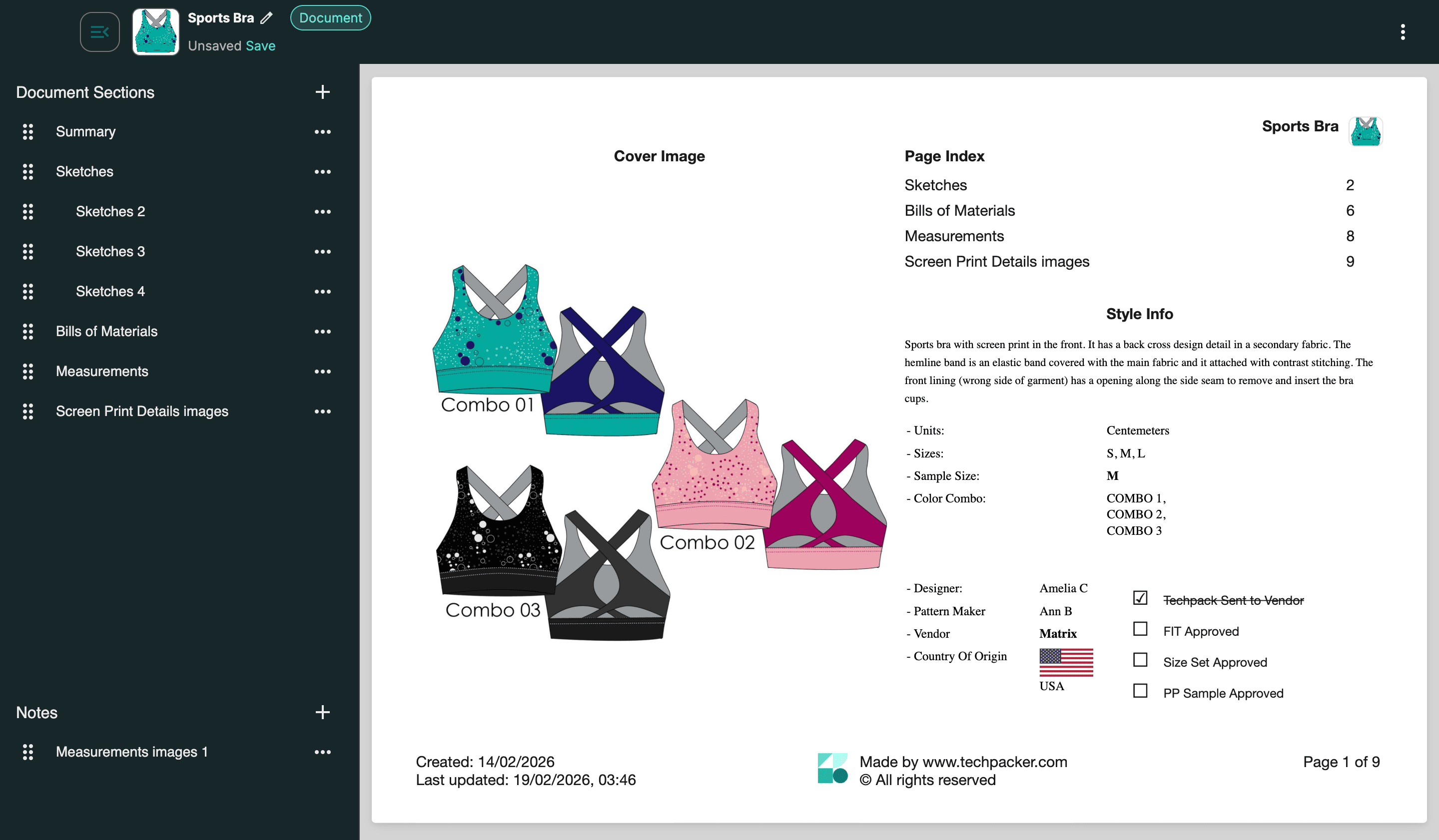
It covers technical flat sketches, measurement specifications, the full bill of materials, construction methods, and cost data in a single document. It is the translation layer between what the designer intends and what the factory can actually build.
The full term is technical package. In production workflows, designers, product developers, and manufacturers use both terms interchangeably.
A tech pack is not a design brief, a mood board, or a sketch.
A mood board communicates aesthetic direction. A sketch communicates shape. A tech pack communicates production instructions. Factories don't need to understand your inspiration. They need to know the seam allowance on the side panel, the Pantone code for the thread, and the tolerance on the chest measurement.
From the factory's perspective, a tech pack is the document they quote from, sample from, and build from. Without it, they work from assumptions, and assumptions cost you revisions.
Although tech packs are most commonly associated with apparel, they're equally useful for footwear, handbags, accessories, home textiles, furniture, and other manufactured products. Any product that requires consistent, repeatable production benefits from a detailed specification document.
Who Creates a Tech Pack?
A tech pack is usually created by the person responsible for turning a design into a production-ready product. Depending on the size of the brand, that could be a fashion designer, technical designer, product developer, or founder.
Large fashion companies often have dedicated technical design teams that manage measurements, grading, construction details, and factory communication. Smaller brands and independent designers typically handle the entire process themselves.
The important part isn't who creates the tech pack—it's that someone owns the production specifications before the design reaches the factory. Every missing detail becomes a decision the manufacturer has to make on your behalf.
Subscribe to our blog and get FREE access to
All premium articles
E-courses and ebooks
Ad-free experience
Tech pack templates
What Does a Tech Pack Include?
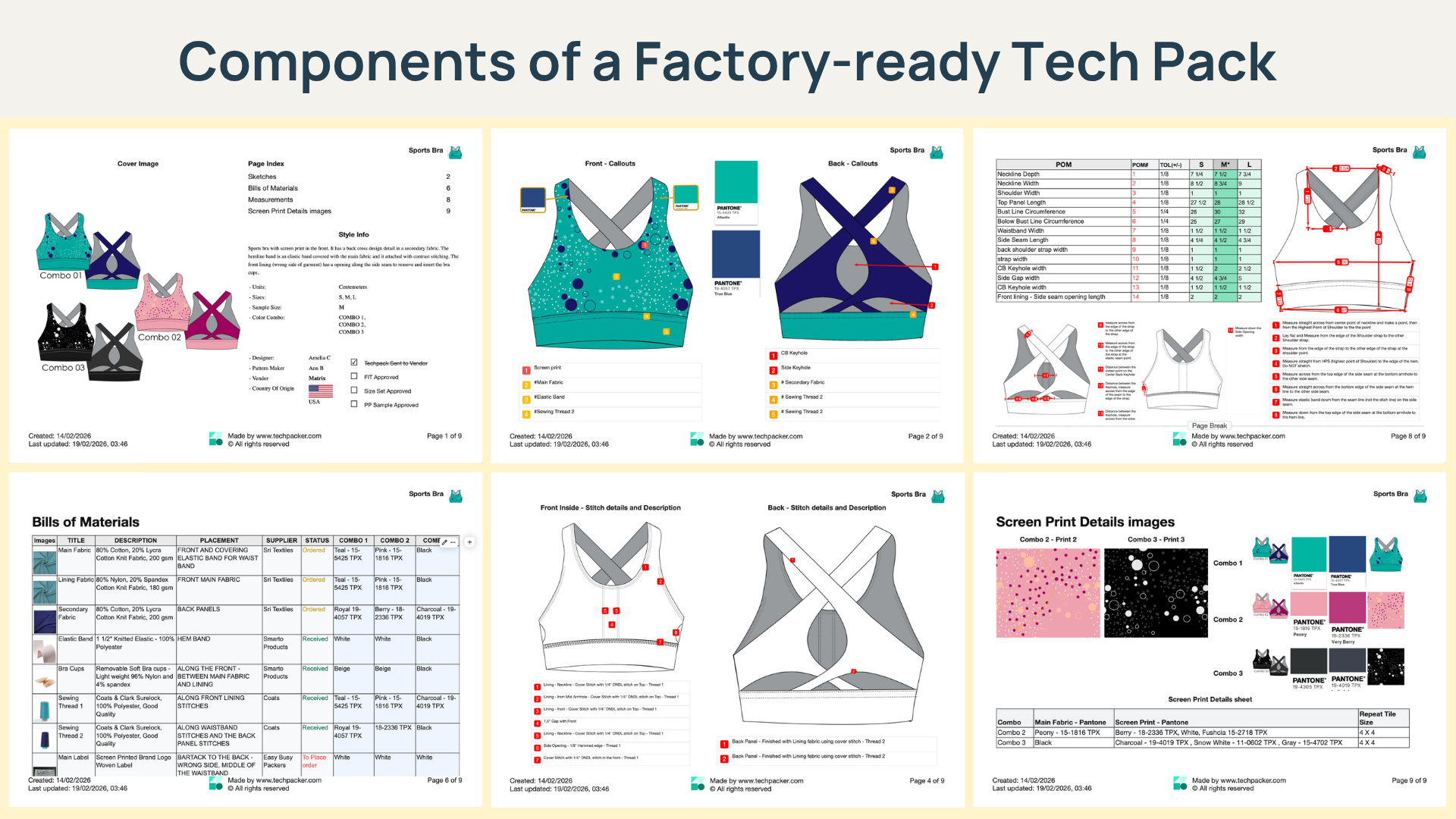
A complete tech pack contains seven core components. Together, they give a manufacturer everything needed to produce the garment without asking a single clarifying question.
Cover Page and Style Information
The cover page carries the style name, style number, season, colorway options, brand name, date, and version number. The version number sounds administrative, but it is operationally significant.
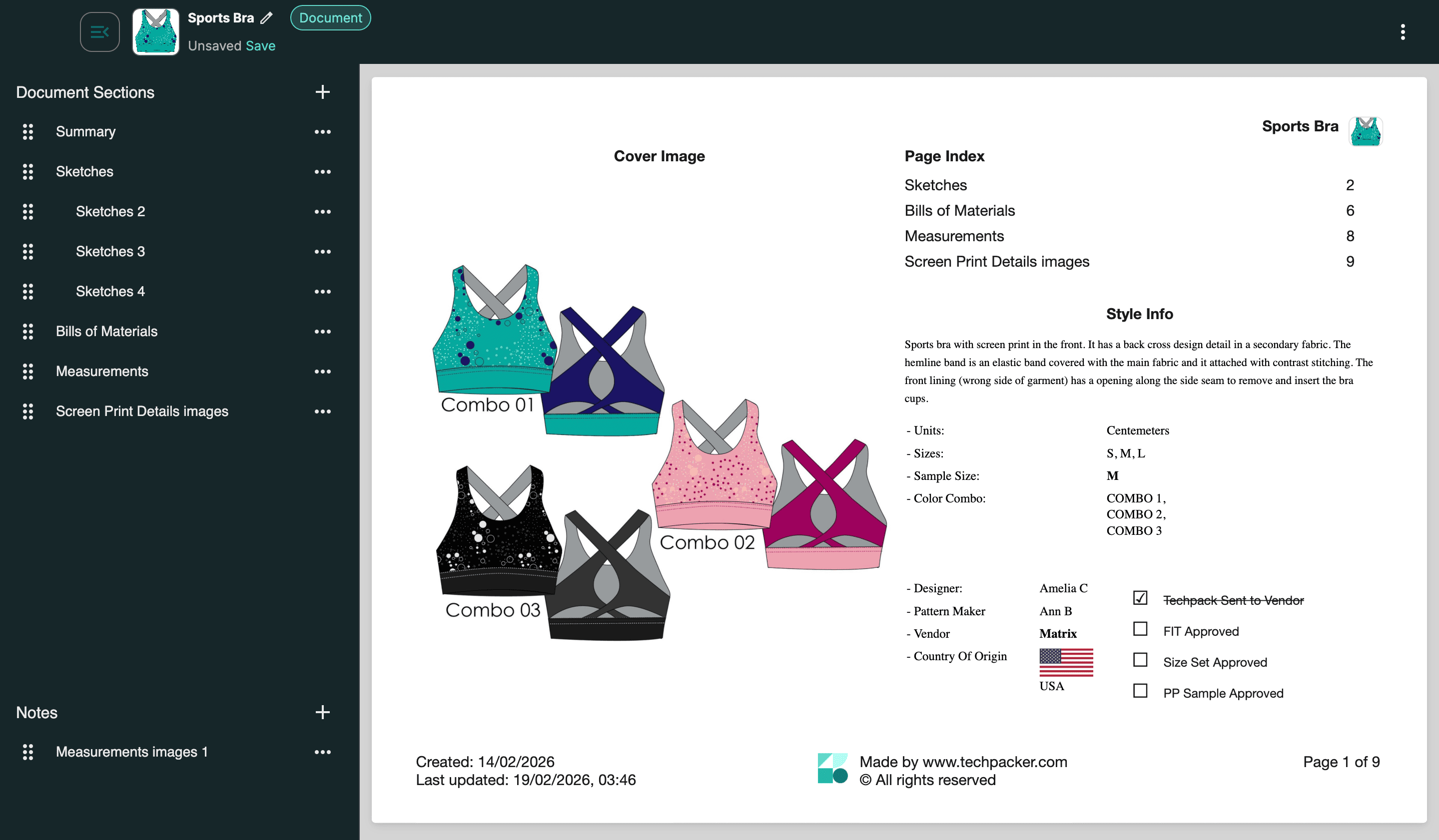
Factories work with multiple brands and multiple revision rounds simultaneously. A tech pack without a version number creates the risk that a factory builds to an older iteration without either party knowing.
Technical Flat Sketches
Flat sketches are engineering drawings, not fashion illustrations.
They show the garment front, back, and side, drawn flat with callout lines pointing to every seam, pocket, placket, stitching detail, and hardware placement.
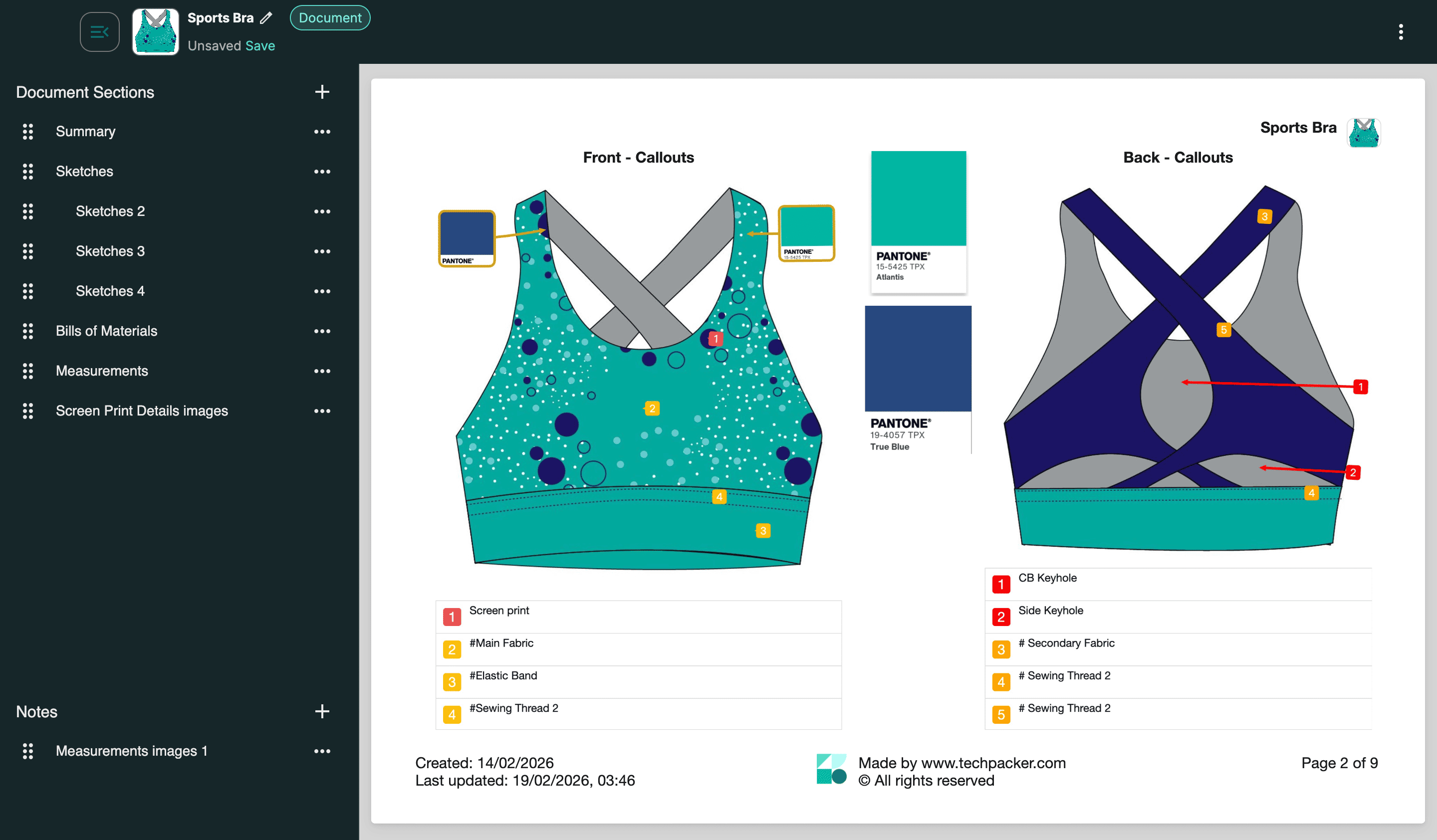
A common beginner mistake is providing only the front view. Factories need the full construction picture before they can make a single pattern piece.
Bill of Materials (BOM)
The bill of materials lists every component that goes into the garment: fabrics, trims, thread, hardware, labels, and hang tags. Each item includes the color reference (Pantone, where applicable), supplier reference if one exists, and unit of measure.
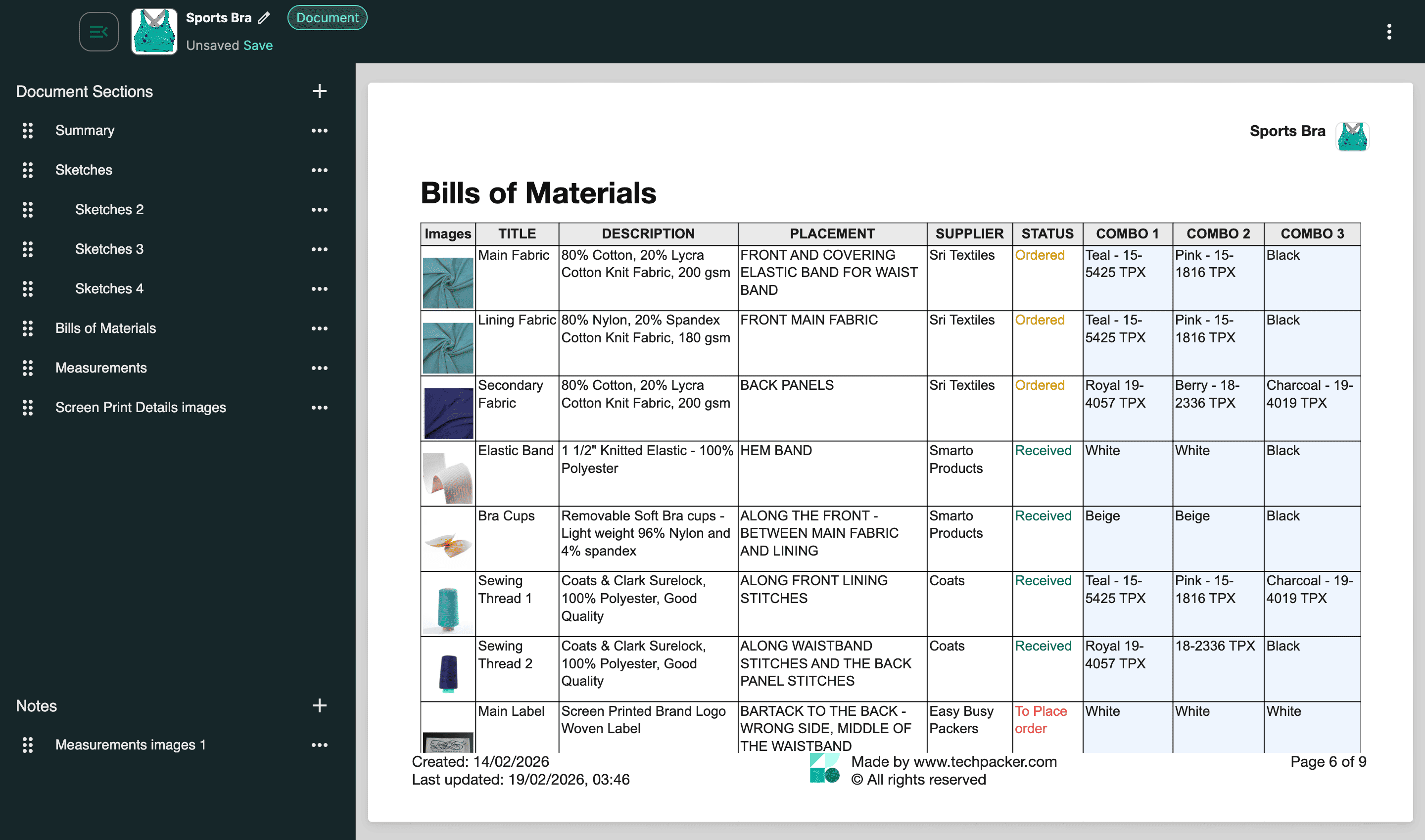
A missing BOM transfers material sourcing decisions to the factory, and when factories source independently, they choose based on availability and margin, not your brand spec. The bill of materials guide covers how to build one before your first factory handoff.
Measurement Specifications and Grading Chart
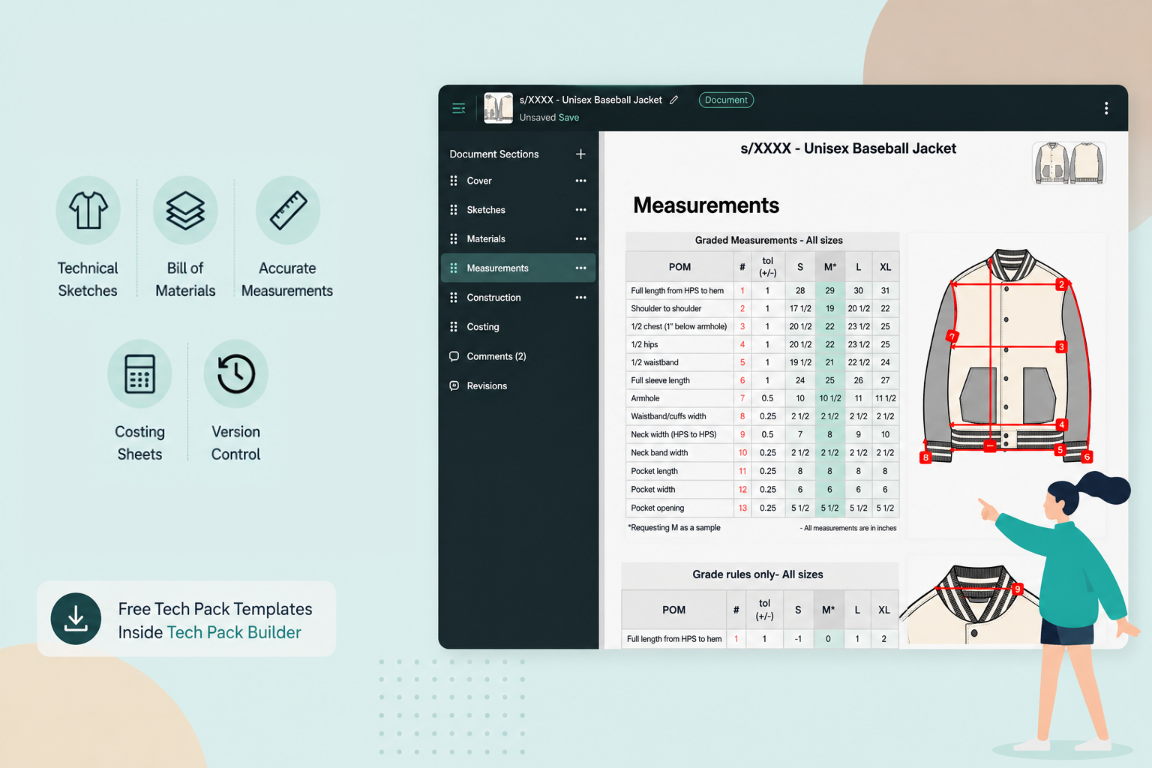
The point-of-measure (POM) chart lists every dimension of the garment at base size, with a tolerance range for each measurement. Grading rules specify how each dimension changes across the size run.
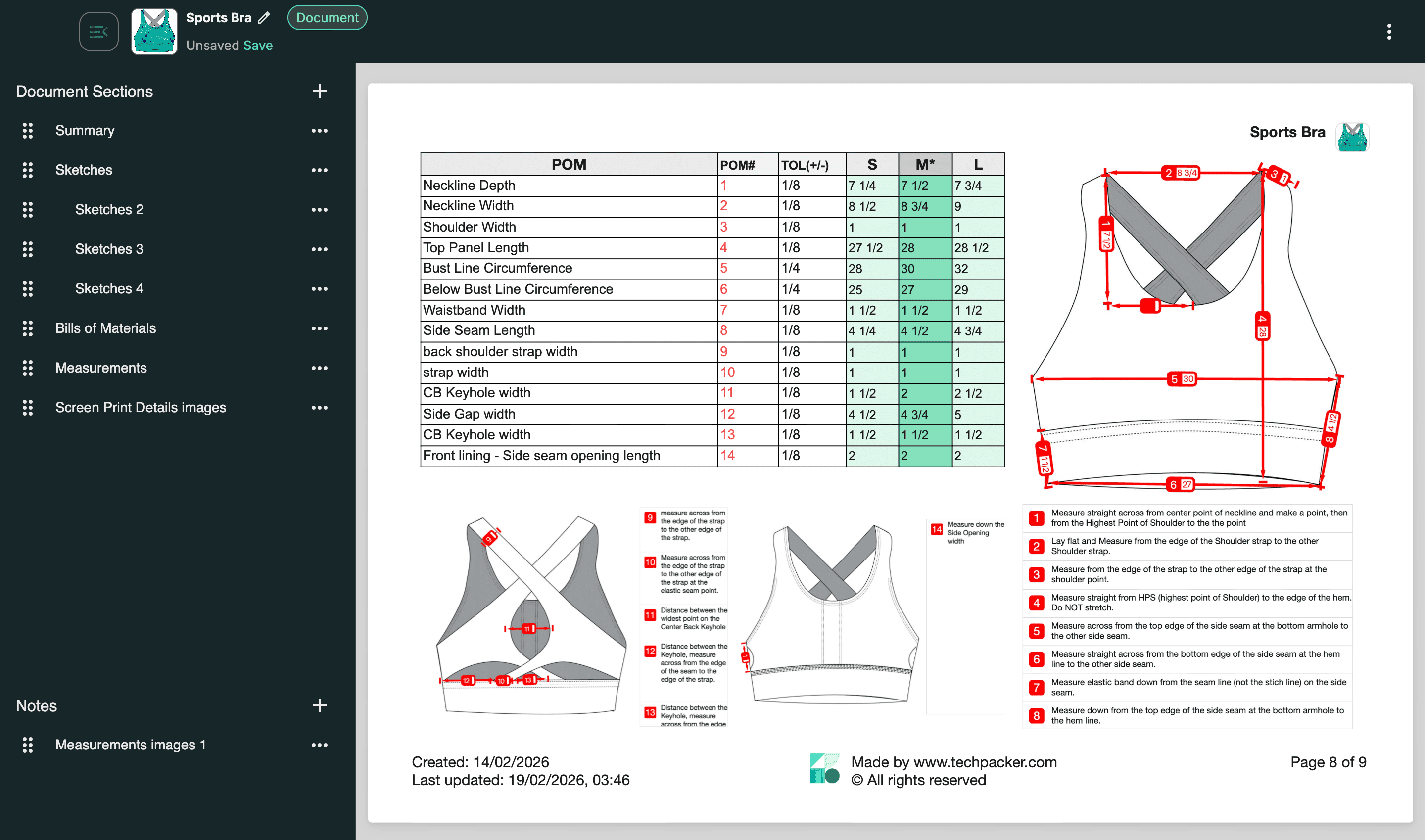
Every measurement point should have a corresponding labeled callout on the flat sketch so there is no ambiguity about where the factory is measuring from.
Research from Common Objective on fashion supply chain failures found that unclear or missing measurement specs account for roughly 40% of first-sample rejections.
The garment spec sheet guide covers measurement documentation in full.
Construction Notes and Stitching Details
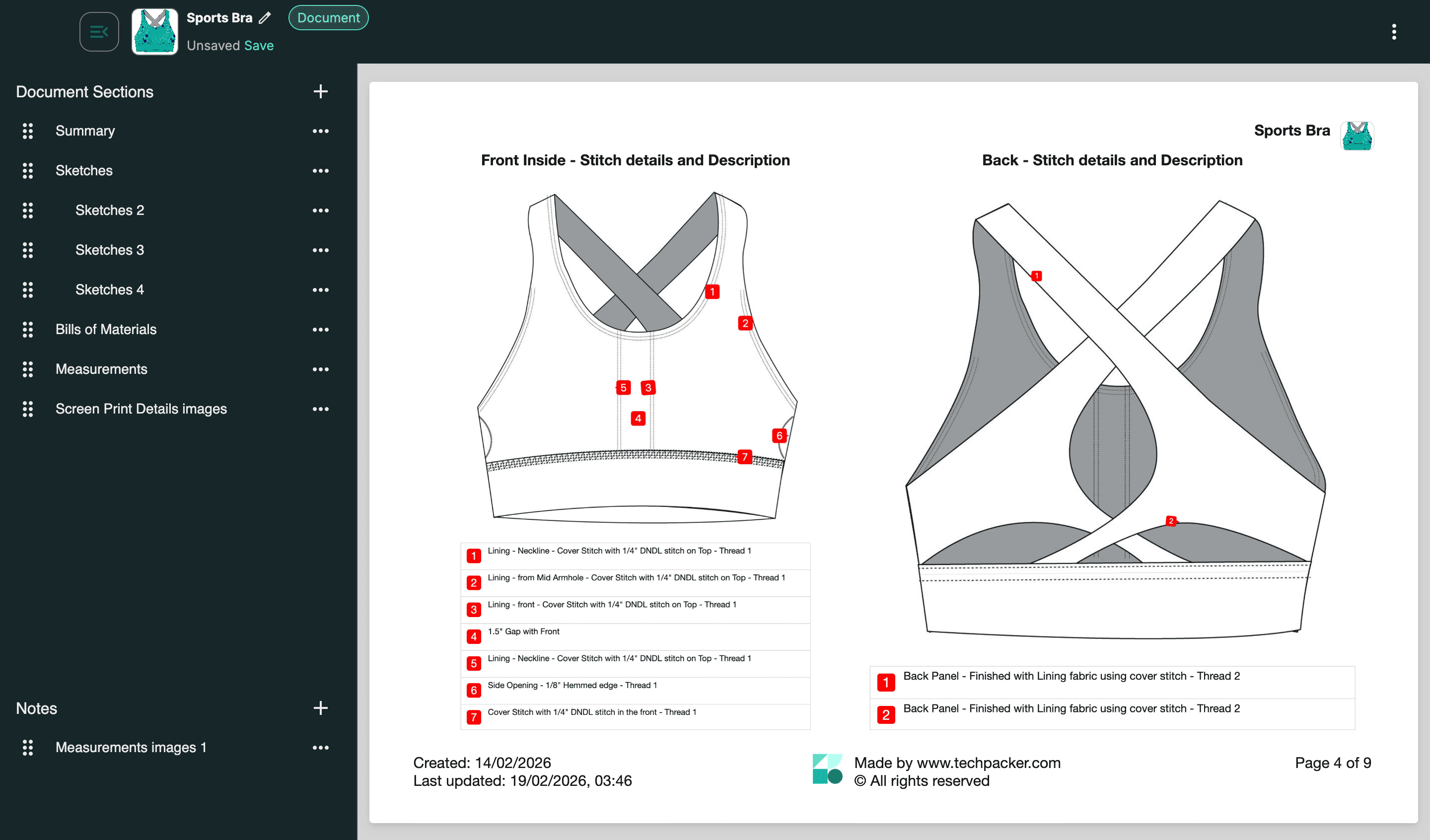
Construction notes specify seam types, stitch count per inch, thread color, and finishing methods. A note that reads "standard construction" produces different results at every factory because what counts as standard varies by region and by the factory's defaults. Specific instructions eliminate guesswork at the pattern-making stage.
Cost Sheet
The cost sheet captures estimated material costs, cut-make-trim (CMT) labor estimates, and a target FOB price.
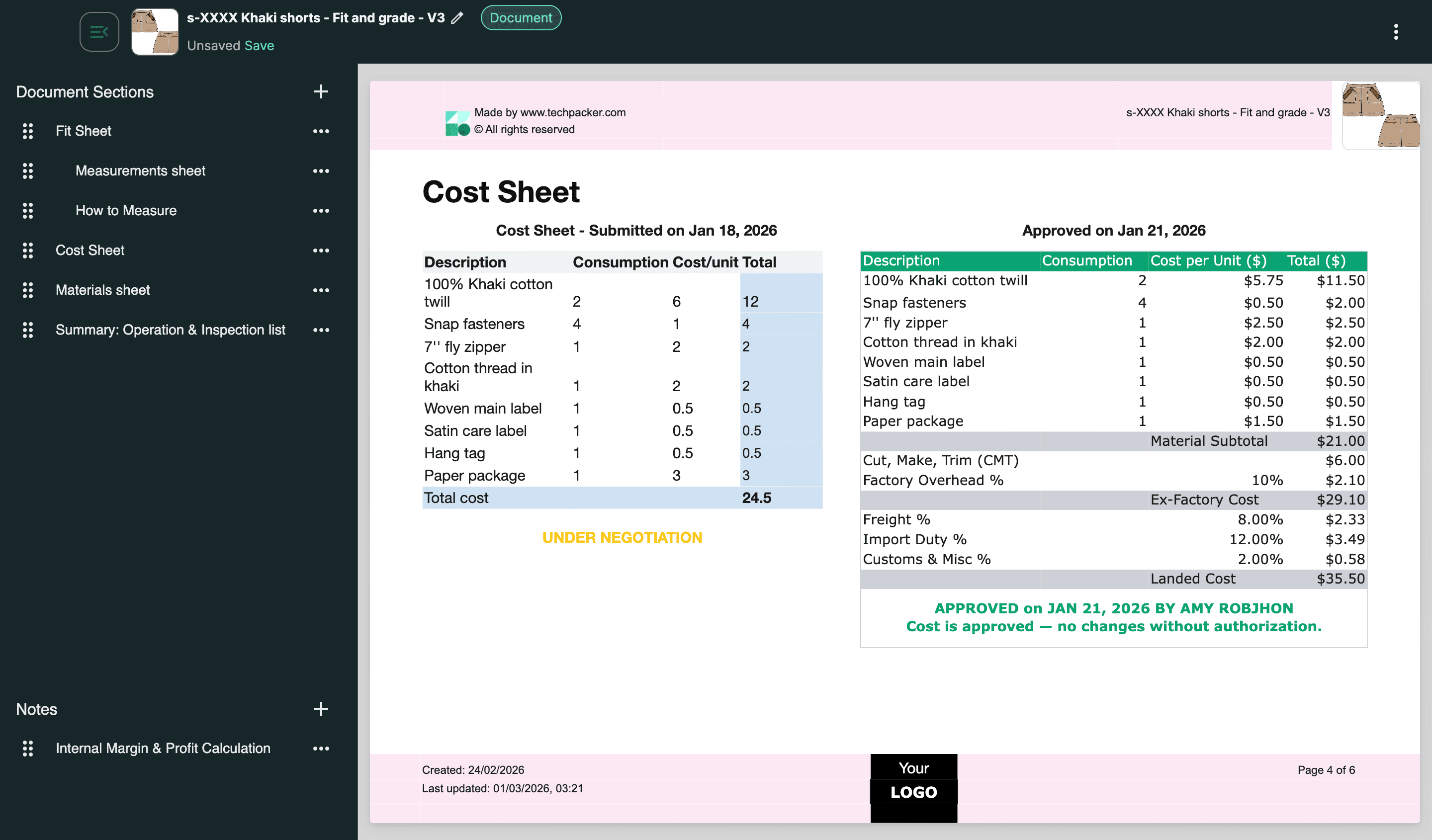
When a factory has your cost targets alongside your spec, they can flag material substitutions or construction alternatives that bring the garment within range without compromising the design. The garment costing guide breaks this down in detail.
Revision History and Version Log
The revision log records every spec change: what changed, when it changed, and who approved it. This section exists specifically to prevent a factory from building to the wrong version when multiple rounds of revisions exist across an email thread.
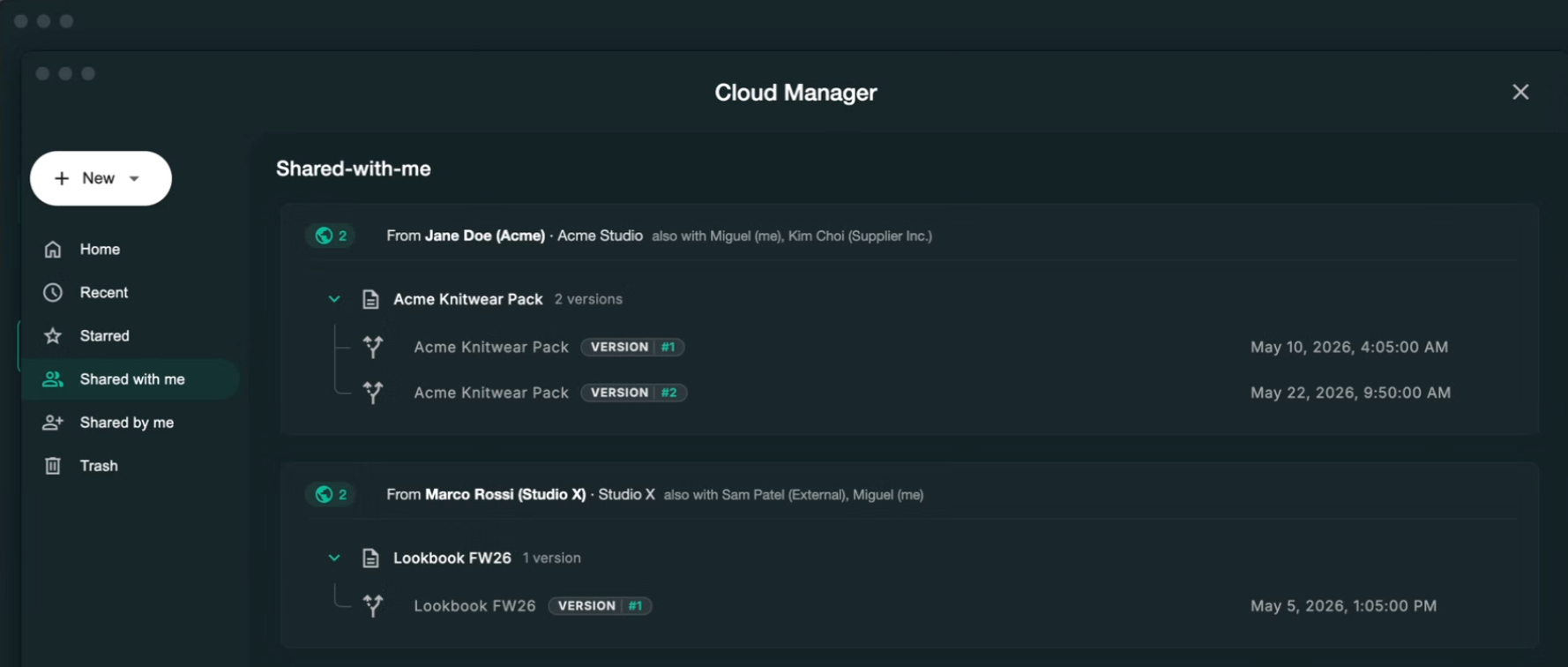
After a factory receives your tech pack, the first sample rarely becomes the final product. Feedback from fit sessions, material availability, costing, or production feasibility often leads to one or more revisions. Updating the original tech pack instead of creating disconnected versions keeps designers, manufacturers, and other stakeholders working from the same specifications throughout product development.
Why Do You Need a Tech Pack?
A tech pack is your primary tool for cost control in product development. Brands that approach factories without complete specs average 3 to 5 revision rounds per style. Brands with complete tech packs average 1 to 2.
At a rework cost of $1,500 to $5,000 per additional round across a 10-style debut collection, the difference between a complete tech pack and an incomplete one compounds fast.
Factories also need your spec to price accurately.
Without a BOM and construction detail, a factory quote is a rough estimate. The real cost surfaces after bulk production begins, when material substitutions or construction interpretations that weren't specified turn out to be more expensive than your target. By then, the margin damage is done.
A versioned, dated tech pack with your brand name and style numbers is also a timestamped record of your design.
In a quality dispute or a factory IP conflict, a complete tech pack is the reference document that defines what you ordered and what you approved. That protection is worth having regardless of how well you know your manufacturer.
When Should You Create a Tech Pack?
The best time to create a tech pack is before you start requesting factory quotes or samples.
Many first-time brands wait until after conversations with manufacturers begin, but that's backwards. A complete tech pack allows factories to estimate costs accurately, identify potential production issues early, and build samples that reflect your design instead of their assumptions.
Even if some details change during development, having a structured first version saves far more time than starting from scattered sketches and notes.
Tech Pack vs. Spec Sheet: What's the Actual Difference?
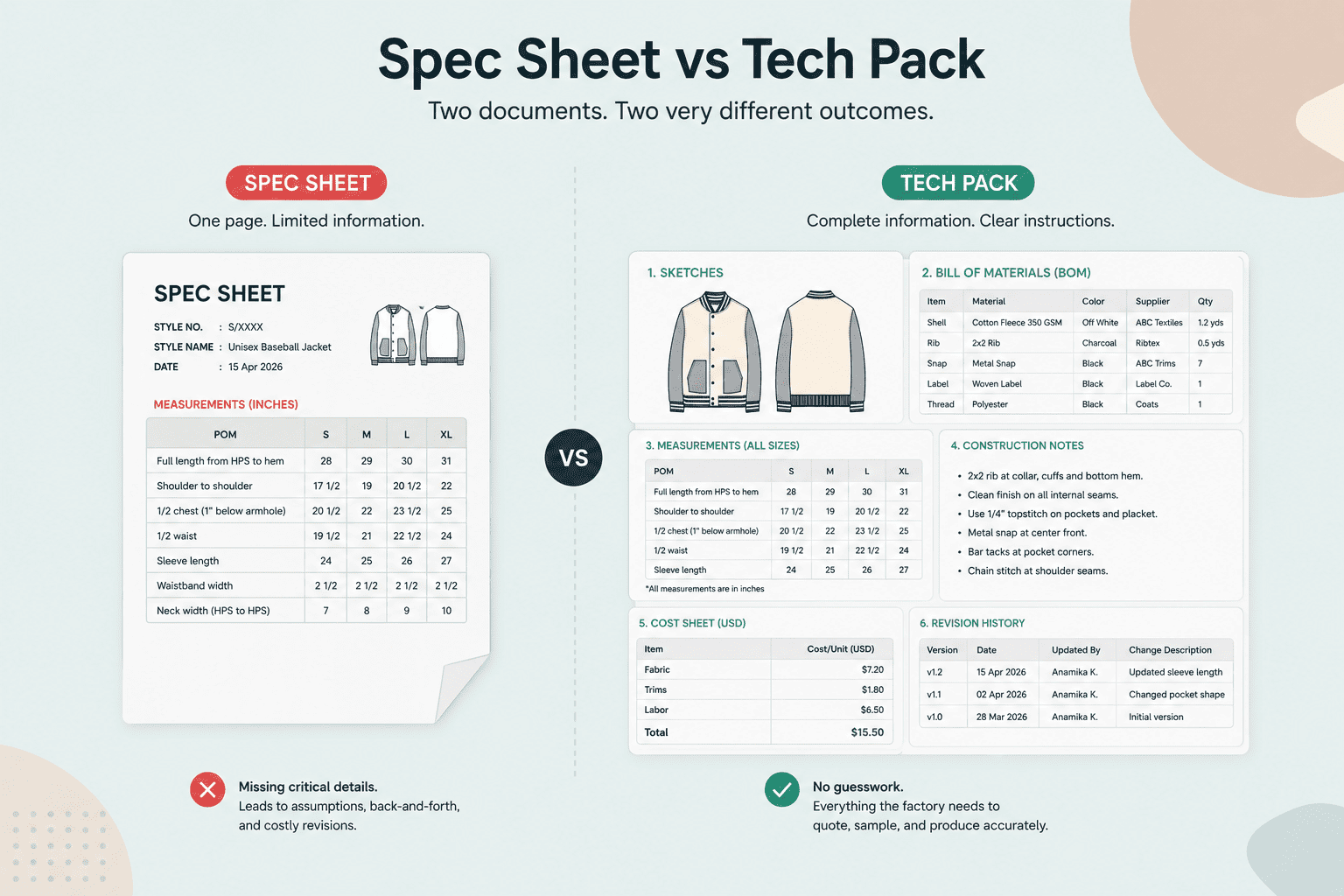
A spec sheet is one section within a tech pack, not a substitute for it. Sending a factory only a spec sheet is like giving a builder only the floor plan without the materials list or the construction drawings.
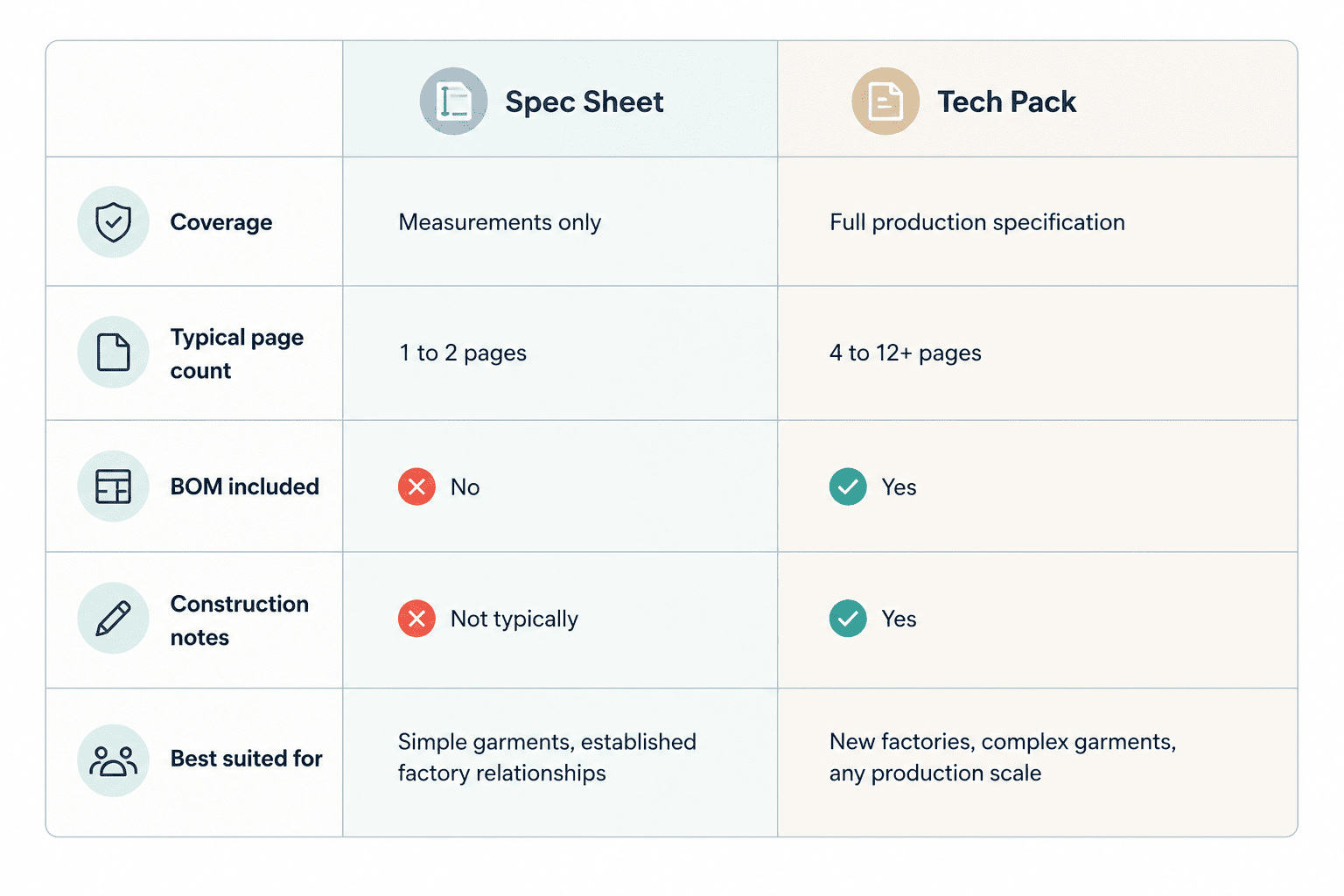
For simple styles with a factory that already knows your standards, a spec sheet can supplement an existing working relationship.
Many new brands use the terms interchangeably because measurement charts are often the first production document they create. In reality, the spec sheet is only one component of the larger tech pack. As products become more complex, relying on measurements alone leaves factories without enough information to reproduce the design consistently.
How Long Does It Take to Build One?
The time depends on garment complexity. A basic tee or simple cut-and-sew piece takes an experienced technical designer 1 to 2 hours.
A mid-complexity piece (structured trousers, a woven shirt with multiple pockets) runs 3 to 4 hours. A technical outerwear piece with complex construction details can take 5 to 6 hours or more.
The variable that extends this timeline the most is not garment complexity. It's the format.
When a designer works across Illustrator for flats, Excel for the BOM, a folder for reference images, and an email thread for revision notes, every revision requires updating multiple separate files, re-exporting, and reassembling the PDF.
A tech pack built inside a single tool, where everything lives in the same file, reduces revision time because there is only one thing to update and one file to send.
The Real Reason Tech Packs Break Down
Most factory miscommunication gets blamed on incomplete specs. The actual cause is usually multi-tool fragmentation.
Here is the standard workflow at most emerging brands. Flat sketches live in Adobe Illustrator. The BOM and measurement chart live in Excel. Reference images sit in a Dropbox or Google Drive folder. The tech pack sent to the factory is a PDF assembled from all of the above, with each component carrying its own version history and save location.
When a spec changes, the update cycle requires opening Illustrator, updating the sketch, and re-exporting. Then opening Excel, updating the BOM, and re-exporting. Then reassembling the PDF and re-sharing.
A measurement updated in Excel may not match the callout on the sketch if the sketch re-export was missed. The factory has no way to detect this without doing its own cross-check.
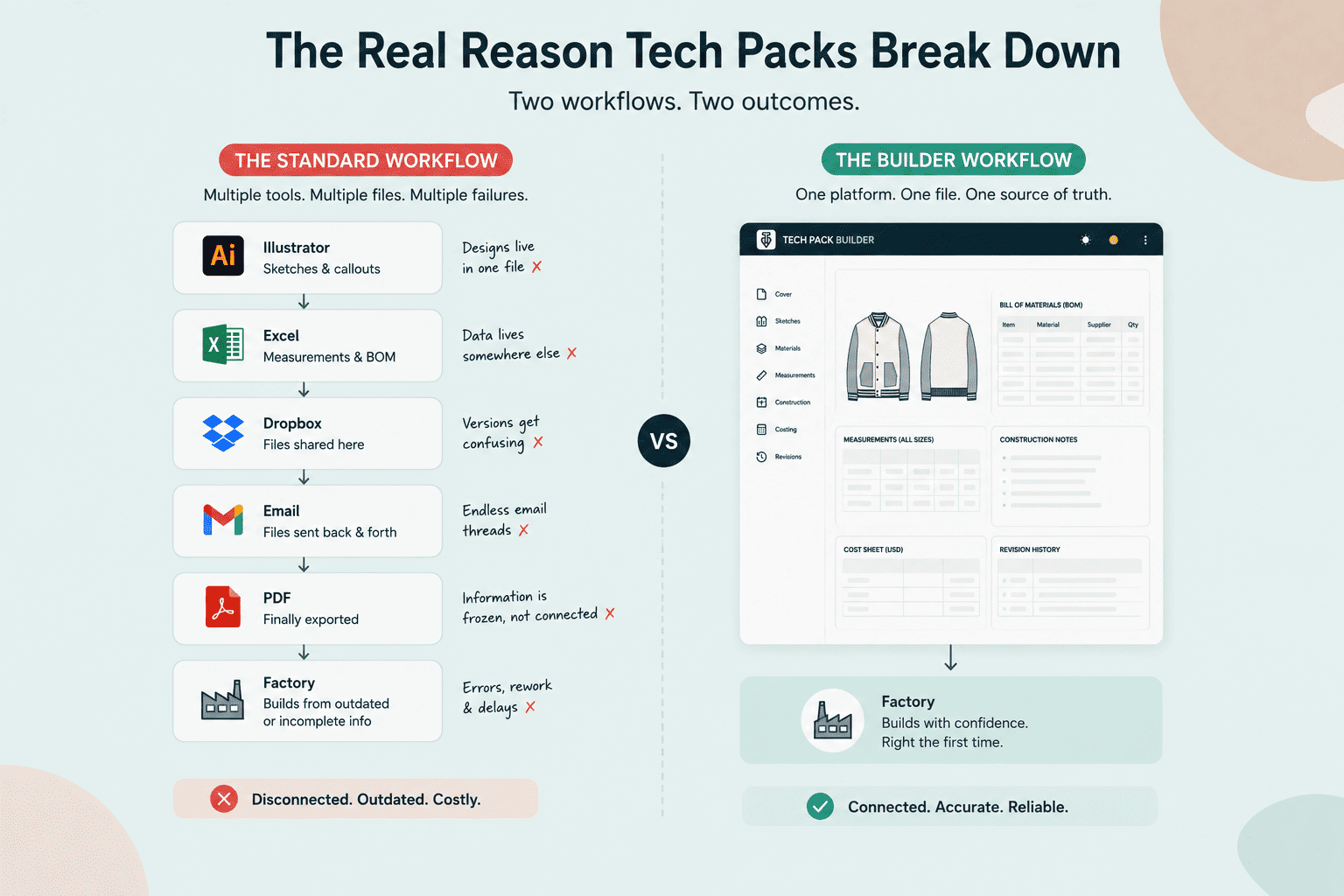
Purpose-built tech pack software solves this at the architecture level. The flat sketch and the BOM live inside the same document. What you see in the editor is exactly what the factory receives on export.
When managed in a modern digital workflow, tech packs also become collaboration hubs. Designers, product developers, merchandisers, and manufacturers all reference the same specifications throughout sampling and production, reducing the need for long email threads, disconnected spreadsheets, and conflicting file versions.
There are no separate files to fall out of sync. That is a fundamentally different approach than trying to force a multi-tool workflow into a format those tools were never designed for.
How to Create a Tech Pack for Your Clothing Brand
Start from a category-specific template. Templates for a basic tee, a woven trouser, and a technical jacket have different default sections. Free factory-ready tech pack templates are available for common apparel categories.
Step-by-Step Tech Pack Creation Process
- Start with the flat sketch. Draw or import front, back, and side views. Add callout lines to every construction detail: seams, pockets, closures, hardware, and label placements.
- Build the BOM. List every material and trim with fiber content, weight, color reference (Pantone), and supplier code where available.
- Set the measurement chart. Document all point-of-measure dimensions at base size with tolerances. Add grading rules for every size in the run. Every measurement should correspond to a labeled callout on the sketch.
- Write construction notes. Specify seam types, stitch count per inch, thread color, and finishing methods. If a construction method is non-standard, add an annotated diagram.
- Add the cost sheet. Estimate material costs per unit and target CMT. Note the FOB target.
- Complete the cover page. Set the style name, style number, season, colorways, version number, and date. Version 1.0 ships when the document first goes to a factory. Every spec change increments it.
- Run an internal consistency check. Every component listed in the BOM should appear in the sketch. Every measurement in the POM chart should have a labeled callout. Any mismatch here becomes a factory question later.
- Send a read-only, factory-ready version to the manufacturer. Keep the editable source file in your own system. When revisions come back, update the source file, increment the version number, and re-share.
Steps 7 and 8 are where spreadsheet-based workflows create the most problems, specifically at the consistency check and re-sharing stage. A single-file workflow handles both in one action.
Download Techpack Builder free for Mac and Windows. No signup required to start building.
Tech Pack examples and templates
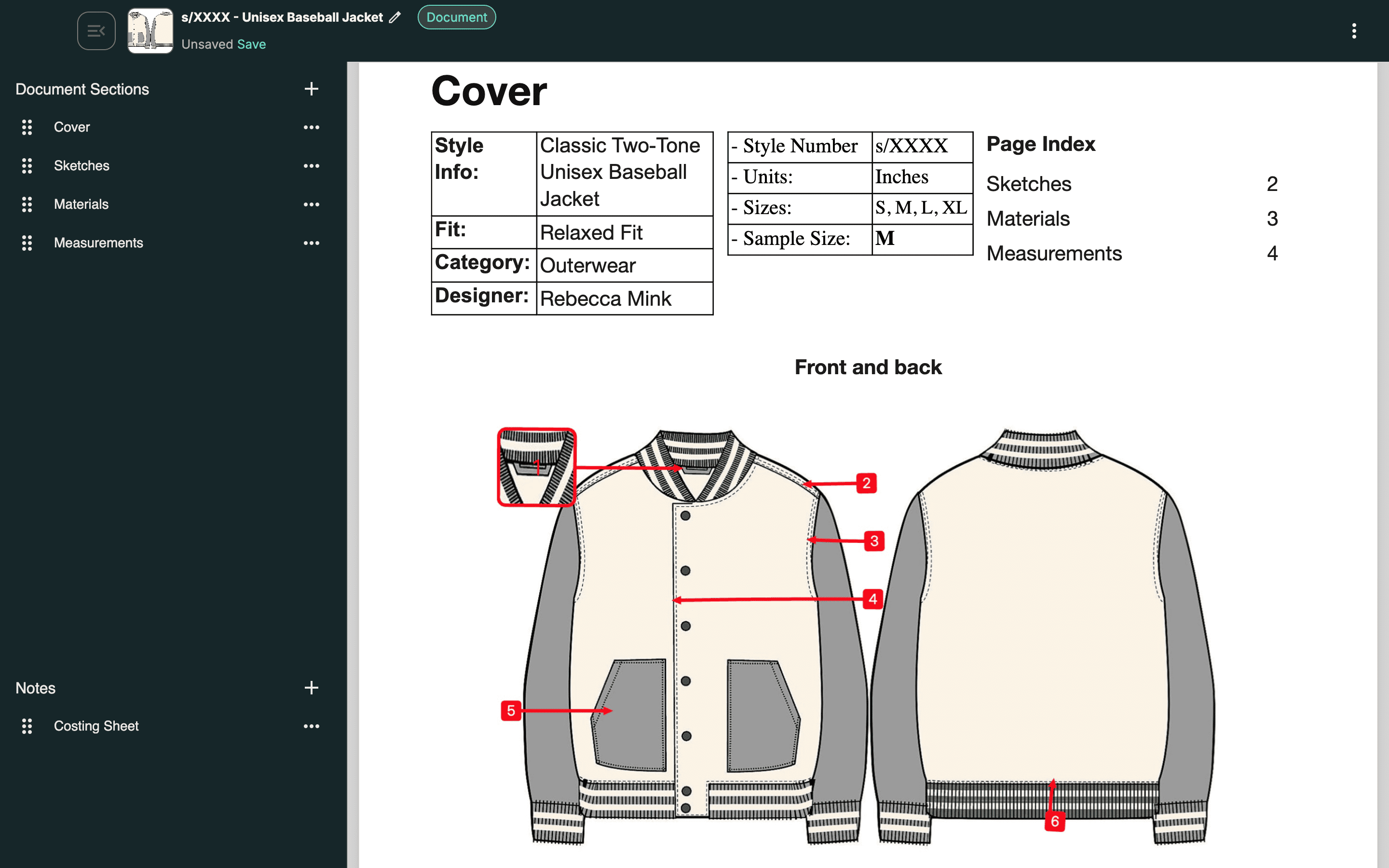
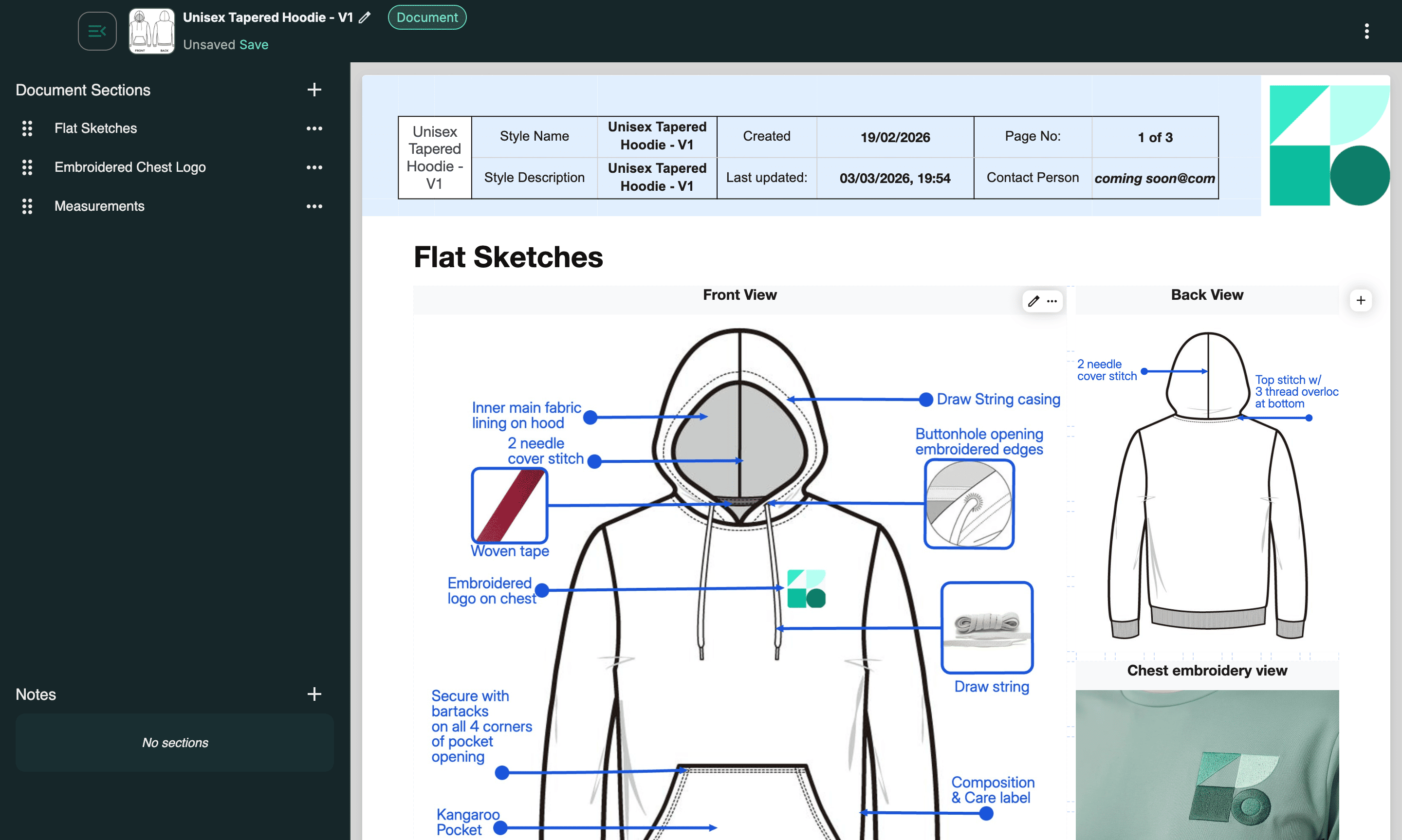
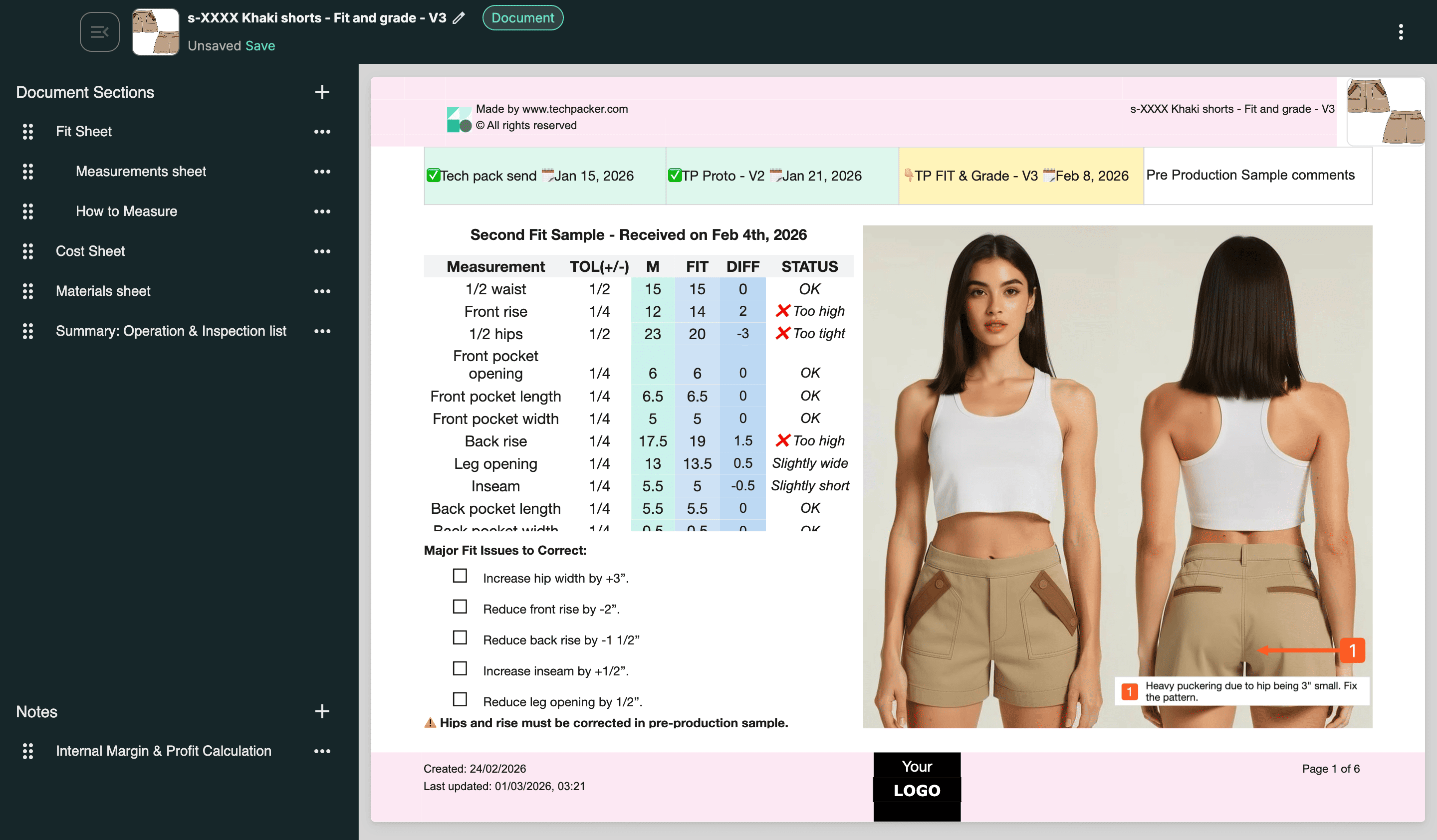
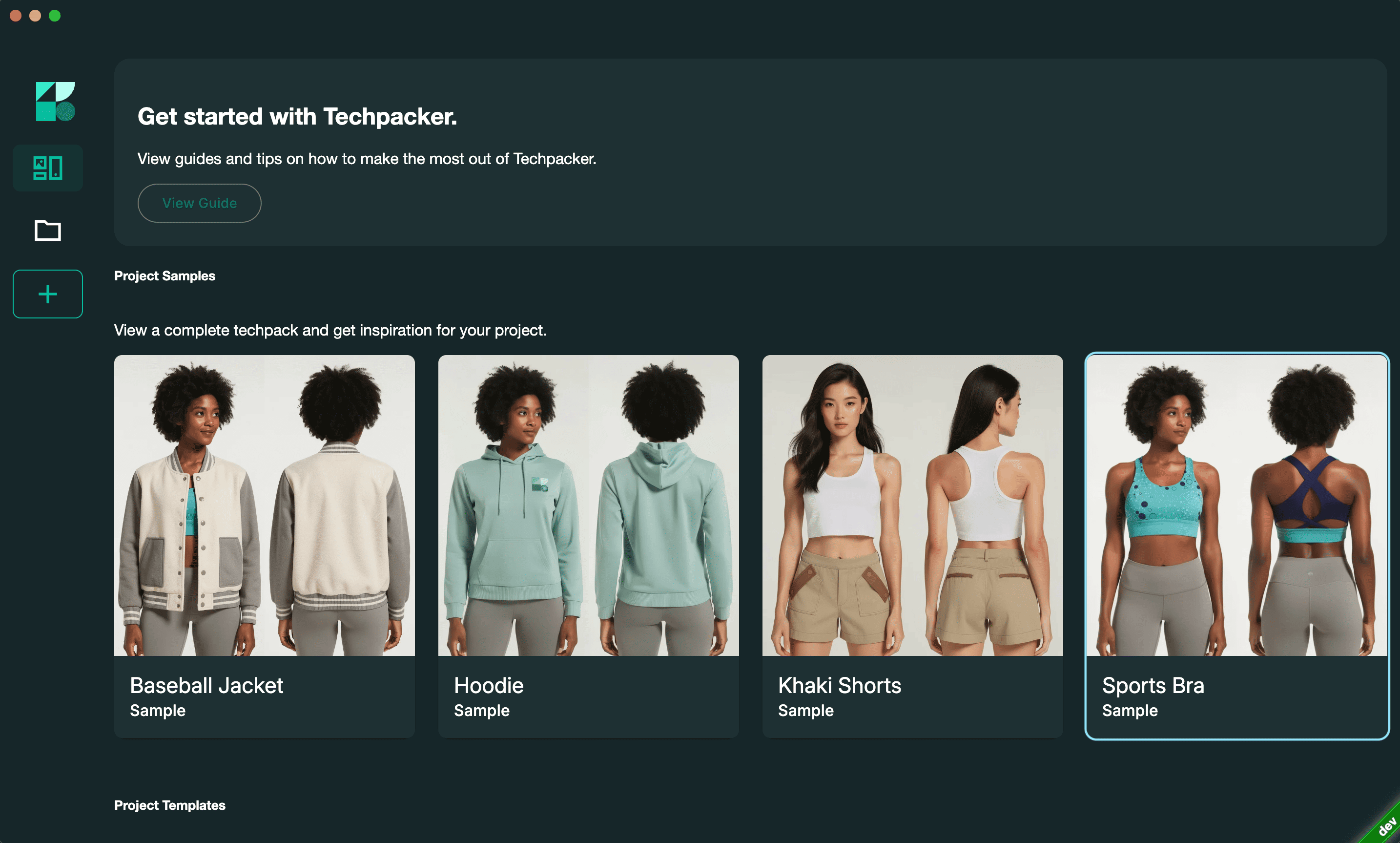
Ready to start building? Explore professionally designed Techpack Builder templates that you can customize for your own products.
Baseball Jacket
Hoodie
Khaki Shorts
Sports Bra
What Comes Next
The most common misconception about tech packs is that they are a barrier: something technical, time-consuming, and only necessary for brands at a certain scale.
The opposite is true. A tech pack is what removes barriers between your design and the factory floor, and the cost of not having one shows up immediately, in the first sampling round.
The single most important thing to take from this guide is not the list of components. It's that most tech pack failures happen at the workflow level, not the content level.
A spec assembled across four separate tools with four separate version histories will create consistency problems regardless of how carefully it was written.
Download Techpack Builder free for Mac and Windows. No signup required, no limits to start. Open a factory-ready template, work through the eight steps above, and have a production-ready document before your next factory conversation.
Other basic FAQ's
1. What's actually in a tech pack, and how is it different from just sending a factory my sketches?
A tech pack includes technical flat sketches with callout labels, a bill of materials listing every fabric and trim with specifications, a point-of-measure chart with tolerances and grading rules, construction notes covering seam types and finishing methods, a cost sheet, and a revision log.
Sending sketches alone gives the factory a visual reference but no production instructions. They fill every unspecified gap with an assumption. A complete tech pack removes those assumptions before sampling begins.
2. Can a beginner build a tech pack without knowing Adobe Illustrator?
Yes. Illustrator is the traditional tool for technical flat sketches, but purpose-built tech pack software includes sketch tools, annotation, BOM tables, and measurement charts that require no design software experience.
A designer can start from a factory-ready template, populate it with their specifications, and export a structured production document without opening Illustrator or Excel. The learning curve is significantly shorter because every feature is built for this one task.
3. How many pages should a tech pack be?
Page count follows garment complexity. A basic tee typically runs 4 to 6 pages. A technical jacket can reach 12 or more.
Every page should earn its place: if a construction detail can be communicated through a callout on the flat sketch, it does not need a separate page. Padding a tech pack with redundant pages does not make it more useful to a factory. Precision does.
4. How many revision rounds is normal during garment development?
With a complete, consistent tech pack, one to two sampling rounds is realistic for most garments. Without one, the industry average climbs to three to five rounds per style. The difference comes down to how many assumptions the factory makes during sampling.
Each assumption that turns out wrong triggers a revision request. Reducing assumptions at the documentation stage directly reduces revision rounds at the sampling stage.
5. My factory says they don't need a tech pack. Should I trust that?
A factory saying they don't need a tech pack means they are confident they can interpret your design from a reference image or sample. That may be true for their initial quote, but it is not true for accurate, repeatable production.
Without a tech pack, you have no documented reference to compare the first sample against, no baseline to hold them to in a quality dispute, and no record of what you actually ordered. A factory comfortable working without one is a factory comfortable making production decisions on your behalf.
Bonus: Download our "Ultimate Guide to Tech pack in Fashion Ebook" for free!