


Contents
For many fashion brands, Google Sheets is where tech pack creation begins.
It is accessible, familiar, and flexible enough to document early designs, measurements, and material details. In the early stages, when collections are small and teams are lean, spreadsheets feel like a practical way to move designs from concept to sampling.
But there’s a point where this starts to shift.
As styles increase, teams expand, and factories expect clearer documentation, Google Sheets begins creating friction instead of supporting growth. What once felt lightweight turns into a system that slows decisions, introduces errors, and complicates factory communication.
Most fashion brands outgrow spreadsheets when tech packs stop being simple reference files and start functioning as production-critical records. At that stage, spreadsheets struggle to support the visual, collaborative, and version-sensitive nature of modern apparel development.
If you’re trying to understand whether your workflow has reached that point, there are usually a few clear signals.
This article breaks down five of the most common reasons fashion brands move beyond Google Sheets for tech pack creation and what that shift reveals about operational maturity, factory readiness, and scalability.
1. Version Control Collapses the Moment More Than One Person Touches the Sheet
Google Sheets starts to crack the moment tech pack creation stops being a solo task.
At first, one designer owns the file. Updates are clear. Nothing breaks.
Then the team grows.
Suddenly, multiple people are editing measurements, materials, sketches and notes, often at different points in time, and without full visibility into what changed, why it changed, or whether it was approved.
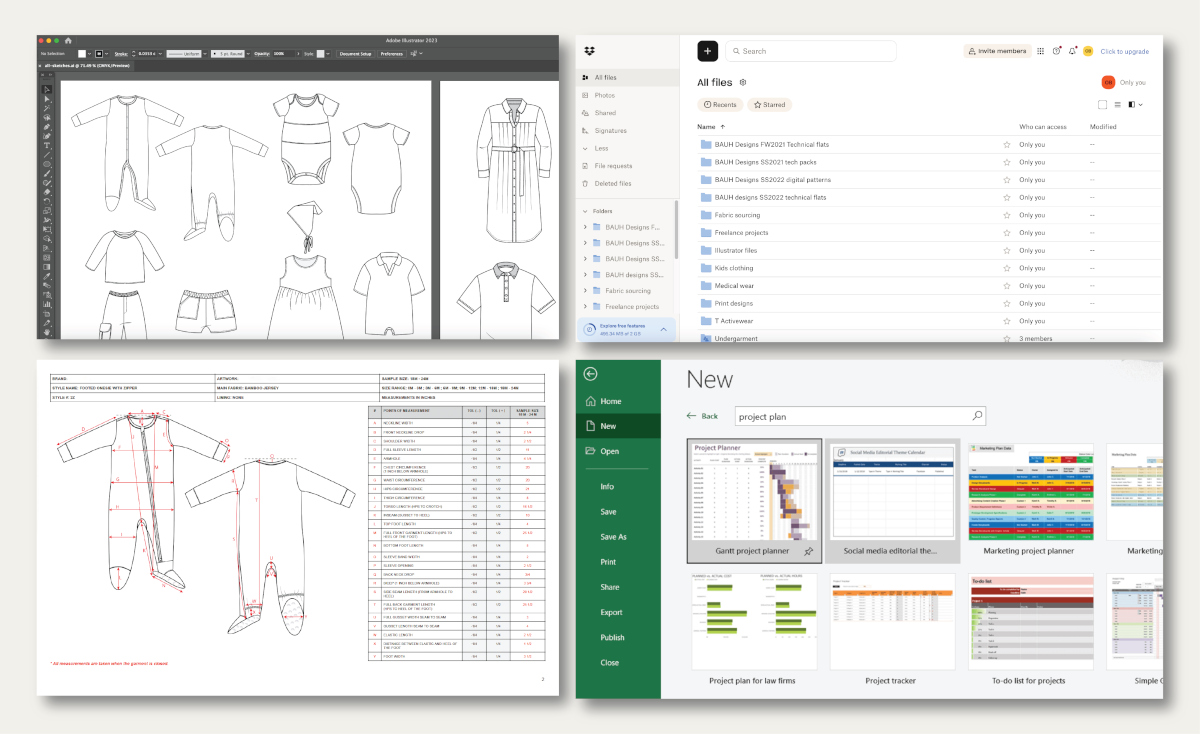
This is where most fashion teams enter what’s commonly called Excel or Google Sheets version hell. And if you’ve worked in growing product teams, you’ve likely seen this firsthand.
What version control looks like inside a spreadsheet
In real workflows, this usually doesn’t show up as one big failure. It plays out in smaller, compounding gaps.
Measurements get updated after a fit session, but only in one tab. Fabric or trim details change after a vendor call, while the sheet already shared with the factory has been downloaded. A merchandiser might add comments while a designer edits values directly, creating overlapping layers of information. And in some cases, factories proceed with sampling using an older file simply because it “looked complete” at the time.
None of this happens because teams are careless.
It happens because spreadsheets were never built to manage controlled, production-ready documentation. Google Sheets can show that something changed, but it struggles to answer the questions factories and production teams actually care about:
Which version is final? What changed since the last sample? Has this update been approved for manufacturing?
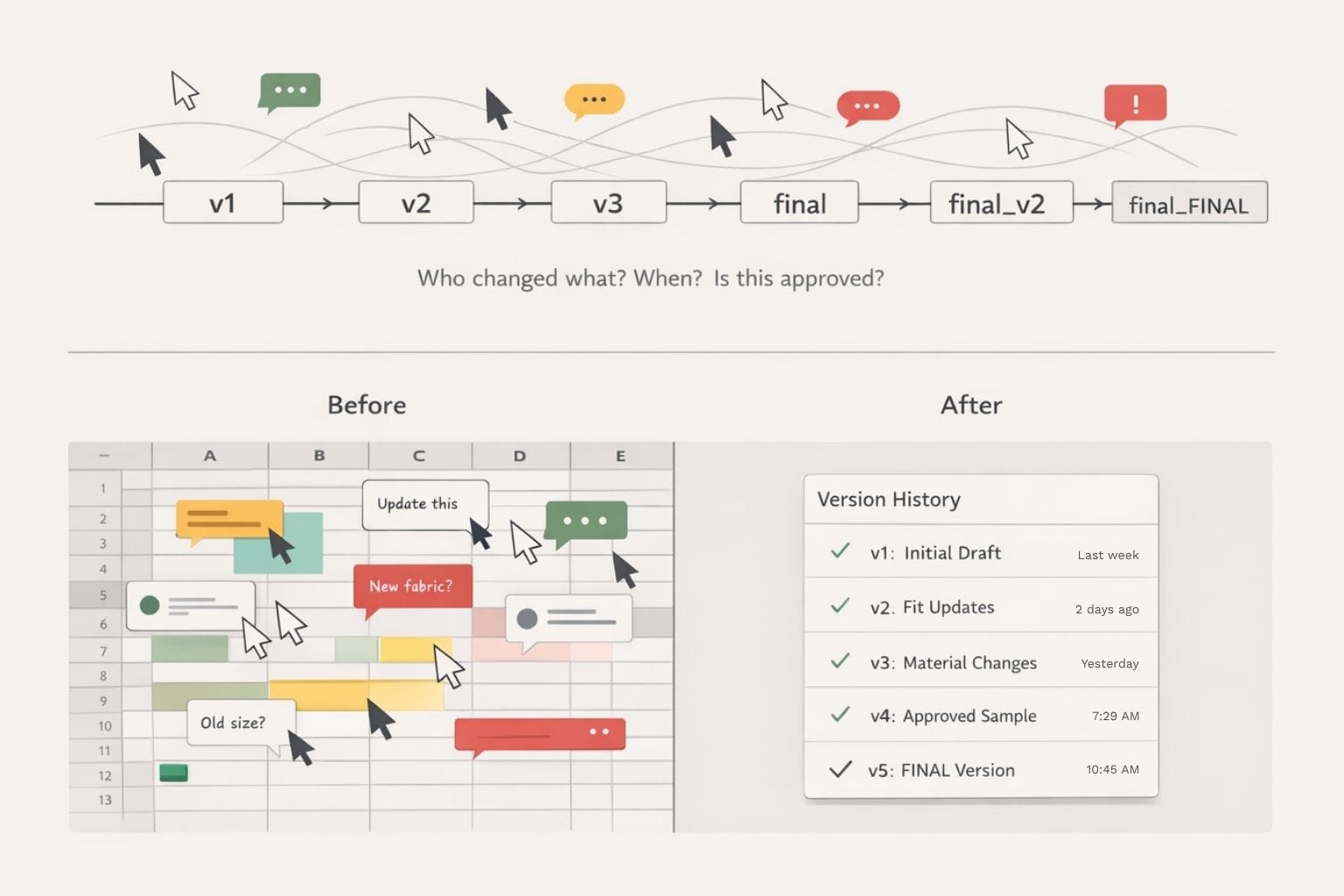
To compensate, teams start building manual workarounds around the spreadsheet, like relying on file naming conventions, color-coded cells, comments, and long email threads explaining what to follow and what to ignore. Over time, this adds friction to the fashion tech pack workflow and increases the risk of costly misinterpretation.
The operational cost of spreadsheet-driven versioning
The impact goes beyond inconvenience. Poor version control slows teams down and gradually weakens trust with factories.
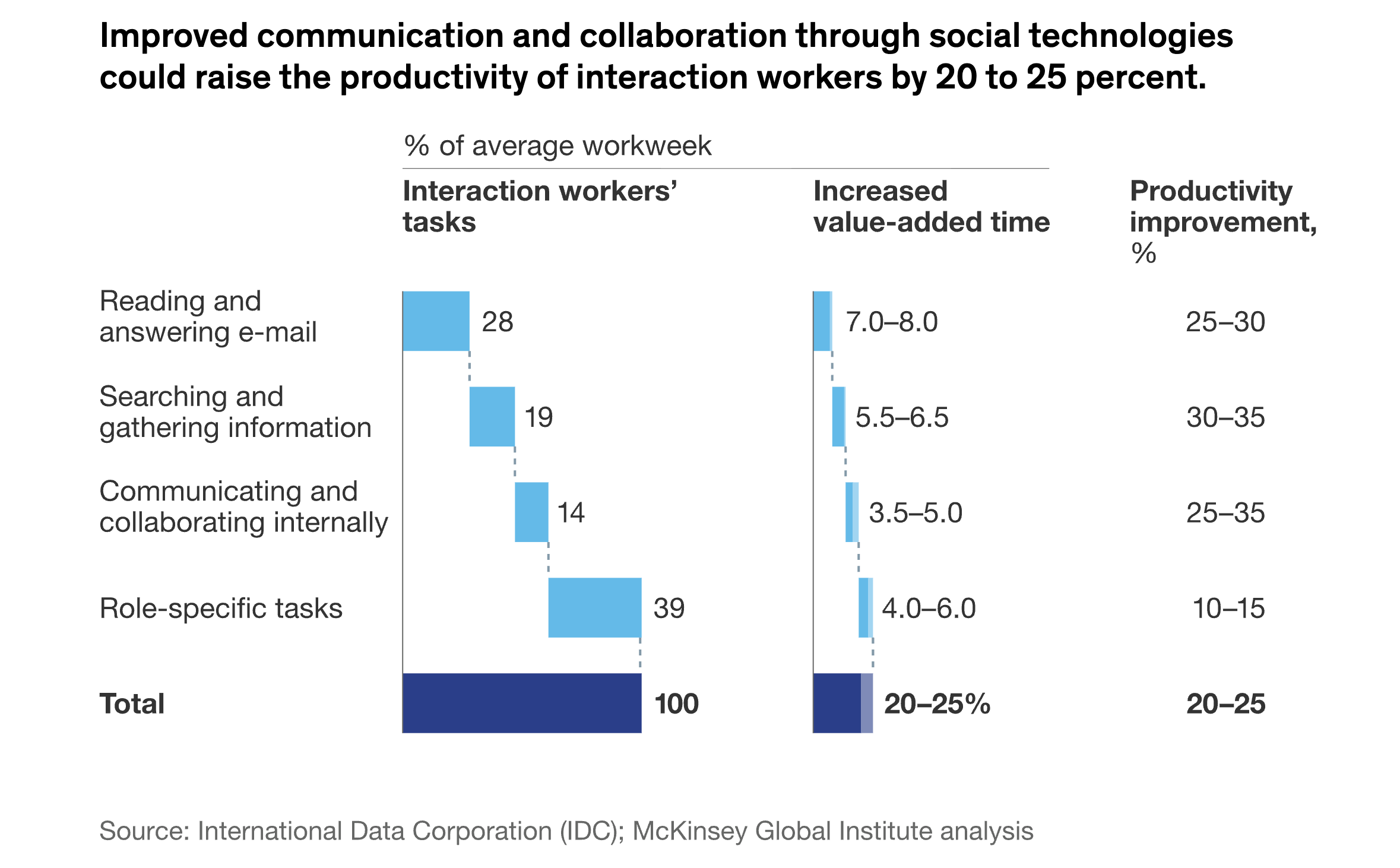
McKinsey has found that fragmented information and poor collaboration can reduce productivity by 20 to 25 % in knowledge-intensive workflows, including product development and manufacturing coordination. In fashion, that loss translates directly into delayed samples, rework, and missed delivery windows.
When tech packs are treated as casual documents instead of controlled records, factories are forced to interpret intent rather than follow clear instructions. Over time, this leads to production errors, constant back-and-forth clarification, and a growing perception that the brand’s documentation isn’t fully reliable.
For growing fashion brands, this is often the first clear signal that spreadsheets are no longer sustainable. It’s the stage where teams stop trying to fix Google Sheets and start comparing purpose-built tools, which is exactly what the Techpack Builder vs Excel breakdown is meant to clarify.
2. Google Sheets Fails at Visual-First Tech Pack Documentation
Fashion is visual by nature, but spreadsheets are not.
This gap becomes obvious the moment tech packs move beyond basic measurements and material lists. As designs evolve, factories rely far more on visual clarity to interpret construction details, stitching, placements, and finishes. Google Sheets, however, treats visuals as secondary attachments rather than core documentation.
You’ll notice this shift quickly as products become more design-complex and factory interpretation becomes more execution-critical.
Why visuals matter more than text in tech packs
In a real fashion product development workflow, visuals are not decorative. They are instructional. Factories depend on them to understand intent without ambiguity, especially when teams are working across time zones, languages, and production contexts.
Factories depend on them to understand intent without ambiguity, especially when teams are working across time zones, languages, and production contexts.
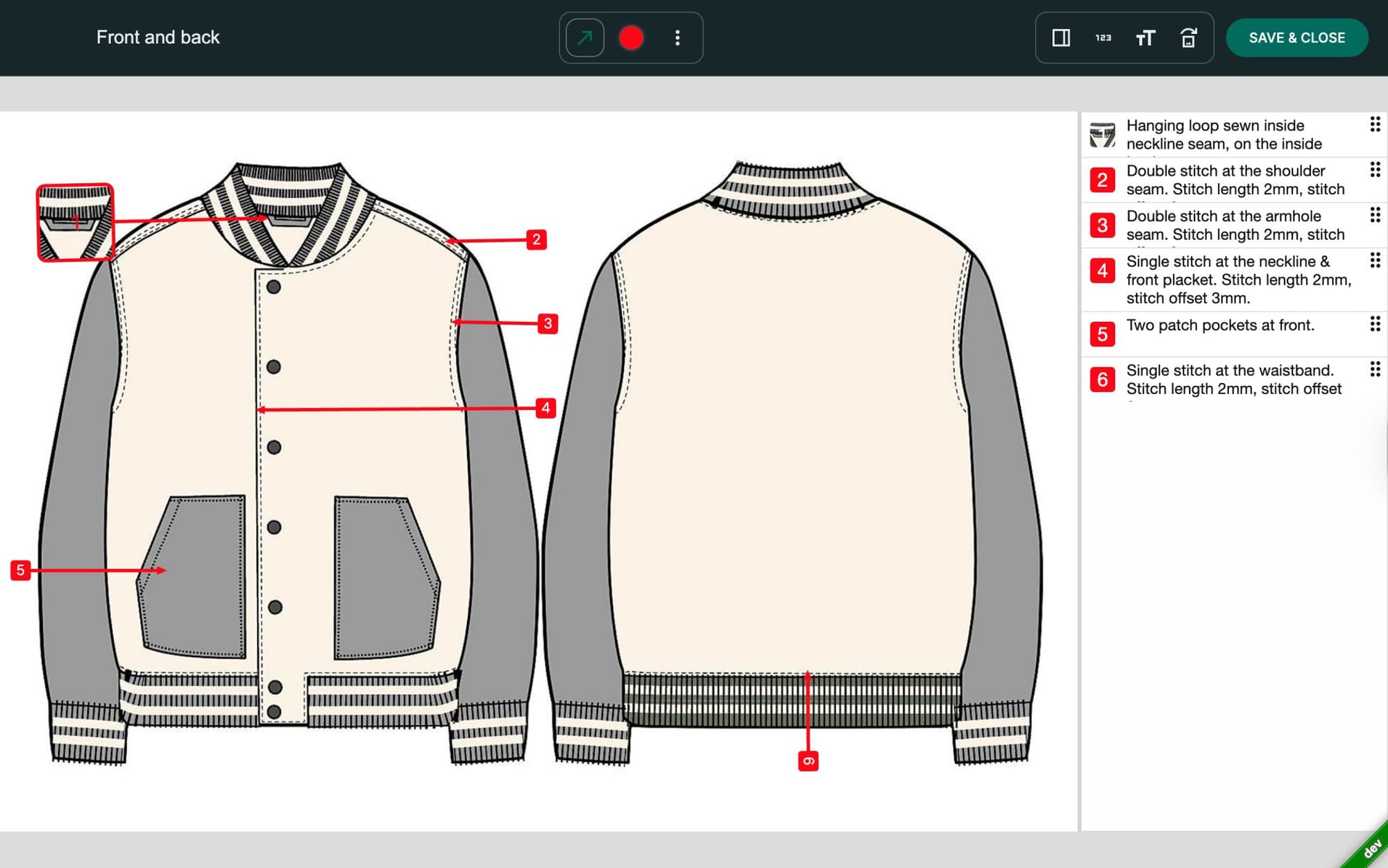
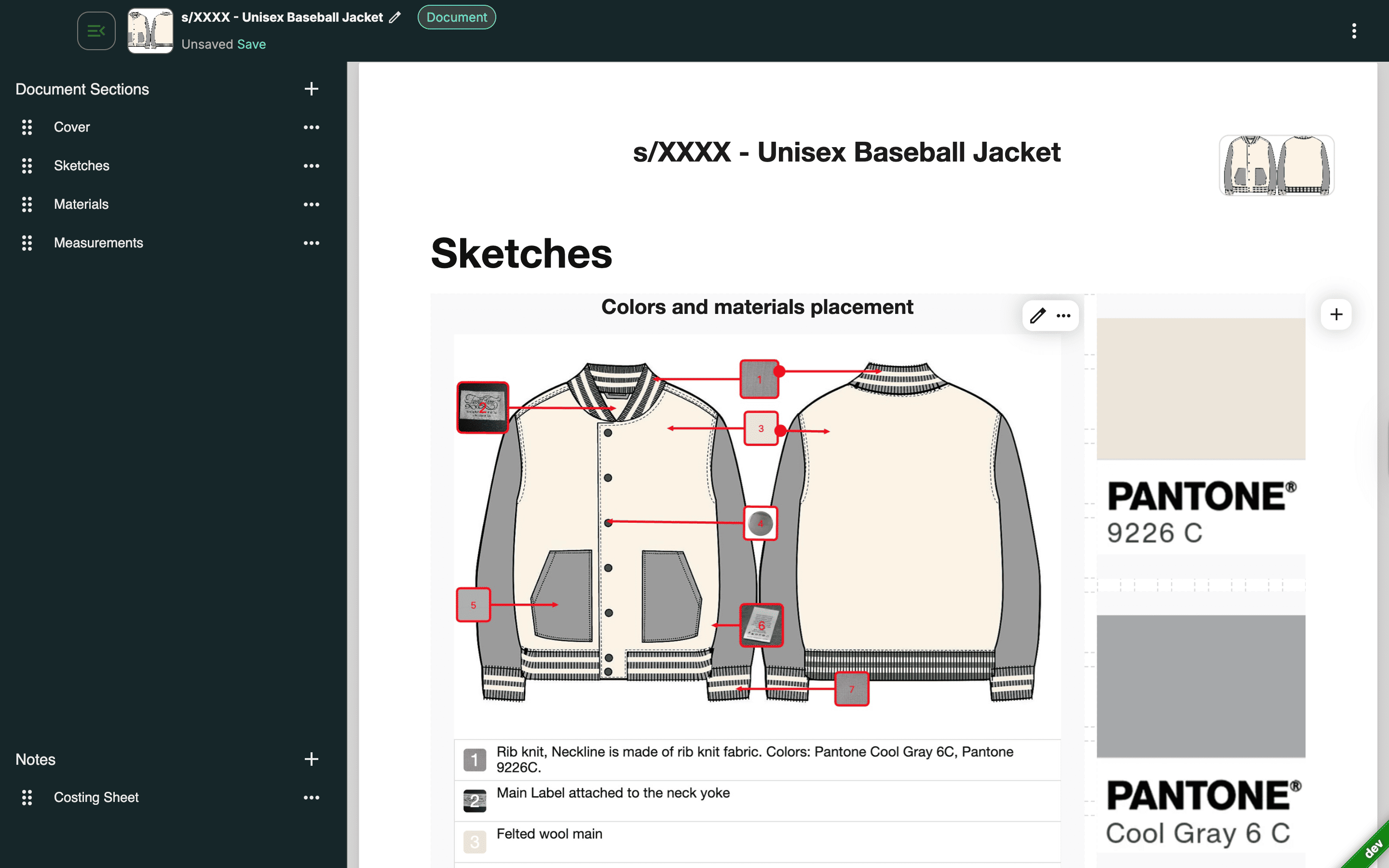
A factory-ready tech pack typically requires annotated sketches showing exact placements and construction details, callouts for stitches and seams, references tied directly to measurements and materials, and visual context for trims, labels, and packaging.
Google Sheets struggles to support this kind of visual hierarchy.
Images are usually pasted into cells, resized inconsistently, or linked externally through shared drives. Annotations often live in separate Illustrator files or PDFs, forcing factories to move between multiple documents just to understand one product.
We’ve seen factories spend more time assembling fragmented references than actually reviewing the garment itself.
The hidden friction spreadsheets create for factories
When visual information is fragmented, interpretation becomes guesswork.
Factories often receive a spreadsheet with measurements and notes, separate sketch files or PDFs, and additional clarifications shared over email or messaging platforms. Because nothing is visually connected, teams are forced to interpret relationships between documents instead of relying on a single, unified reference.
In practice, this leads to small but costly gaps. A measurement update may not reflect in the sketch. A stitch change might exist in comments but never get marked visually. Over time, factories stop trusting the documentation and begin confirming even basic details through follow-ups.
According to Deloitte, poor data visualization and unclear documentation are among the top contributors to rework and production inefficiencies in manufacturing environments. Visual clarity directly affects both accuracy and production speed, especially when instructions must travel across distributed teams.
Why this breaks down at scale
As style counts grow, relying on spreadsheets for visual tech packs becomes increasingly unsustainable.
Each new SKU introduces more images, more annotations, and more cross-references that spreadsheets aren’t built to manage. Teams end up spending more time aligning visuals with data than actually progressing products toward production.
At this stage, most brands realize the limitation isn’t formatting, it’s infrastructure.
The speed gains they’re looking for don’t come from cleaner spreadsheets or stricter templates. They come from using systems designed for visual-first tech pack creation from ground up.
3. Factory Communication Suffers When Tech Packs Live in Spreadsheets
Factories do not struggle because they lack skill. They struggle when instructions are unclear, fragmented, or outdated.
They expect tech packs to function as a single source of truth, clearly communicating intent, specifications, and changes in a format that reflects what a factory-ready tech pack looks like.
When Google Sheets becomes the primary system for fashion manufacturing documentation, communication often turns reactive instead of precise. Teams end up spending more time clarifying decisions than progressing production.
How spreadsheet tech packs confuse suppliers
From a factory’s perspective, spreadsheet-driven tech packs rarely arrive as one unified reference.
Instead, they show up as a collection of disconnected inputs, a Google Sheet with measurements and BOM details, sketch files or PDFs shared separately, and follow-up messages explaining what changed or what should be ignored.
This forces manufacturers to interpret relationships between files instead of relying on one authoritative source.
Even small gaps in clarity can create production risk. Sampling may happen against outdated specifications. Details that exist in one file may not translate into another. And teams often find themselves answering repeat questions about information that technically already exists.
We’ve seen factories pause production simply to reconfirm instructions that should have been obvious inside the tech pack itself.
Why factories lose confidence in spreadsheet workflows
Factories value brands that communicate clearly and consistently. When documentation feels messy or constantly changing, it signals operational instability, even when the brand’s intent is strong.
Over time, this perception affects collaboration.
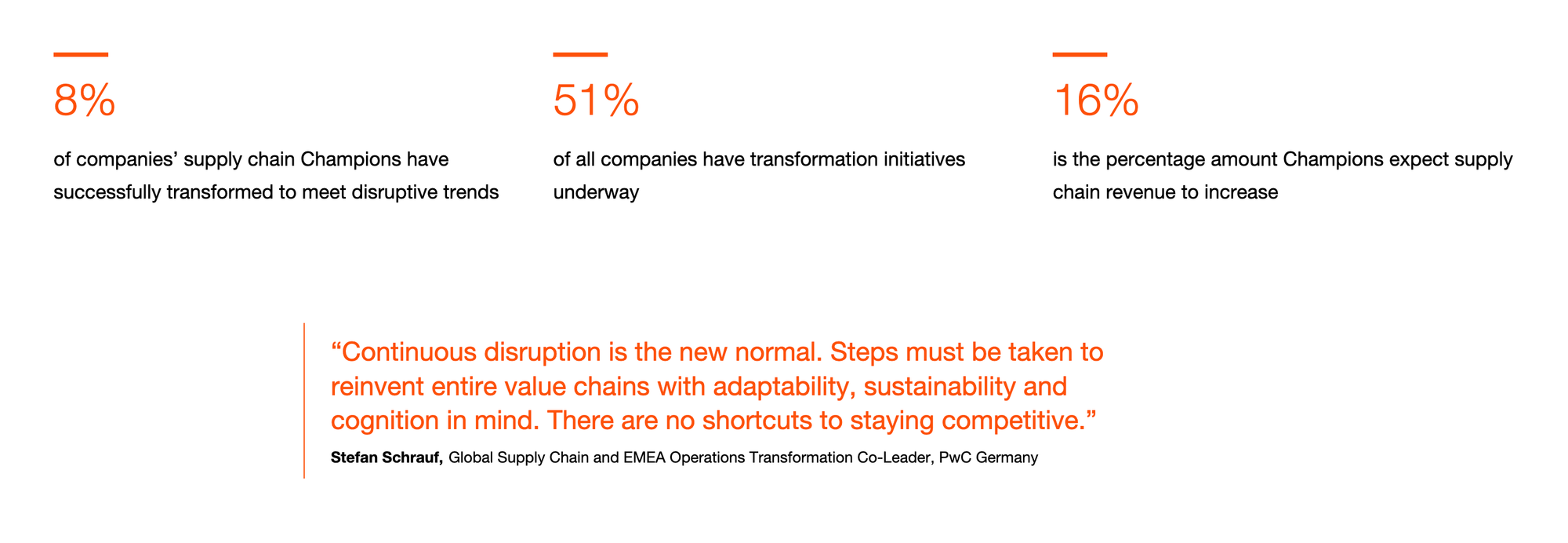
A PwC study highlights how supply chain leaders are actively restructuring operations to reduce inefficiencies caused by fragmented processes and poor coordination. Documentation plays a major role in that equation.
When tech packs are spread across sheets, files, and conversations, factories are forced to double-check everything. This slows timelines and increases dependency on approvals, and creates follow-up loops that shouldn’t be necessary in a production-ready workflow.
The professional gap spreadsheets create
At a certain scale, tech packs stop being internal tools, they start representing the brand externally. They signal how organized, reliable, and production-ready a fashion company really is.
Spreadsheet-based tech packs often communicate the opposite unintentionally. Formatting inconsistencies, disconnected visuals, and evolving comment threads can signal unclear ownership of final specifications and a higher likelihood of mid-production changes.
As brands begin working with more experienced or in-demand manufacturers, this gap becomes harder to ignore. Factories expect documentation that clearly communicates approvals, locked specifications, and execution readiness in one place.
When that expectation isn’t met, relationships can become strained — not because of product quality, but because of documentation clarity.
For many growing fashion brands, this becomes a turning point.
They realize the issue isn’t the factory or the internal team, it’s the tool sitting at the center of the workflow.
4. Scaling Styles and SKUs Turns Google Sheets into Manual Overhead
Google Sheets feels manageable when a brand is producing a handful of styles. But as collections grow, that flexibility quickly turns into fragility.
Once style counts increase, spreadsheets stop behaving like lightweight tools and start functioning like a web of manual dependencies. Every new SKU multiplies the effort required to keep tech packs accurate, aligned, and production-ready.
What scaling looks like inside a spreadsheet
When fashion teams rely on spreadsheets for tech pack creation at scale, repetitive work becomes unavoidable.
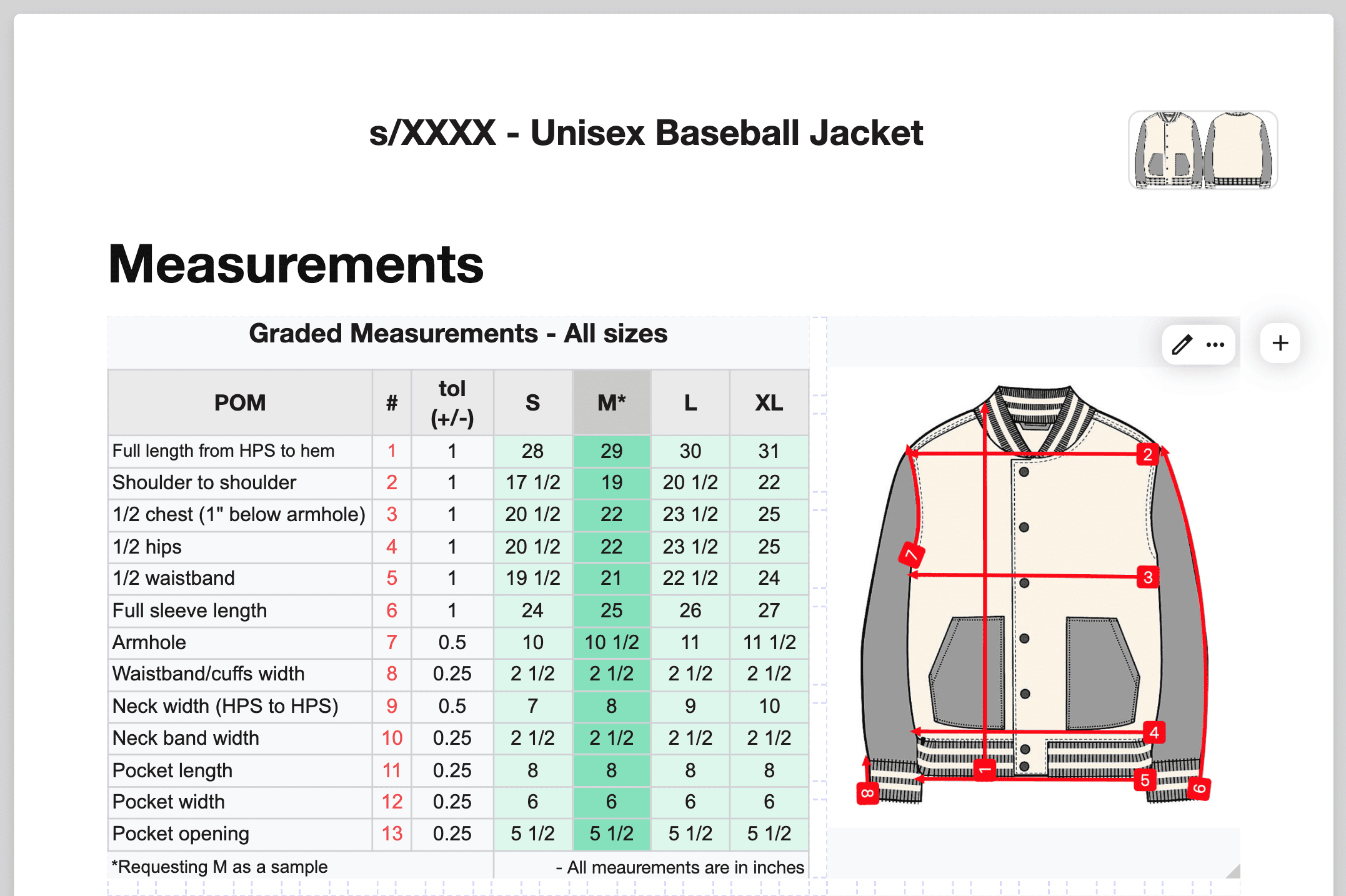
Tabs are duplicated for every new colorway or size run. Measurements, notes, and BOM details are manually copied across styles. Teams re-check multiple sheets just to confirm that the same update was applied consistently. Separate files are often maintained for seasonal drops, revisions, or factory-specific adjustments.
Individually, these tasks don’t seem dramatic. But together, they create a maintenance-heavy workflow.
Time gets spent managing documents instead of refining product quality or accelerating production timelines.
The hidden cost of manual repetition
Manual overhead doesn’t always feel urgent, it accumulates quietly.
It shows up as slower updates, delayed handoffs, and small inconsistencies that slip through because the process depends on copying and cross-checking rather than structured inheritance.
Accenture reports that up to 40 percent of employees’ time in operational roles can be lost to repetitive manual tasks that could otherwise be automated. In fashion product development, that often means time spent reconciling spreadsheets instead of moving designs toward production.
As SKU counts grow, the margin for error shrinks. A missed update in one size chart or a forgotten change in a duplicated sheet can ripple through sampling and production, leading to rework that costs both time and money.
We’ve seen teams discover inconsistencies only after samples arrive and not because decisions were unclear, but because the documentation structure didn’t scale with complexity.
Why spreadsheets slow speed to market
Speed in fashion doesn’t come from working faster inside the same tool. It comes from removing unnecessary steps.
Spreadsheets require teams to think about structure, formatting, and consistency every time they create or update a tech pack. This cognitive load compounds as collections grow, making each additional style slower to manage than the last.
Brands often try to solve this by creating stricter templates or adding more rules inside Google Sheets. While that can help temporarily, it doesn’t eliminate the root issue. Spreadsheets weren’t designed to scale with visual complexity, repeated components, or evolving product lines.
At this stage, teams are no longer struggling with speed but with structure, which is why simplifying tech pack creation and management becomes an operational necessity rather than a process improvement.
When scaling styles and SKUs begins to feel heavier instead of faster, it’s usually a clear sign that Google Sheets has reached its operational ceiling.
5. Spreadsheets Block Professionalization With Serious Manufacturers
At a certain stage, the problem with Google Sheets is no longer efficiency, it's perception.
As fashion brands grow, tech packs stop being internal working files and become external signals of operational maturity. Factories, especially established or in-demand manufacturers, use tech packs to assess how reliable a brand will be as a production partner.
Spreadsheet-based tech packs often fail this test.
How factories read spreadsheet tech packs
Manufacturers do not just read tech packs for information. They read them for clarity, consistency, and confidence.
When documentation arrives as a spreadsheet combined with loosely attached sketches, evolving comments, and follow-up explanations, factories often infer that specifications may continue changing, approvals may not be clearly defined, and production decisions could require extra confirmation.
Even if the brand’s internal process is strong, the documentation can suggest uncertainty.
And factories prioritize partners who reduce operational risk.
Brands that present clean, factory-ready tech packs are easier to work with. They require fewer clarifications, move faster through sampling, and create less ambiguity during production.
Why spreadsheets signal immature operations
Google Sheets was never designed to present polished, production-ready documentation. Formatting inconsistencies, embedded images, and long comment threads make tech packs feel provisional rather than final.
Over time, this creates friction in areas that directly affect growth.
Factories may hesitate before beginning work. More time is spent clarifying instead of producing. Brands struggle to negotiate priority or tighter timelines because documentation itself introduces uncertainty.
According to a report by Boston Consulting Group, companies with mature operational processes and standardized documentation can reduce production delays by up to 30 percent compared to peers with fragmented workflows. In fashion, documentation quality is a visible marker of that maturity.
The credibility gap that holds brands back
For scaling fashion brands, professionalization is not about appearances. It is about trust.
Factories expect tech packs to function as a single source of truth with clear visuals, locked specifications, and an obvious signal that the brand is ready to move from discussion to execution.
When spreadsheets sit at the center of tech pack creation, brands often struggle to cross this credibility threshold. The limitation is not the team’s capability, but the tool’s inability to represent a modern fashion product development workflow.
This is often the final tipping point.
Brands realize that if they want to work with stronger manufacturing partners, move faster, and reduce production risk, their documentation process has to evolve beyond spreadsheets.
Explore Techpacker’s tech pack builder to understand how fashion teams present factory-ready documentation without spreadsheet chaos.
When Tech Packs Stop Being the Only Problem
By the time most fashion brands move away from Google Sheets, the initial win comes from cleaner, faster tech pack creation. That alone removes a major bottleneck in the design to production handoff.
However, for some teams, tech packs are only the first layer of complexity.
As collections grow, more stakeholders get involved, vendor networks expand, and approvals multiply. At that stage, the challenge shifts from documentation to coordination.
The question is no longer just how tech packs are created, it becomes how product development is managed end to end.
Techpack Builder remains focused on solving the documentation layer: creating, managing, and sharing factory-ready tech packs without spreadsheet chaos.
However, once teams begin needing cross-functional approvals, vendor collaboration, sampling status tracking, and lifecycle visibility beyond the tech pack itself, documentation alone stops being enough.
That’s where PLMBR fits in.

PLMBR is the PLM product within the Techpacker ecosystem, designed for teams that have outgrown documentation workflows and now need full product development processes managed in a centralized system.
It extends visibility beyond the tech pack — into approvals, timelines, vendor coordination, and lifecycle tracking — without disconnecting from the documentation foundation teams already rely on.
Techpack Builder remains focused on creating and sharing tech packs without spreadsheet chaos. When teams start needing cross-functional approvals, vendor coordination, sampling status tracking, and lifecycle visibility beyond the tech pack itself, that is where PLMBR fits. PLMBR is the PLM product in the Techpacker family, designed for teams that have outgrown documentation and now need full product development workflows managed in one system.
What Changes When You Move Beyond Spreadsheets
When fashion teams shift from Google Sheets to a dedicated tech pack system like Techpack Builder, the changes aren’t just technical, they’re operational.
Version updates become structured, visible, and controlled, reducing the confusion that comes from overlapping edits. Visual annotations live directly inside the tech pack, allowing construction details and callouts to sit alongside measurements and materials rather than in separate files.
Factories receive a single factory-ready document instead of fragmented spreadsheets, sketches, and follow-up clarifications. Style duplication and scaling become structured processes rather than manual copy-paste exercises. And over time, documentation begins reflecting a higher level of operational maturity across the organization.

Techpack Builder is built specifically to replace spreadsheet-based tech pack workflows with a visual-first, automated system that replaces fragmented spreadsheets with a visual, structured system that acts as a single source of truth for factories.
If your friction matches the signals above, you have already outgrown spreadsheets.
Conclusion: The Spreadsheet Problem Is a Growth Signal
Google Sheets is not the enemy. For many early-stage fashion brands, it’s the starting point.
Spreadsheets offer familiarity and speed when collections are small and teams are lean. But as brands scale, that same flexibility can begin creating friction across version control, visual clarity, factory communication, SKU management, and professional credibility.
Each of the five signals outlined above points to the same shift: tech packs evolve from simple reference documents into production-critical records that factories depend on for accurate execution.
At that point, improving spreadsheets rarely solves the problem. The real gains come from adopting tools designed for visual-first documentation, structured updates, and factory-ready outputs.
If your team spends more time explaining tech packs than using them, if factories frequently ask for clarification, or if scaling collections feels heavier instead of faster, the signal is already there.
Tech pack creation is not just about documenting products. It's about communicating intent with precision. When that communication matters, spreadsheets stop being enough.
If you want to understand how modern fashion teams replace spreadsheet-based workflows with clear, factory-ready documentation, explore Techpacker vs Excel or learn more about simplifying tech pack creation and management to see what a system built for fashion product development looks like in practice.
This shift is not about upgrading tools for the sake of technology. It is about aligning your documentation with the level of brand you are building.