
Contents
The factory is waiting. Your manufacturer is asking questions you can't answer fast enough. And somewhere on your laptop, there's a half-finished spreadsheet that was supposed to be a tech pack.
Sound familiar?
For most early-stage fashion brands, the tech pack is simultaneously the most important document they'll create, and the one they're least equipped to build efficiently. It is the binding contract between your creative vision and your factory floor. Get it right, and production runs clean. Get it wrong, and you're staring down a cascade of costly sample revisions, wasted weeks, and a finished product that looks nothing like the original design.
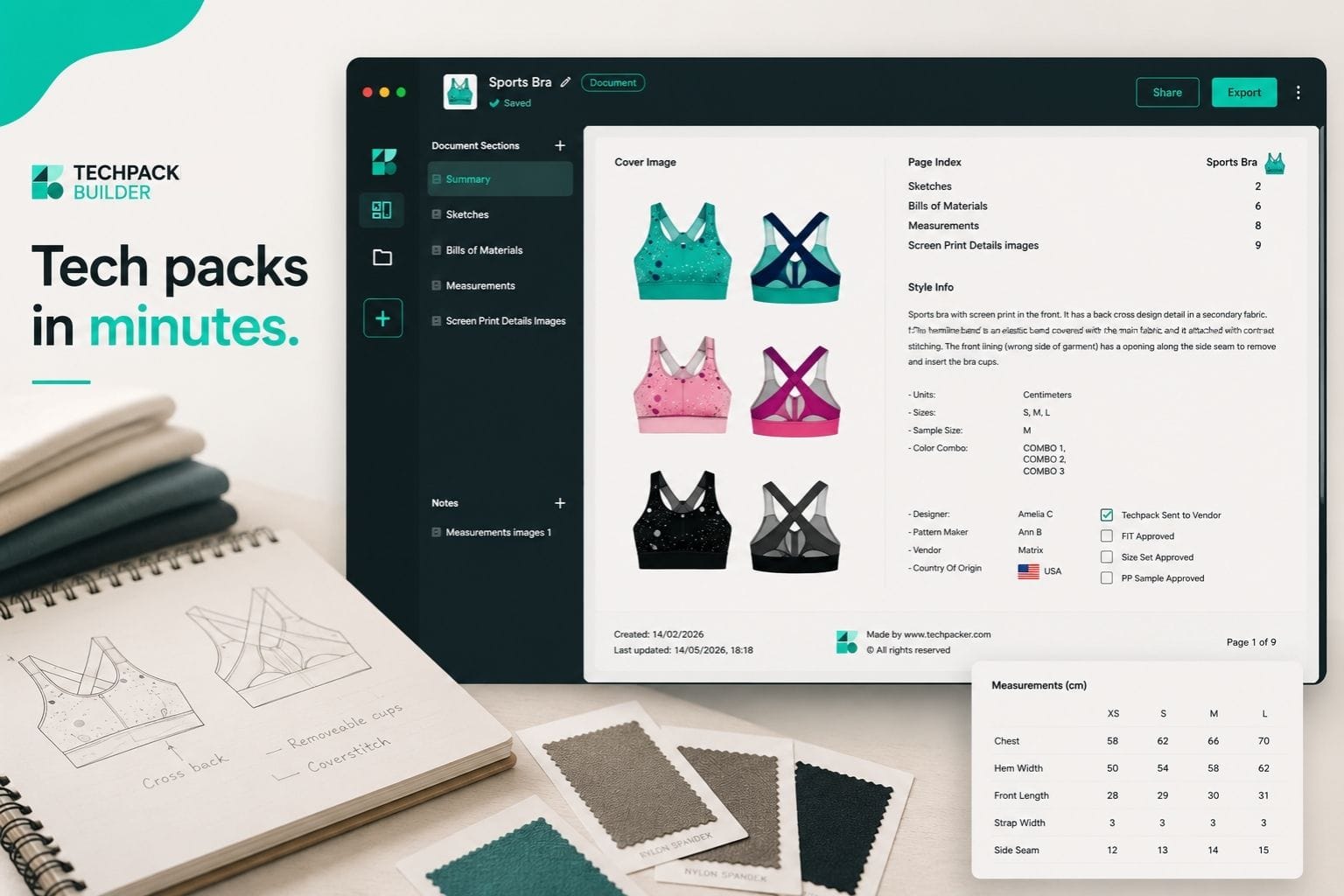
Techpack Builder is a native desktop tech pack studio built for fashion brands that need factory-ready documentation fast, without the overhead of enterprise PLM software or the cost of hiring a freelancer for every style.
This guide breaks down the exact workflow that small teams are using to build complete tech packs in under an hour, and why getting this right is one of the highest-leverage things a startup brand can do before touching a single sample.
Click here for TL;DR
Most small fashion brands spend 2–8 hours building a single tech pack manually across Excel and Illustrator, tools that were never designed for this job.
The result is fragmented files, version confusion, and costly factory revisions. With the right workflow and a purpose-built tool like Techpack Builder, a startup team of two can build a complete, factory-ready tech pack in under an hour, for free, no sign-up required.
Why Small Fashion Brands Are Losing Weeks Before Production Even Starts
The short answer: they're using the wrong tools for the job, and it's silently destroying their production timelines.
The average manual tech pack takes 2 to 8 hours of skilled work per style, according to industry benchmarks tracked by Adstronaut AI (2025). For a 10-style capsule collection, that's up to 80 hours of administrative grind before a single stitch is sewn.
But the real cost isn't the hours. It's what happens downstream when the documentation is wrong.
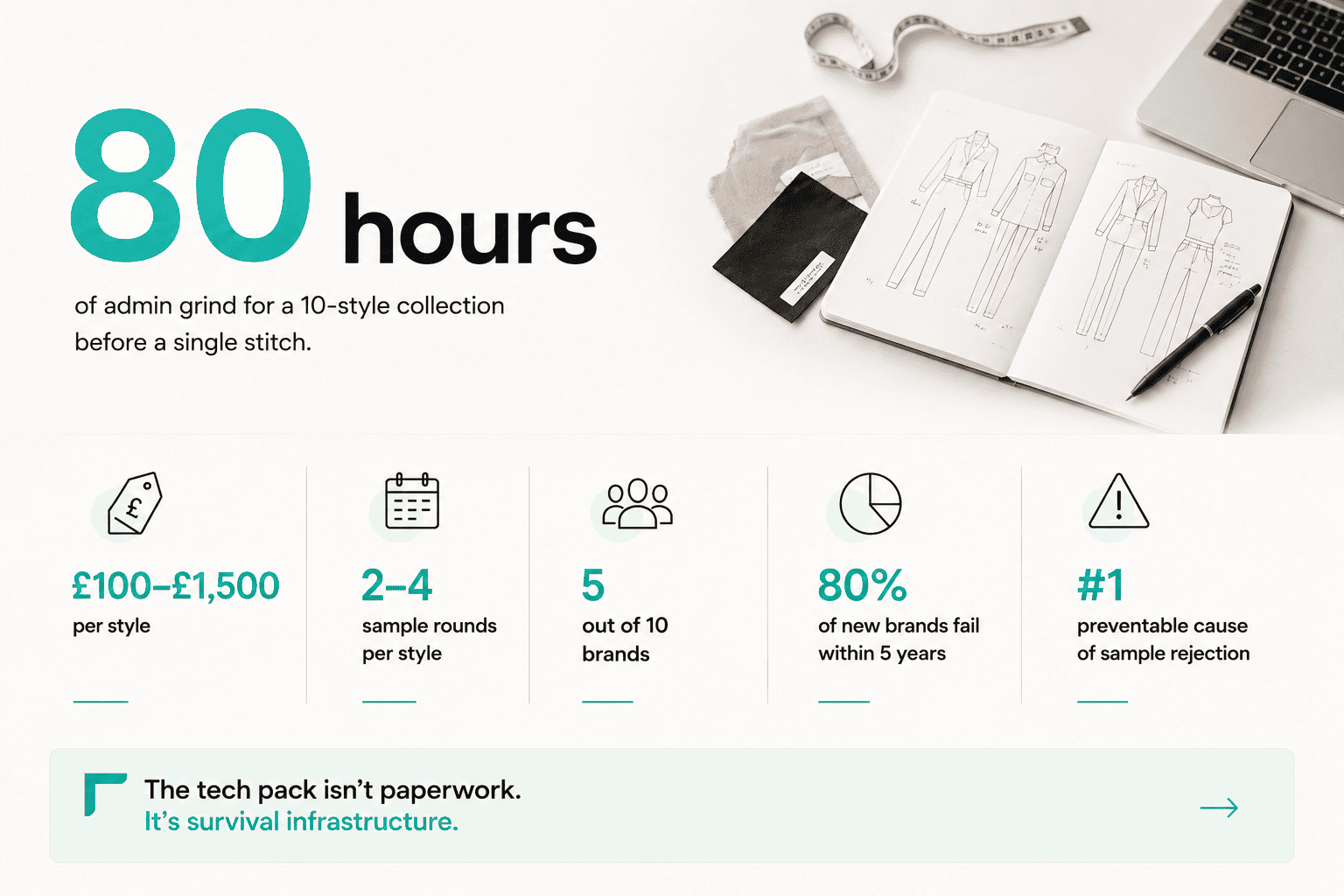
Here's what the data actually looks like for small brands:
- Freelance tech packs cost £100–£1,500 per style (approximately $125–$1,900 USD), with the industry average around £250 (Hook and Eye UK, 2024). A 10-style collection outsourced to a freelancer runs $3,000–$10,000 minimum, before sampling begins.
- Most brands need 2–4 sample rounds per style, with each revision round taking 1–2 weeks (Apex Fashion Lab, 2025). That's 4–6 weeks of dead time purely from back-and-forth, and every round has a cost attached.
- 5 out of 10 fashion entrepreneurs approach manufacturers without proper tech packs,according to Maker's Row, Adstronaut AI (2025). The predictable result: inaccurate factory quotes, overcharging on samples, and garments that miss the spec.
- Approximately 80% of new fashion brands fail within five years (FashionINSTA, 2025). Production inefficiency and cash flow problems, directly tied to poor pre-production documentation, are recurring contributors.
Among the most preventable causes of sample rejection, according to MFG Merch's garment sampling guide (2025), is an incomplete or ambiguous tech pack. Factories don't guess well. Vague instructions produce vague samples, and vague samples produce expensive revision rounds.
The tech pack isn't paperwork. For a startup, it's survival infrastructure.
The "Version Hell" Problem Most Founders Don't Recognize Until It's Too Late
Small teams typically don't fail at tech packs because they don't care, they fail because they're using four different tools to do one job.
It looks like this in practice: a measurement spreadsheet in Excel, flat sketches in a separate Illustrator file, colorway references in a shared Google Doc, construction notes in an email chain, and a PDF exported last Tuesday that may or may not reflect the latest spec change.
None of these files communicate with each other. None of them are version-tracked in any meaningful way. And when your factory in Vietnam emails at 2 AM asking which sleeve measurement to use, you have no reliable answer.
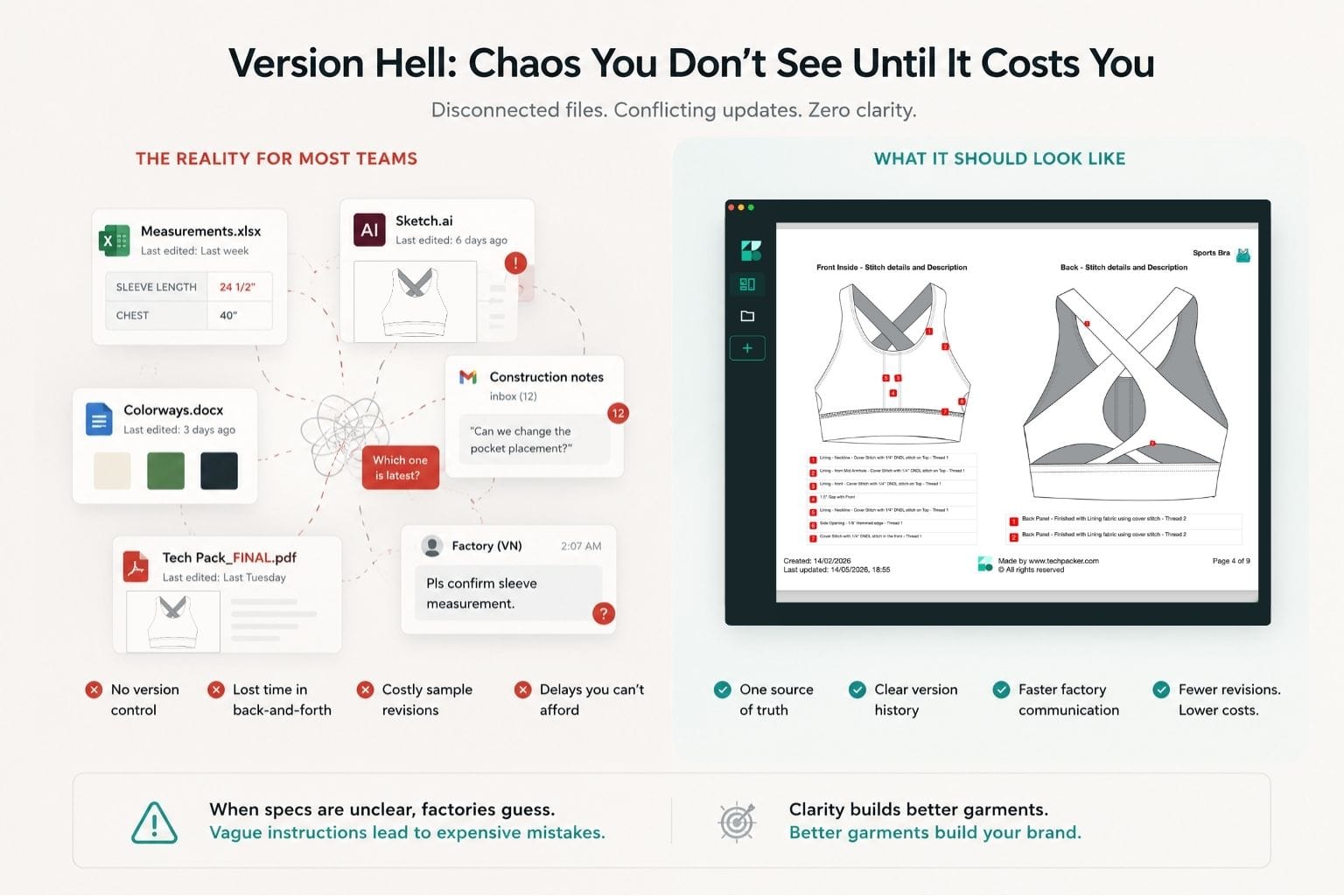
This isn't a discipline problem, it's a structural one. Most startup brands are using tools built for entirely different jobs: Excel for BOM & spec, Illustrator for graphic design. Retrofitting them for technical manufacturing documentation creates exactly the fragmented, error-prone workflow that causes sample failures.
Bamboo Rose, a PLM platform that works with established brands, has noted that brands relying on email chains and disconnected files tend to face greater friction in their development process, more revision cycles, longer timelines, and higher overhead (Bamboo Rose, 2022)
The worst part? The cost compounds. If a single email thread to clarify a construction detail takes 10 minutes and generates six back-and-forth responses, that's an hour gone, just on communication overhead. Multiply that across a collection, and you've lost days.
Create Tech Pack in Minutes: A Step-by-Step Workflow for Small Teams
A startup team of two can build a complete, factory-ready tech pack in minutes by following one principle: everything in one place, in one document, from the first block to the last.
Here's the exact workflow:
Step 1: Open a Structured Template
Start with a purpose-built tech pack template, not a blank spreadsheet. Professional templates pre-structured with the correct sections for measurements, materials, construction details, and fit notes eliminate the blank-page problem and the "did I forget anything?" anxiety that causes most first-time tech packs to miss critical details.
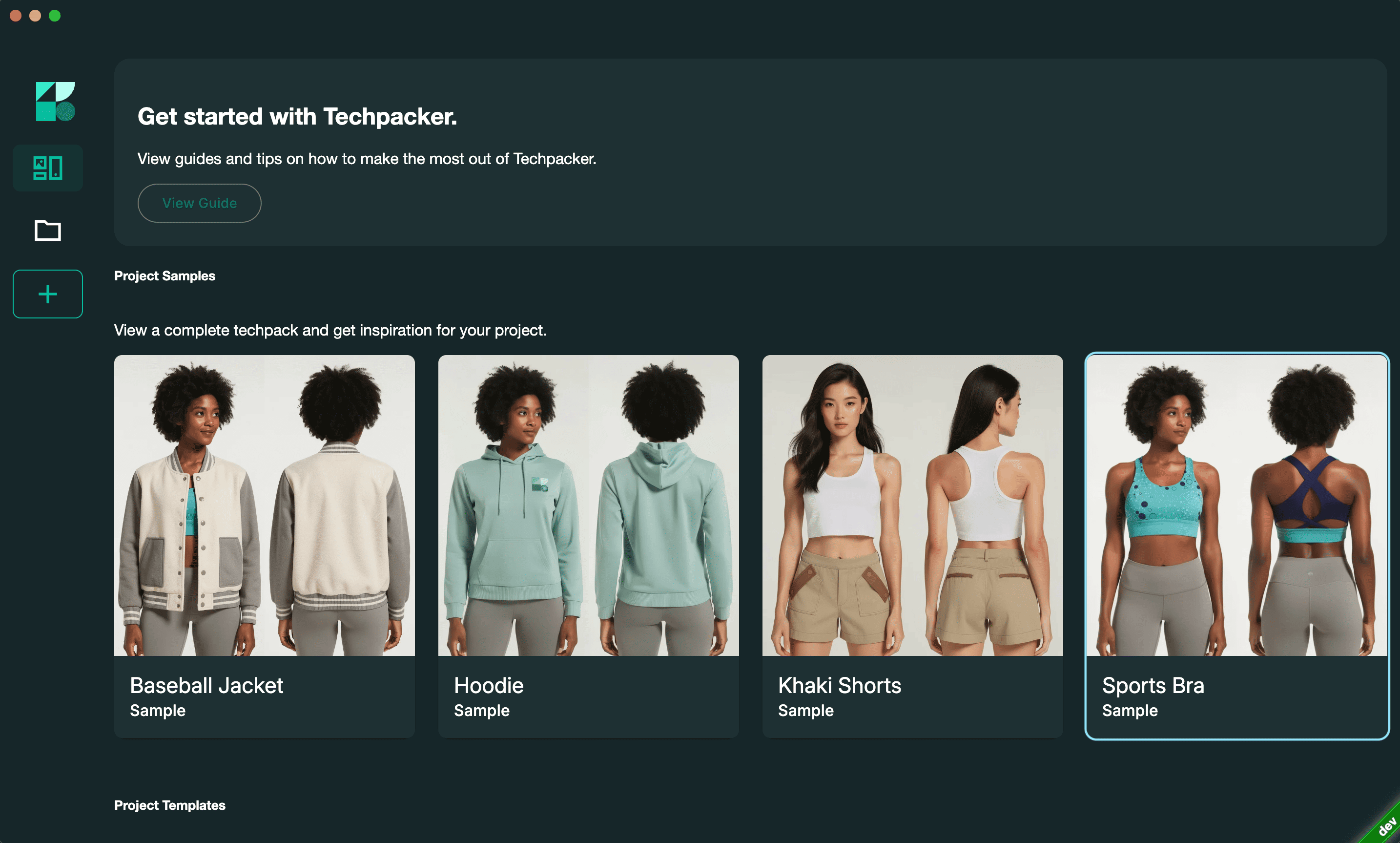
The key is working within a content block architecture: pre-set sections for visual sketches, construction callouts, BOM tables and spec sheets that all live inside a single document. When your flat sketch and your measurement table coexist in the same workspace, you stop toggling between apps and start actually building. This single change cuts setup time by 60–70%, according to Techpacker's internal user data.
Step 2: Drop in Your Sketch and Annotate Directly
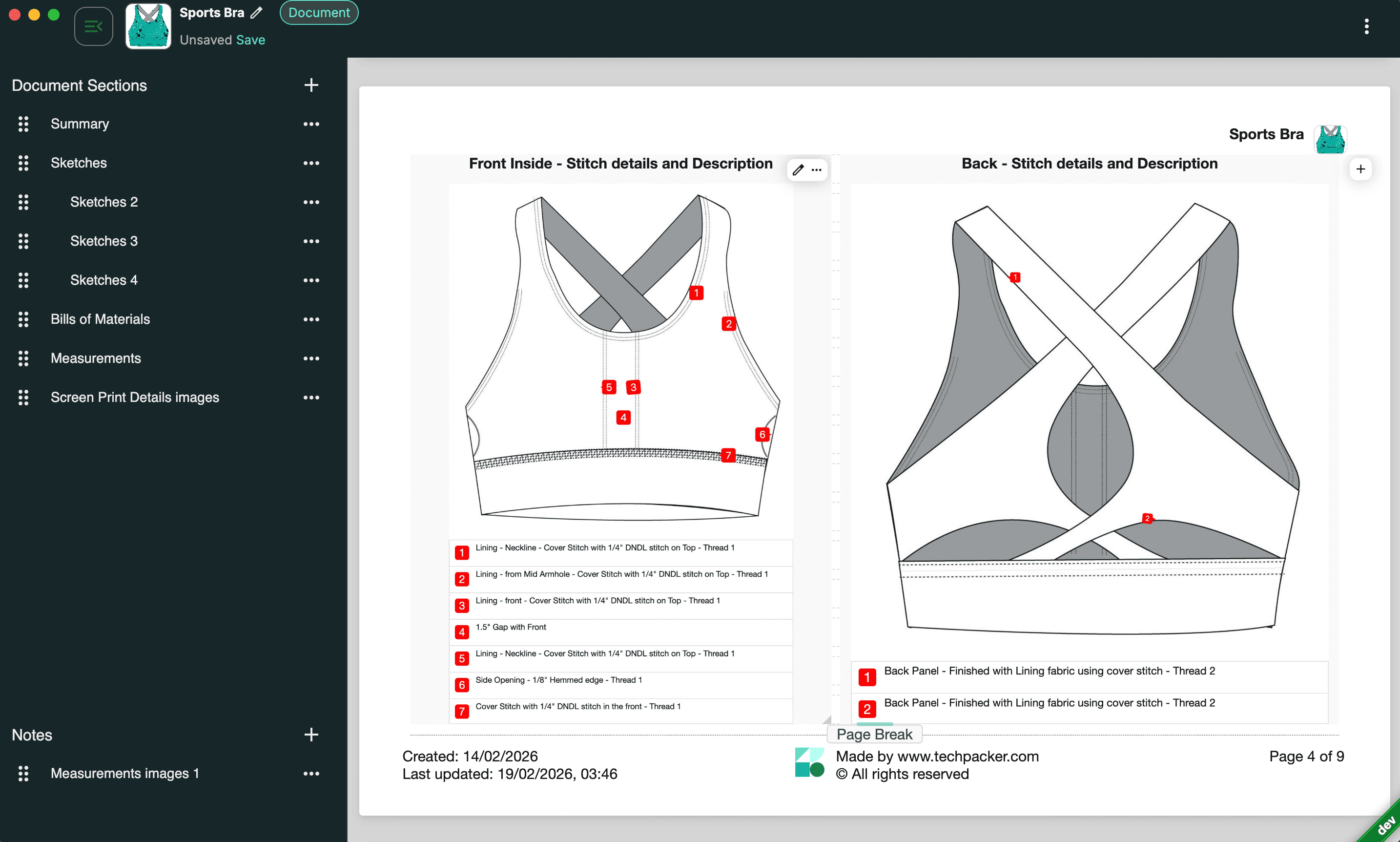
Forget the Illustrator → export → re-import → screenshot → paste-into-Word cycle. In a visual-first tech pack workspace, you drag your sketch image directly into the document, annotate construction callouts on top of the flat, and add spec notes right there, without switching applications.
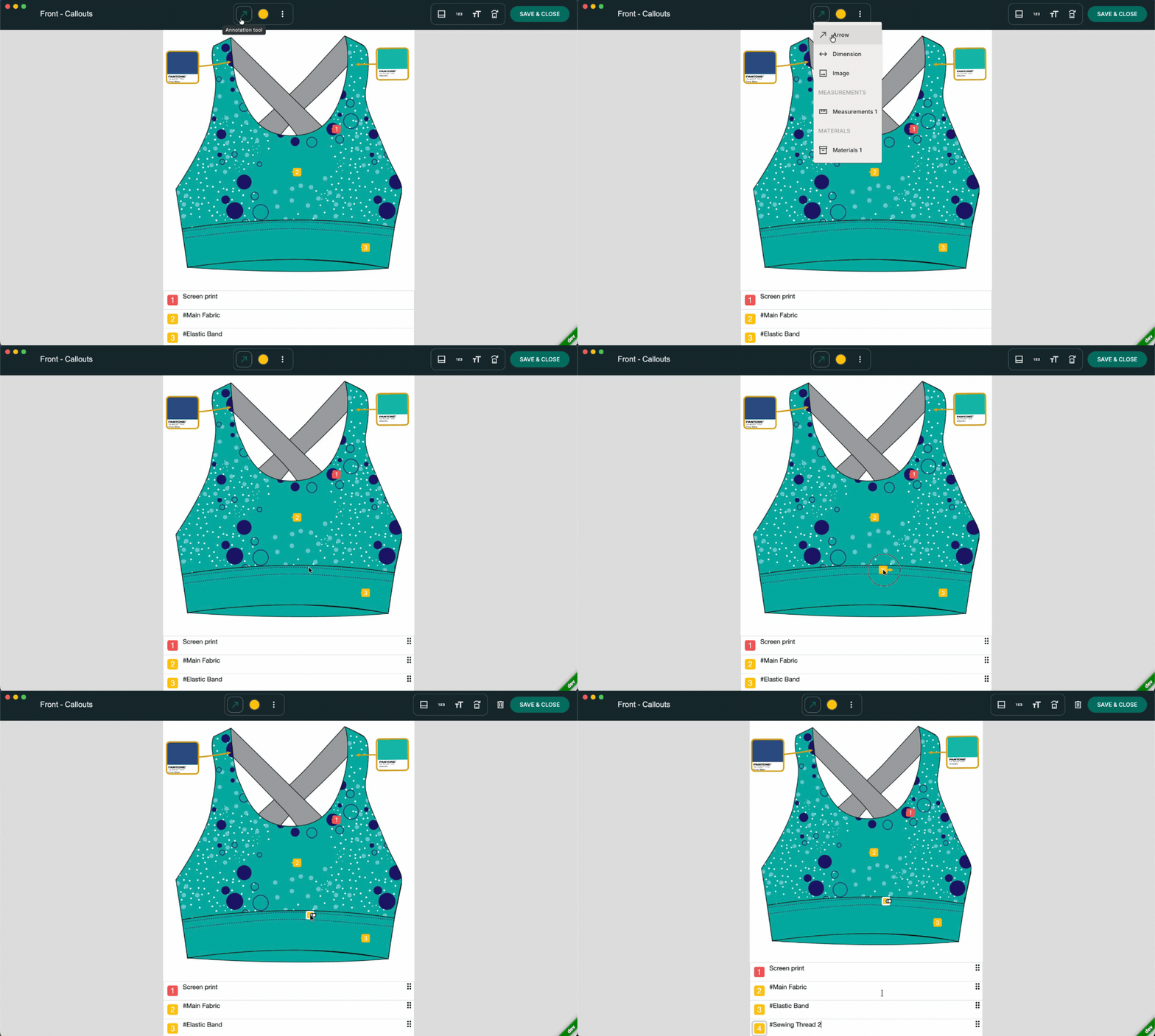
What you see in the editor is precisely what the factory receives. Zero formatting surprises. Zero layout drift on export. This is the fundamental difference between a tool designed for technical documentation and one that's been hacked together from general-purpose software.
Step 3: Build Your Bill of Materials as a Live Block
The Bill of Materials, your complete list of fabrics, trims, zippers, buttons, labels, and packaging, is where most DIY tech packs quietly fall apart. It lives in a separate spreadsheet, goes out of sync with the design file, and becomes a liability when a factory substitutes a cheaper zipper because the correct specification wasn't included.
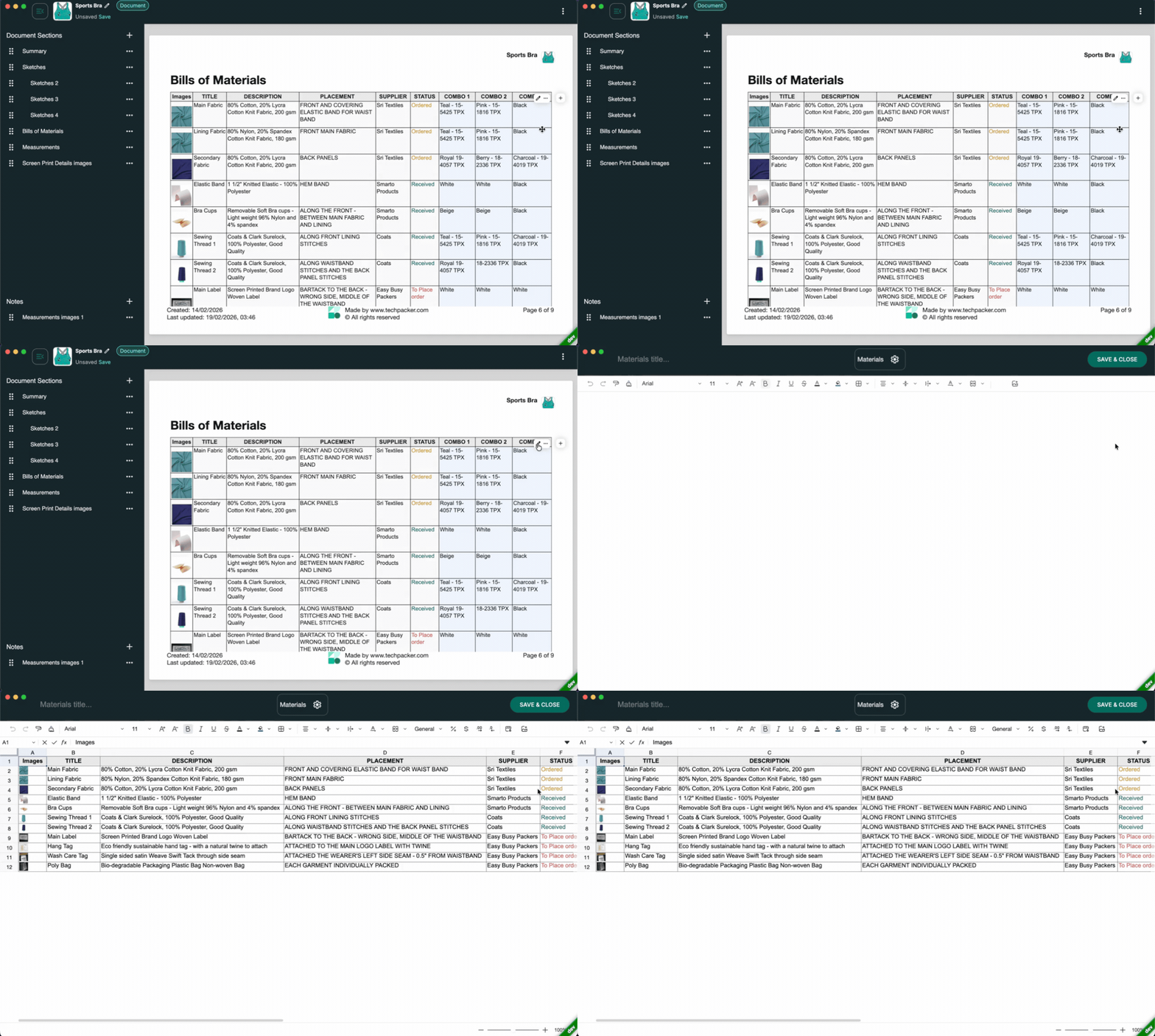
In a structured content block system, the BOM lives inside the document as an editable, updatable table. Change the spec, and the document reflects it. When you share externally, the factory sees exactly what was approved at that moment, with a clear version timestamp.
Step 4: Add Measurement Specs with Tolerances
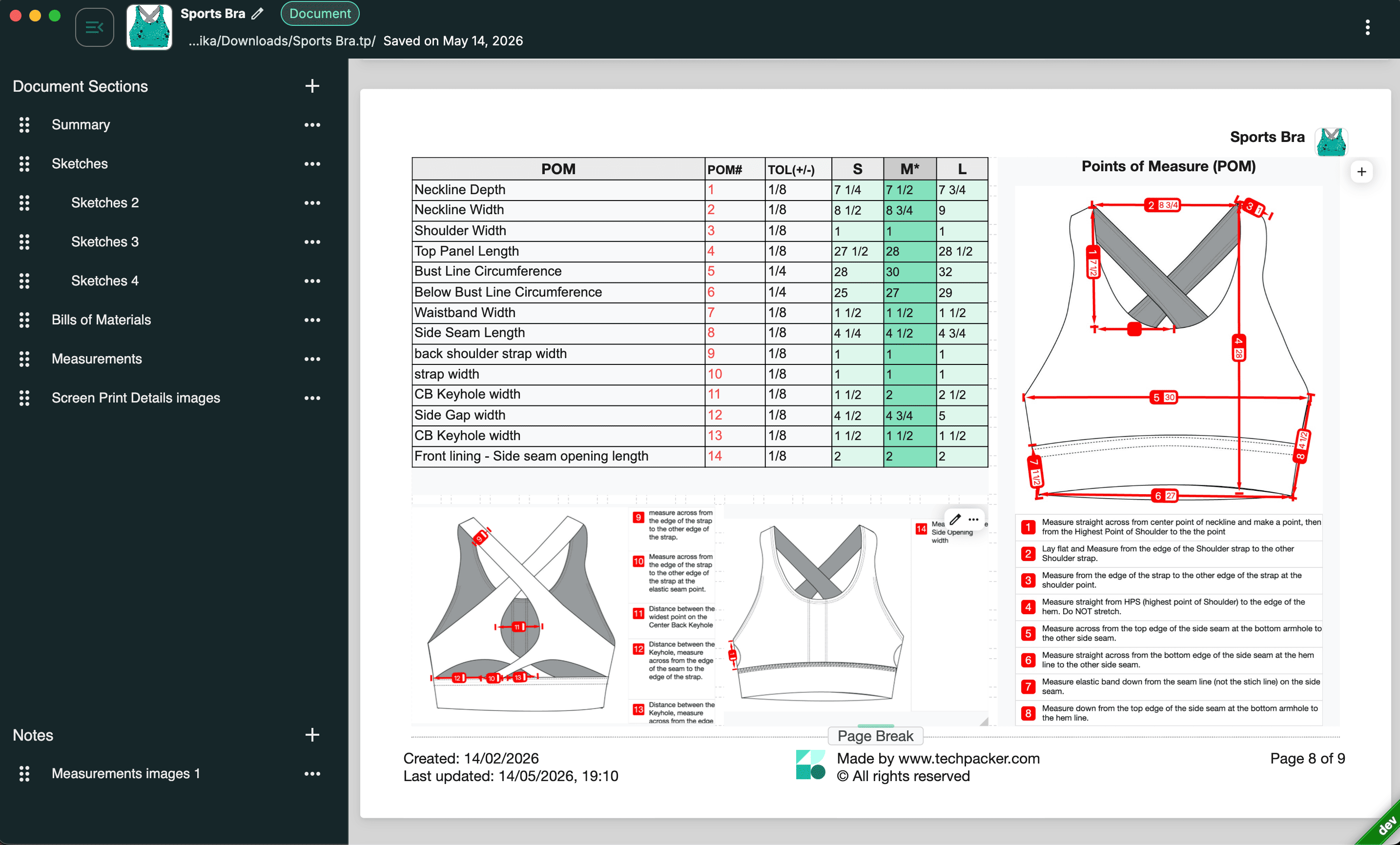
Every point of measure (POM) must appear on the sketch with a precise dimension by size, along with a stated tolerance (the acceptable margin of error, industry standard is ±0.5 inches). Missing even one measurement is an open invitation for factory error. Missing tolerances means factories set their own, which rarely match yours.
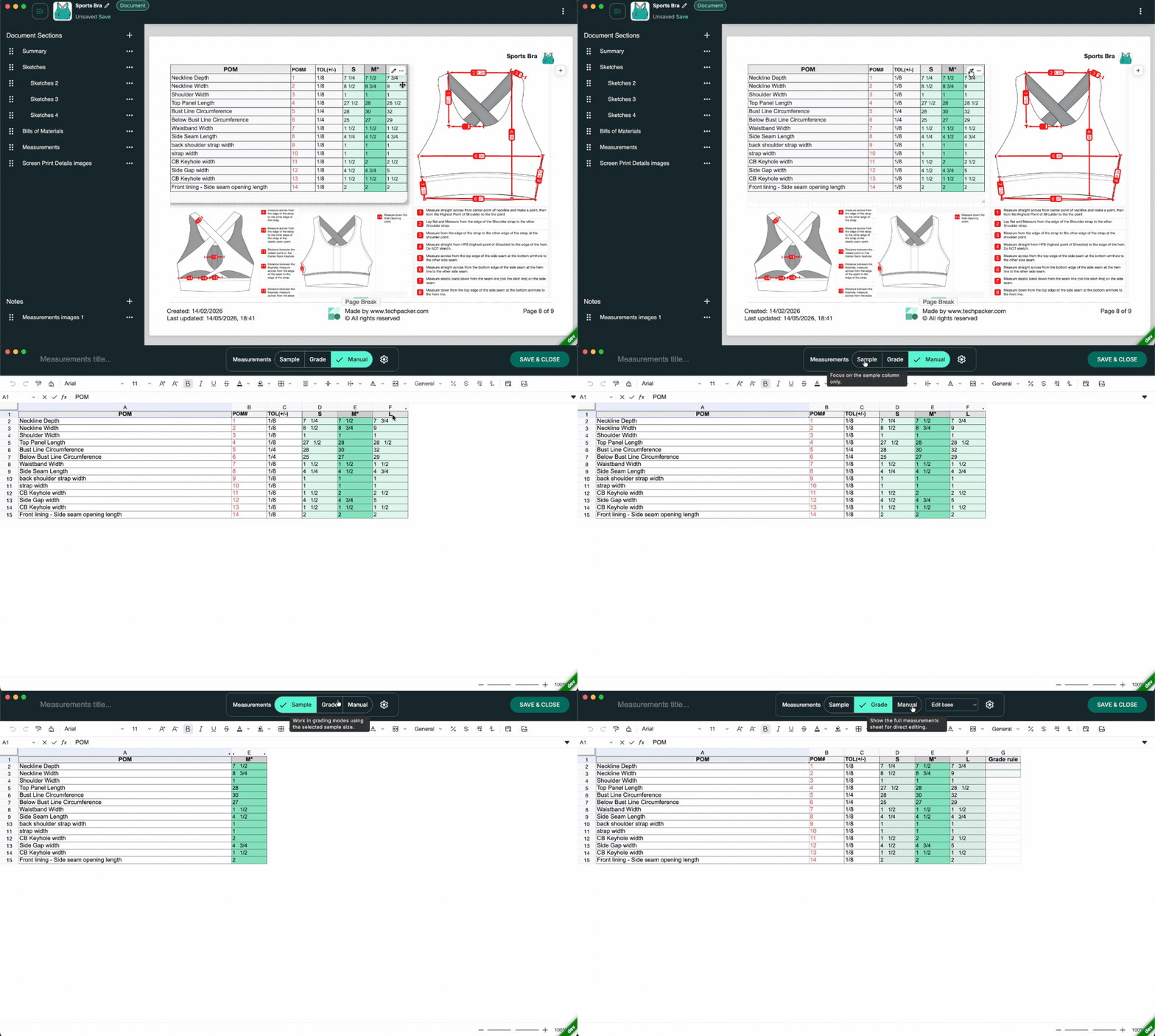
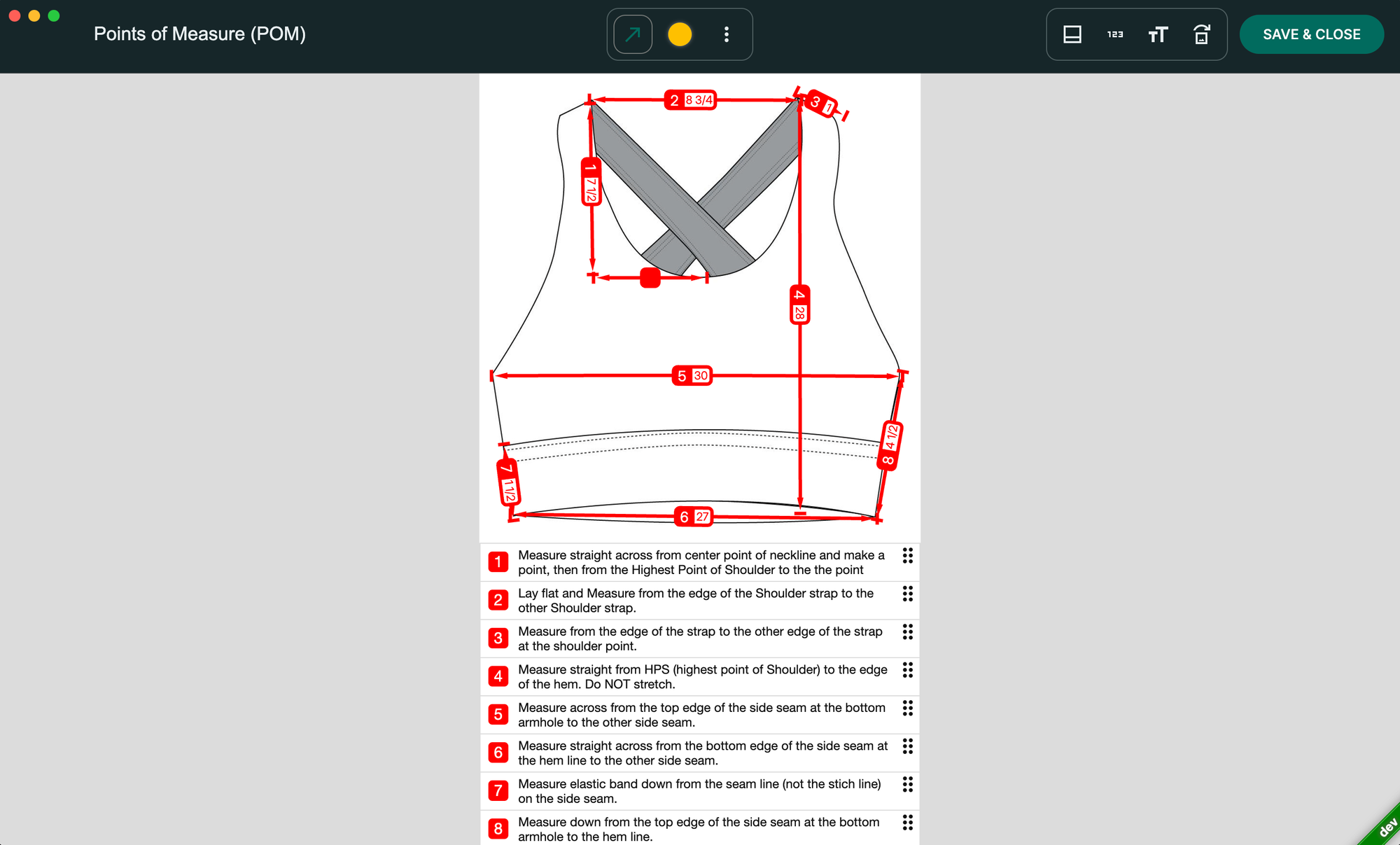
Annotating directly on the sketch (rather than in a separate table that a factory has to cross-reference) reduces misreads significantly. The measurement callout and the visual reference are on the same page, in the same document.
Step 5: Lock, Version, and Share as Read-Only
This is the step most small teams skip, and it's where version hell is born.
Once the tech pack is complete, export a read-only version specifically for factory sharing. Not a PDF from Illustrator. Not a copy of the spreadsheet. A structured, protected file that the manufacturer can read with complete clarity and cannot accidentally modify.
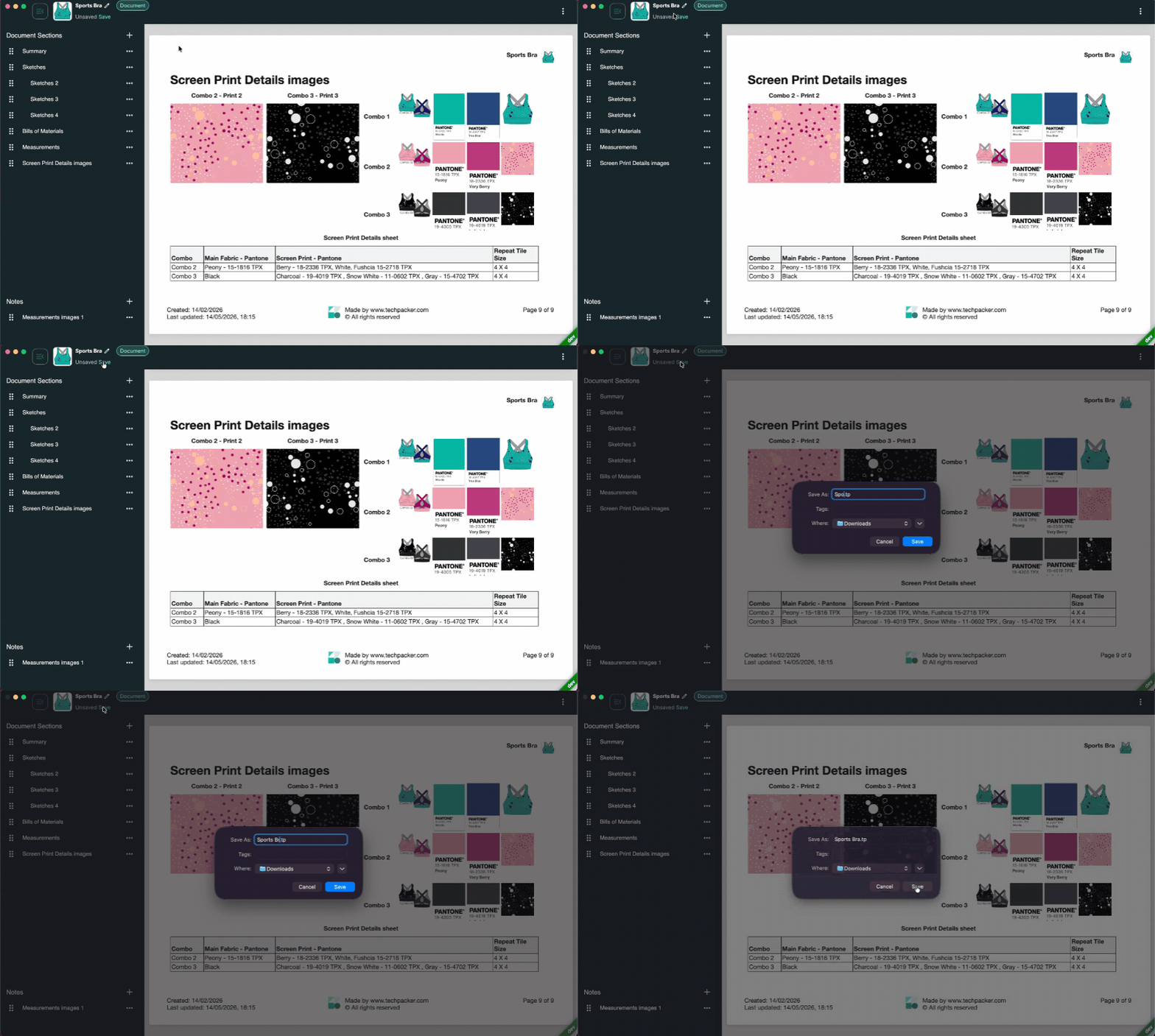
Techpacker's .tpv format (Version Control) is built for exactly this purpose, a read-only, lightweight file that replaces the traditional PDF master. Every version shared externally is automatically logged, creating a clear record of what was sent, to whom, and when. When your factory asks "is this the latest version?", you have a timestamped answer in seconds.
Ready to build your first tech pack? Techpack Builder is free to download on Mac and Windows, no sign-up required to start creating. Download here and build your first pack today.
What a Factory-Ready Tech Pack Actually Contains
A complete tech pack is a manufacturing blueprint. The difference between a good one and a bad one is measured in sample rounds, and sample rounds are measured in weeks and dollars.
Here's the non-negotiable checklist for every style:
Technical Flat Sketch, Clean, 2D front and back line drawings. Not a product photo, not a mood board. A precise technical illustration the factory can pattern from.
Points of Measure (POM), Every measurement annotated directly on the sketch, with exact dimensions by size. Missing measurements force factory assumptions.
Tolerances, The acceptable margin of error for each measurement (typically ±0.5 inches). Without stated tolerances, factories default to theirs.
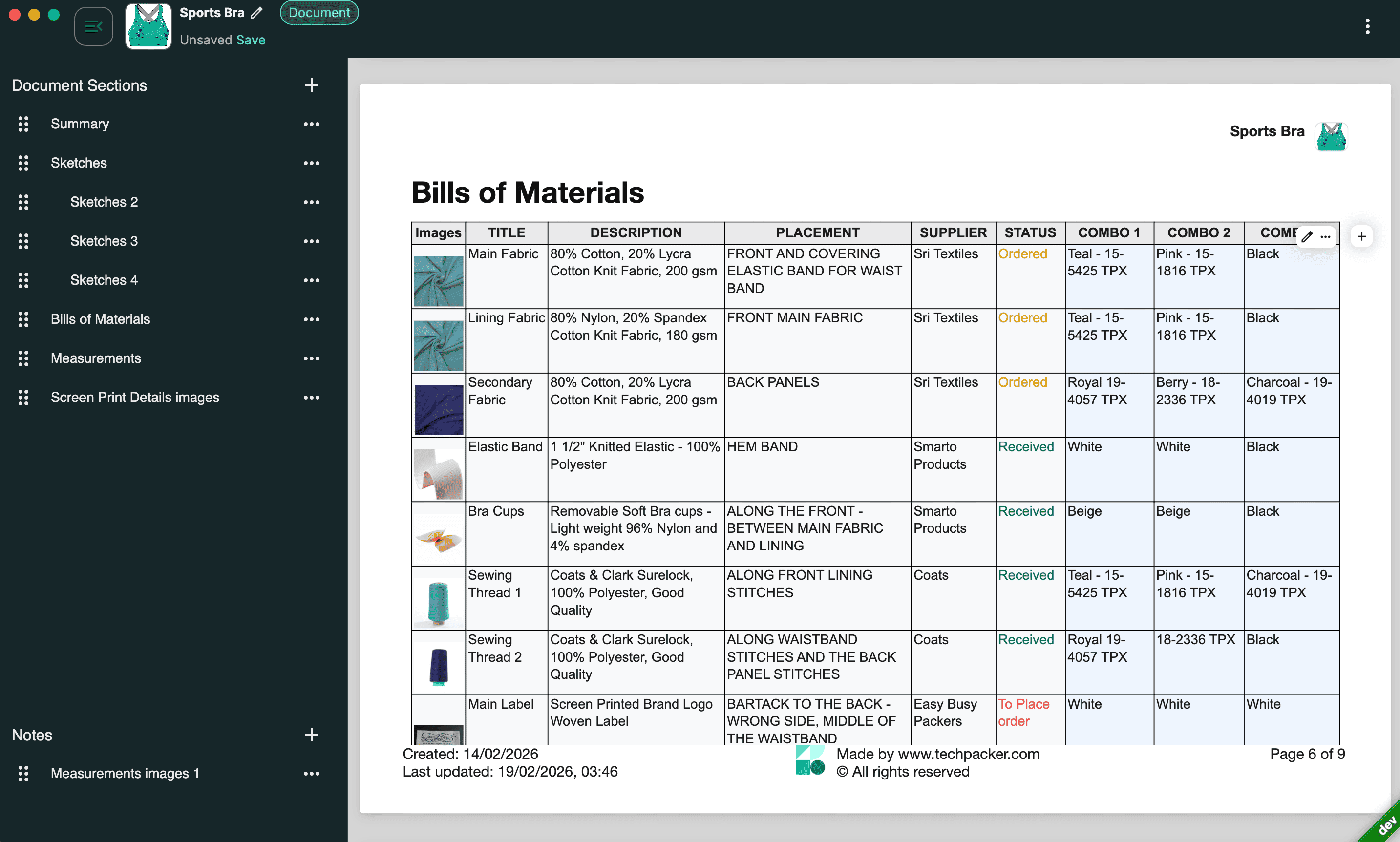
Bill of Materials (BOM), Every component specified: main fabric (with GSM and composition), lining, interfacing, zippers, buttons, thread color, labels, hang tags, care instructions, and packaging.
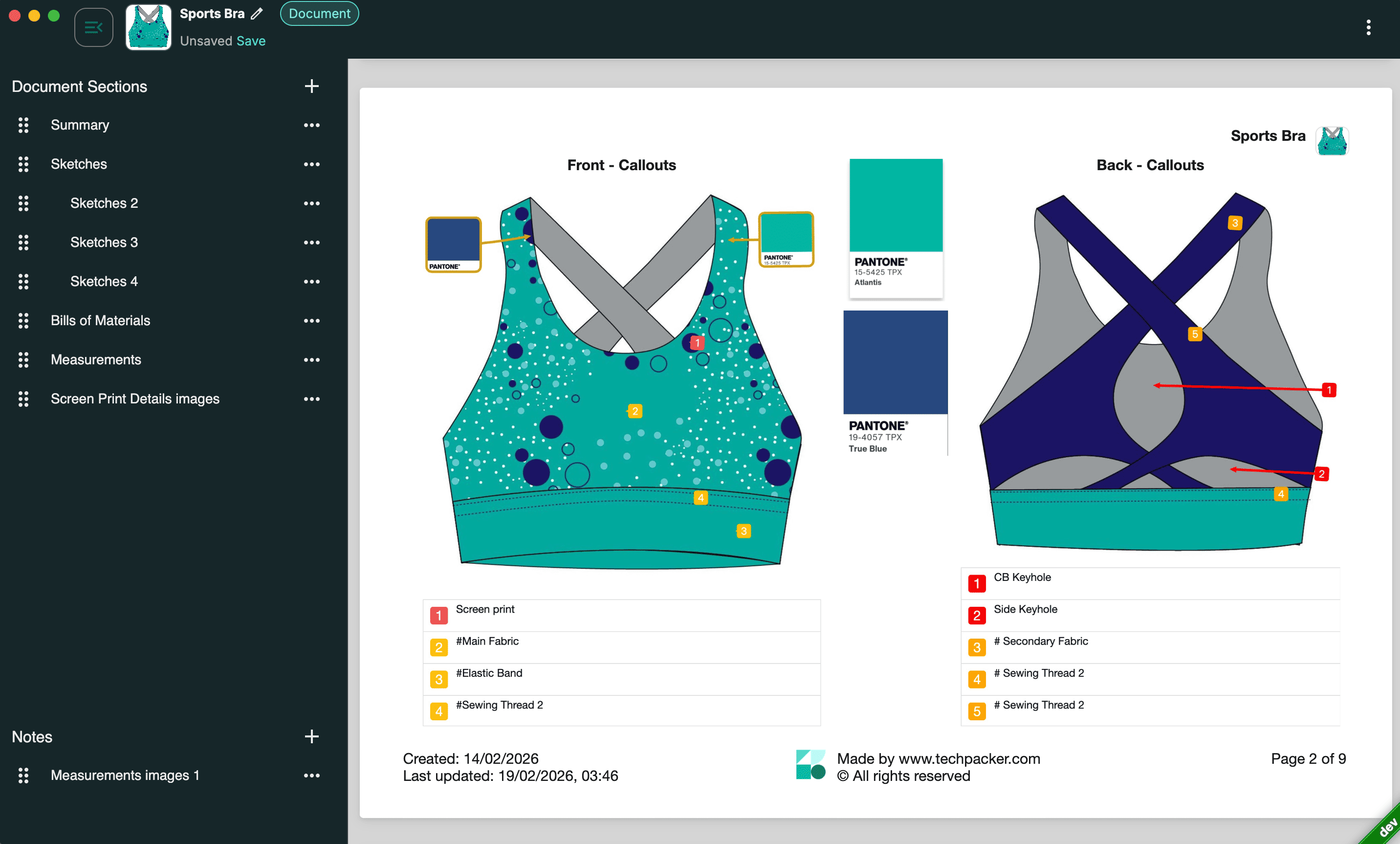
Construction Details, Seam types, stitch specifications, hem finish, pocket attachment, lining attachment. This section generates the most sample revision rounds when left vague.
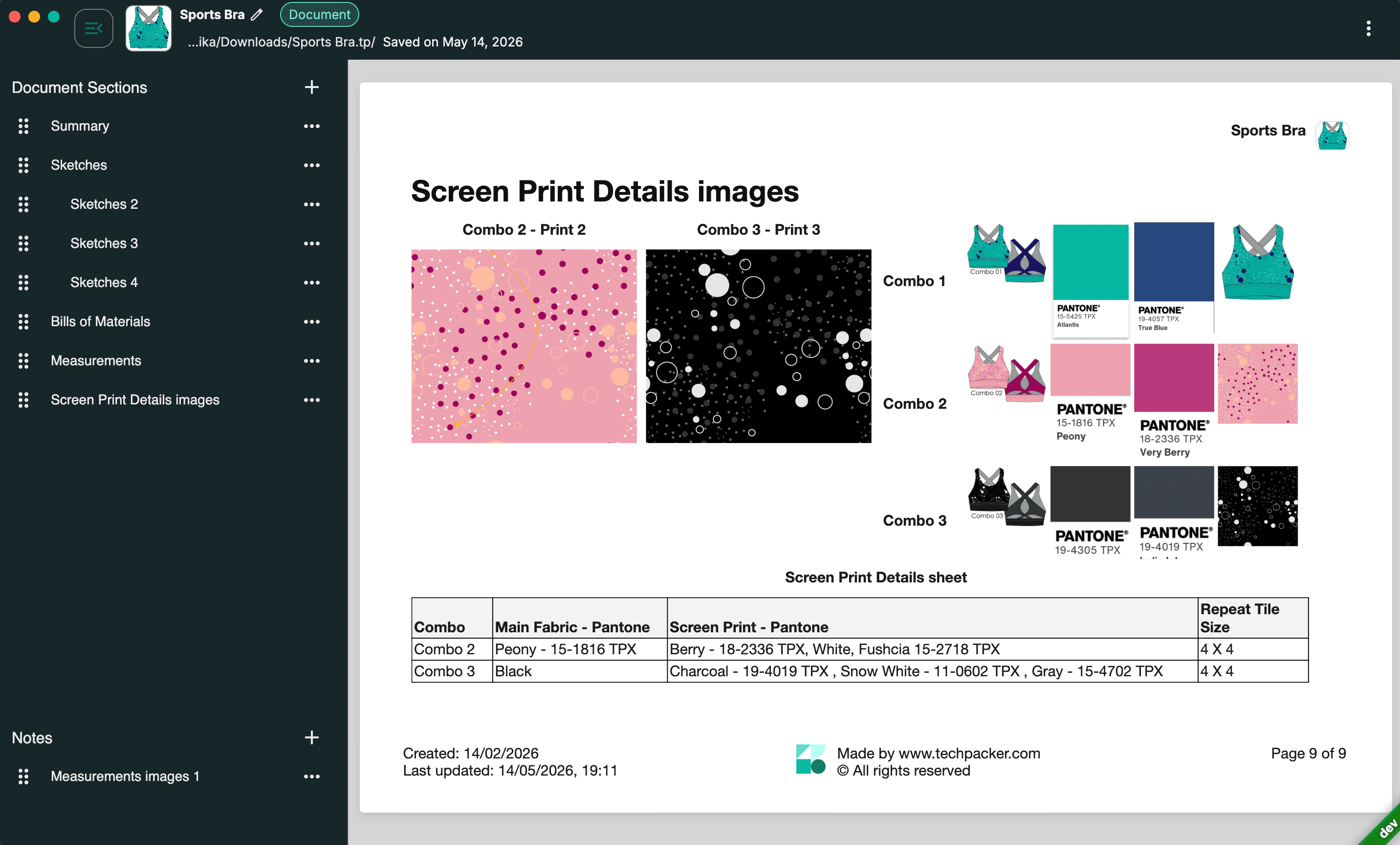
Colorways, Exact color references using Pantone codes, hex values, or approved swatch images for every variation.
Revision Log, A change history showing what was updated, when, and by whom. Because factories will always ask "is this the latest?", and the answer needs to be immediate.

Brands that consistently nail their first or second sample round aren't luckier than other brands. According to the garment sampling protocol guides published by MFG Merch (2025), the most reliable predictor of first-sample accuracy is a complete, unambiguous tech pack, particularly the specificity of construction details and tolerance callouts.
Why Native Tools Outperform Browser-Based PLM for Small Brands
For a 2–5 person fashion startup, the right tech pack tool is not the same tool a 300-person brand uses. Scale mismatch is real, and it costs startups time and money in both directions.
Until recently, small brands had three painful options:
- DIY in Excel + Illustrator, Slow, error-prone, and fragmented across tools not built for manufacturing documentation
- Hire a freelancer, $300–$1,000 per style (Successful Fashion Designer, 2024), with turnaround times that stall collection calendars
- Implement an enterprise PLM, Systems like Backbone, Rechain, or Centric SMB require lengthy onboarding, IT involvement, and pricing structures built for brands 10x the size
Techpack Builder exists specifically in the gap between option 1 and option 3. It is a local-first native desktop application, available on Mac and Windows, built with a single architectural principle: your design data should work like an Adobe Illustrator file, not a Google Doc. You own it. It lives on your machine. It's portable, structured, and private by default.
Because the app runs locally, it works offline, a practical necessity for designers traveling to factories in regions with restricted internet access. There is no browser lag, no cloud dependency for core workflows, and no subscription required to start creating.
The content block interface combines the structured data discipline of Excel with the visual layout capability of Illustrator, in a single workspace. What you build is exactly what gets exported. There are no layout drift surprises, no formatting errors on the factory's end, and no version confusion when you've shared a protected .tpv file instead of a loose PDF.
For a 2-person brand, that's not just a workflow improvement. That's a structural advantage over every competitor still building in spreadsheets.
The Real Competitive Advantage: Speed to Sample Is Speed to Market
The brands scaling fastest right now aren't the ones with the biggest teams, they're the ones who've eliminated friction in the design-to-production handoff.
Every week lost to pre-production admin, unclear tech packs, revision rounds caused by vague construction notes, version confusion with factories, is a week your product isn't generating revenue.
Industry production calendars for small brands show that each round of sampling takes 2–4 weeks, with most brands requiring at least two rounds (World Collective Ecosystem, 2025), meaning sampling alone can consume 6–12 weeks, with poor or incomplete tech packs extending each round unnecessarily. For a trend-driven product, that's often the entire selling window.
The brands that consistently launch on time are doing three things differently:
- They document precisely from day one. Every measurement, every material, every construction callout, specific, complete, and in one place.
- They version-control externally shared files. Factories always have one source of truth. Confusion about "which version" doesn't exist.
- They build in minutes, not hours. Using tools designed for the job instead of retrofitted accounting software.
For a startup founder wearing five hats simultaneously, reclaiming 6–7 hours per style in pre-production admin isn't a nice-to-have. It's the difference between launching on time and losing the window entirely.
Start Building in Minutes
Building a tech pack in minutes isn't a productivity hack. It's what happens when you use a tool that was actually designed for the job.
If you're still building in Excel and Illustrator, you are not saving money. You are paying for it in sample revision rounds, production delays, and the invisible cost of your own time, compounded across every style in every collection.
Because the factory is waiting. And now, you're ready.
Other basic FAQ's
1. What should a tech pack include for a fashion startup?
A complete tech pack for a fashion startup must include: a technical flat sketch (front and back), points of measure with tolerances, a Bill of Materials (fabrics, trims, hardware), construction details (seam types, stitch specs, hem finish), colorway references (Pantone or hex), and a revision log. Missing any of these elements forces factories to make assumptions, which drives up sampling costs and revision rounds.
2. How long does it take to create a tech pack?
Manual tech pack creation using Excel and Adobe Illustrator takes 2–8 hours per style, according to Adstronaut AI (2025). Using a purpose-built native tool like Techpack Builder with pre-structured templates and content blocks, the same style can be completed in under one hour, including the sketch, BOM, measurement spec, and version-controlled export.
3. How much does it cost to outsource a tech pack?
Freelance tech packs cost £100–£1,500 per style (approximately $125–$1,900 USD at current rates), with the industry average around £250 (~$315 USD) (Hook and Eye UK, 2024). A 10-style collection outsourced to a freelancer runs $3,000–$10,000 minimum before sampling begins. Purpose-built tools like Techpack Builder eliminate this cost entirely for brands willing to build in-house.
4. Why do fashion startups get bad samples from factories?
Among the most common causes of sample rejection is an incomplete or ambiguous tech pack, according to MFG Merch's garment sampling protocol guide (2025). When construction details, tolerances, or BOM specs are missing, factories make substitutions and assumptions that rarely match the brand's vision. Most brands require 2–4 sample rounds as a result, each adding 1–2 weeks to the production timeline.
5. Do I need to know Adobe Illustrator to create a tech pack?
No. While Illustrator has traditionally been the industry standard for creating flat sketches, modern native tools like Techpack Builder allow founders and designers to drag and drop sketch images directly into a structured workspace, annotate construction points visually, and build a complete BOM, without any Illustrator proficiency required.
Techpack Builder is the native-first, visual tech pack studio for fashion brands, built for speed, privacy, and professional output.